
Visualizations & Layouts
Visualizations & Layouts
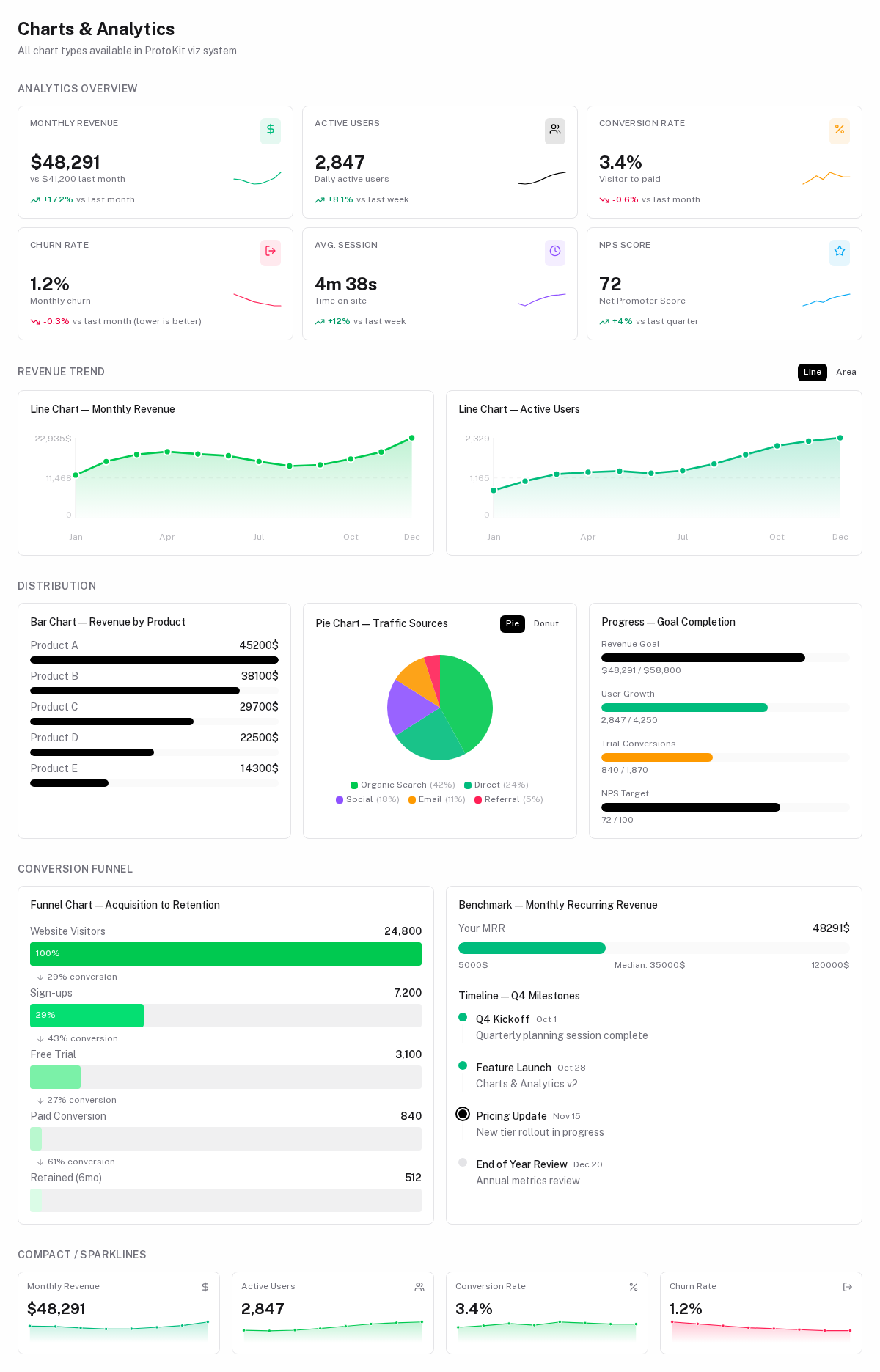
Built-in visualization types
Add a visualizations array to your schema to render charts and tables below the results section. All chart types are available as standalone Viz* components and as values in VizDef.type.
type | Component | Best for |
|---|---|---|
progress | VizProgressBar | Single metric vs. goal |
benchmark | VizBenchmarkBar | Positioning relative to a range |
bar-chart | VizBarChart | Ranked or categorical values |
line-chart | VizLineChart | Single time-series trend |
area-chart | VizAreaChart | Multi-series trends with fill |
pie-chart | VizPieChart | Part-of-whole distribution |
donut-chart | VizPieChart (donut) | Part-of-whole with centre total |
funnel-chart | VizFunnelChart | Step-by-step conversion |
stat-cards | VizStatCards | KPI overview with trends |
comparison-table | VizComparisonTable | Side-by-side attribute comparison |
feature-matrix | VizFeatureMatrix | Feature coverage matrix |
timeline | VizTimeline | Dated milestone list |
progress
A single horizontal progress bar with optional label and value display.
visualizations: [
  {
    type: 'progress',
    label: 'Progress to Break-Even',
    value: ({ fields, derived }) =>
      Math.min(100, (fields.expectedUnits / derived.breakEvenUnits) * 100),
    max: 100,
    color: ({ derived }) => derived.profitAtForecast > 0 ? 'success' : 'warning',
    showValue: true,
  }
]
benchmark
A progress bar with a benchmark marker line — useful for showing where you stand vs. an industry standard.
{
  type: 'benchmark',
  label: 'LTV:CAC vs Industry Benchmark',
  value: ({ derived }) => derived.ltvCacRatio,
  benchmark: 3,     // show a marker at 3.0
  max: 10,
  format: 'number',
}
bar-chart
Vertical or horizontal bar chart from a list of { label, value } items.
{
  type: 'bar-chart',
  label: 'Revenue by Plan',
  orientation: 'vertical',    // 'vertical' | 'horizontal'
  items: ({ fields, derived }) =>
    (derived.planBreakdown ?? []).map(p => ({
      label: p.name,
      value: p.revenue,
    })),
  format: 'money',
}
comparison-table
Side-by-side comparison of multiple items across a set of criteria. Used in competitor analysis, feature comparisons, etc.
{
  type: 'comparison-table',
  label: 'Competitor Comparison',
  rows: ['Pricing', 'Free Tier', 'API Access', 'Support'],
  columns: ({ collections }) =>
    (collections.competitors ?? []).map(c => ({
      key: c.id,
      label: c.name,
      values: {
        'Pricing':    c.pricing,
        'Free Tier':  c.hasFree ? 'Yes' : 'No',
        'API Access': c.hasApi  ? 'Yes' : 'No',
        'Support':    c.support,
      },
    })),
}
feature-matrix
Checkbox-style matrix of features vs. options. Common for pricing plan comparison.
{
  type: 'feature-matrix',
  label: 'Plan Feature Matrix',
  features: ['Unlimited users', 'API access', 'SSO', 'Audit log', 'SLA'],
  plans: ({ collections }) =>
    (collections.plans ?? []).map(p => ({
      label: p.name,
      features: p.features ?? [],   // string[] of included feature names
    })),
}
line-chart
A smooth SVG line chart with an optional gradient fill and axes. Accepts a flat array of { label, value } points.
{
  type: 'line-chart',
  title: 'Monthly Revenue',
  config: {
    data: ({ derived }) => derived.revenueByMonth,  // { label, value }[]
    showAxes: true,
    unit: '$',
    color: 'var(--color-emerald-500)',
  },
}
area-chart
A multi-series SVG area chart. Each series renders its own filled region and line, making it ideal for comparing trends over the same time axis.
{
  type: 'area-chart',
  title: 'Revenue vs Target',
  config: {
    series: ({ derived }) => [
      { label: 'Actual',  data: derived.revenueByMonth, color: 'var(--color-primary-500)' },
      { label: 'Target',  data: derived.targetByMonth,  color: 'var(--color-emerald-500)' },
    ],
    showAxes: true,
    unit: '$',
  },
}
pie-chart / donut-chart
An SVG pie chart with a legend. Use donut-chart to render a donut variant that displays the total value in the centre.
{
  type: 'donut-chart',
  title: 'Traffic Sources',
  config: {
    data: ({ derived }) => derived.channelBreakdown,  // { label, value, color? }[]
    unit: '%',
    showLegend: true,
  },
}
funnel-chart
A horizontal funnel that shows step-by-step conversion rates. Each bar is sized relative to the first step, and the percentage conversion from the previous step is shown between bars.
{
  type: 'funnel-chart',
  title: 'Acquisition Funnel',
  config: {
    data: ({ derived }) => [
      { label: 'Visitors',   value: derived.visitors },
      { label: 'Sign-ups',   value: derived.signups },
      { label: 'Trial',      value: derived.trials },
      { label: 'Paid',       value: derived.paid },
    ],
    showConversion: true,
  },
}
stat-cards
A responsive grid of KPI cards. Each card shows a label, value, optional trend arrow with percentage, and an optional sparkline.
{
  type: 'stat-cards',
  config: {
    cols: 3,
    cards: ({ derived }) => [
      {
        label: 'Monthly Revenue',
        value: `$${derived.mrr.toLocaleString()}`,
        trend: derived.mrrGrowthPct,
        trendLabel: 'vs last month',
        icon: 'i-lucide-dollar-sign',
        color: 'emerald',
        sparkline: derived.mrrHistory,   // number[]
      },
      {
        label: 'Active Users',
        value: derived.activeUsers,
        trend: derived.userGrowthPct,
        icon: 'i-lucide-users',
        color: 'primary',
      },
    ],
  },
}
The color field accepts 'primary' | 'emerald' | 'rose' | 'amber' | 'violet' | 'sky' | 'neutral' and controls the icon background, icon tint, and sparkline colour.
timeline
A vertical list of dated milestones.
{
  type: 'timeline',
  title: 'Launch Milestones',
  config: {
    items: ({ collections }) =>
      (collections.milestones ?? []).map(m => ({
        title: m.title,
        date:   m.date,
        status: m.done ? 'done' : 'upcoming',
      })),
  },
}
Custom Dashboard Layouts
For complex tools with multiple tabs, columns, and mixed content types, use the layout property to take full control of the rendering.
Layout structure
layout: {
  rows: [                         // top-level rows, rendered vertically
    {
      cols: [                     // columns within a row
        { type: 'form',  span: 6 },   // left: form fields
        { type: 'stats', span: 6 },   // right: result stats
      ]
    },
    {
      cols: [
        { type: 'viz', vizIndex: 0, span: 12 },  // full-width viz
      ]
    },
    {
      cols: [
        {
          type: 'collection',
          collectionKey: 'interviews',
          span: 12,
        }
      ]
    },
  ]
}
Tab layout
Use type: 'tabs' as a LayoutItem to render a UTabs component. Each tab can contain nested rows/cols:
layout: {
  tabs: [
    {
      id: 'questions',
      label: 'Questions',
      badge: ({ collections }) => collections.questions?.length,
      rows: [
        { cols: [{ type: 'collection', collectionKey: 'questions', span: 12 }] }
      ],
    },
    {
      id: 'interviews',
      label: 'Interviews',
      badge: ({ collections }) => collections.interviews?.length,
      rows: [
        { cols: [{ type: 'collection', collectionKey: 'interviews', span: 12 }] }
      ],
    },
    {
      id: 'patterns',
      label: 'Patterns',
      rows: [
        { cols: [
          { type: 'stats', span: 12 },
          { type: 'viz',   span: 12 },
        ]},
      ],
    },
  ]
}
LayoutItem types
type | Renders | Additional props |
|---|---|---|
'form' | ProtoForm with schema fields | sectionIndex? |
'stats' | ProtoStatGrid from results.stats | — |
'viz' | ProtoViz | vizIndex (0-based) |
'card' | ProtoCard | cardIndex |
'collection' | ProtoCrudList or ProtoCrudTable | collectionKey |
'section' | SectionDef group | sectionKey |
'tabs' | UTabs with nested layouts | tabs array |
span (column width)
Uses a 12-column grid. span: 6 = half width, span: 12 = full width. Default is 12.
Actions toolbar
actions: [
  {
    type: 'copy-text',
    label: 'Copy Interview Script',
    icon: 'i-lucide-clipboard',
    text: ({ fields, collections }) =>
      (collections.questions ?? [])
        .map((q, i) => `${i + 1}. ${q.text}`)
        .join('\n'),
  },
  {
    type: 'export-markdown',
    label: 'Export Summary',
    icon: 'i-lucide-download',
    markdown: ({ fields, derived, collections }) =>
      `# Interview Summary\n\n**${derived.interviewCount} interviews**\n\n## Pain Points\n${derived.painPoints?.join('\n- ')}`,
  },
  {
    type: 'reset',
    label: 'Reset All Data',
    icon: 'i-lucide-trash-2',
    confirm: true,       // shows a confirmation dialog before resetting
  },
]
ProtoActionBar renders these as a toolbar with icon buttons when schema.actions is defined.
Connections
The produces/consumes system lets tools share computed data without tight coupling, forming a reactive data graph across your entire application.
Overview
All composables auto-imported by protokit — from the high-level usePrototype facade to the low-level Y.js primitives.