
Collections
Collections
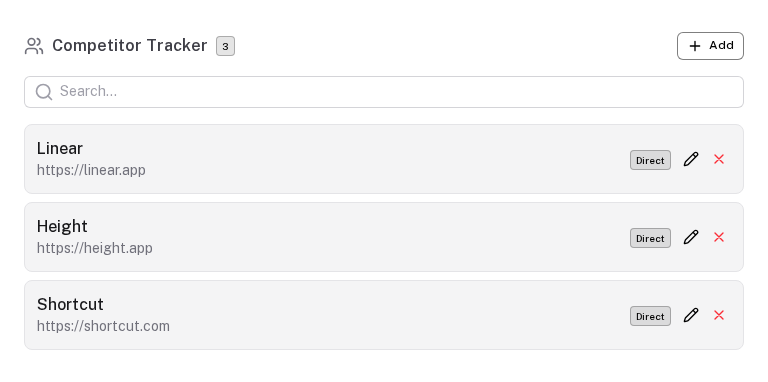
A collection is a schema-driven CRUD list. Each collection maps to a Y.Array in the Y.js document, so items persist offline and sync automatically when connectivity is restored.
Defining a collection
Collections live in the top-level collections key of a PrototypeSchema:
collections: {
  entries: {                          // collection key — also the Y.Array name
    label: 'Entries',
    singularLabel: 'Entry',           // used in "Add Entry" button text
    icon: 'i-lucide-list',

    fields: {
      name:     { type: 'text',      label: 'Name',     required: true },
      category: {
        type: 'select',
        label: 'Category',
        options: [
          { value: 'a', label: 'Type A' },
          { value: 'b', label: 'Type B' },
        ],
        default: 'a',
      },
      score:    { type: 'range',     label: 'Score',   min: 1, max: 10, default: 5 },
      notes:    { type: 'textarea',  label: 'Notes' },
    },

    editMode:  'modal',      // 'inline' (default) | 'modal'
    modalSize: 'xl',         // 'sm' | 'md' | 'lg' | 'xl' | '2xl' | '3xl' | '4xl' | '5xl'

    searchable:   true,
    sortable:     true,
    tableColumns: [
      { key: 'name',     label: 'Name' },
      { key: 'category', label: 'Category' },
      { key: 'score',    label: 'Score', sortable: true },
    ],

    maxItems: 100,
  }
}
Edit modes
inline (default)
Fields render inline in the list row. Good for collections with 1–3 short fields where you want quick in-place editing.
modal
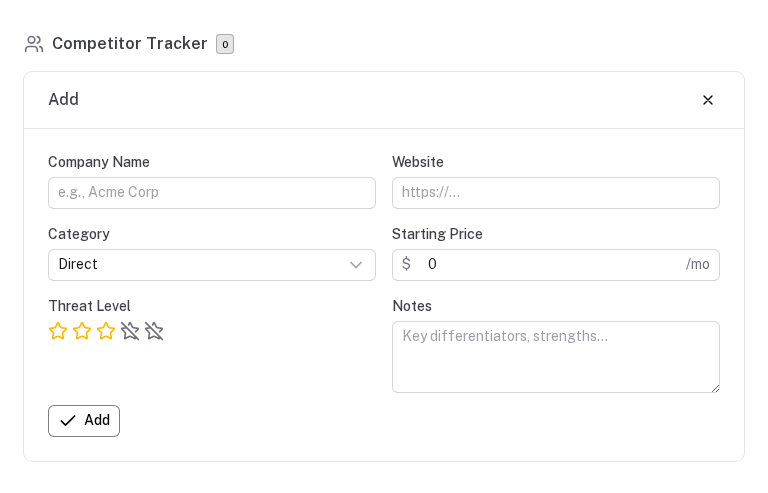
Each item opens in a ProtoCrudModal. Recommended for collections with many fields, long textareas, or complex nested data. The modal automatically persists drafts — if a user closes without saving, their work is preserved in Y.Map 'draft:{key}' and offered for resumption on next open.
editMode:  'modal',
modalSize: '3xl',   // wider sizes auto-enable 2-column field layout
Preset packs
Preset packs let users bootstrap a collection with starter items. They appear on the empty state of the collection as clickable cards.
presets: [
  {
    id: 'starter-pack',
    label: 'Starter Pack',
    icon: 'i-lucide-package',
    description: '5 commonly used entries to get you started',
    items: [
      { name: 'Example Alpha',   category: 'a', score: 7 },
      { name: 'Example Beta',    category: 'b', score: 5 },
      { name: 'Example Gamma',   category: 'a', score: 8 },
    ],
  },
  {
    id: 'detailed-pack',
    label: 'Detailed Template',
    icon: 'i-lucide-layout-template',
    description: '10 entries with pre-filled notes',
    items: [
      // …
    ],
  },
]
Clicking a preset card populates the collection with those items. The user can then edit, add to, or remove them.
Onboarding presets
A variant displayed on the very first empty state — before the user has ever added an item:
onboardingPresets: [
  {
    id: 'quick-start',
    label: 'Quick Start',
    description: 'Get up and running in 30 seconds',
    items: [...],
  },
]
Once items exist, the collection switches to the compact list view with a normal "Add" button.
Using collection data in derived
Collection items are available in ComputeContext.collections:
derived: {
  totalItems: {
    compute: ({ collections }) => collections.entries?.length ?? 0,
  },
  avgScore: {
    compute: ({ collections }) => {
      const items = collections.entries ?? []
      if (!items.length) return null
      return items.reduce((sum, i) => sum + (i.score ?? 0), 0) / items.length
    },
    format: { type: 'number', decimals: 1 },
  },
  topEntries: {
    compute: ({ collections }) =>
      (collections.entries ?? [])
        .filter(i => i.score >= 8)
        .map(i => i.name),
  },
}
Schema migration
Adding a new field to a collection requires no migration — existing items are automatically merged with defaults on read, so the new field gets its default value transparently.
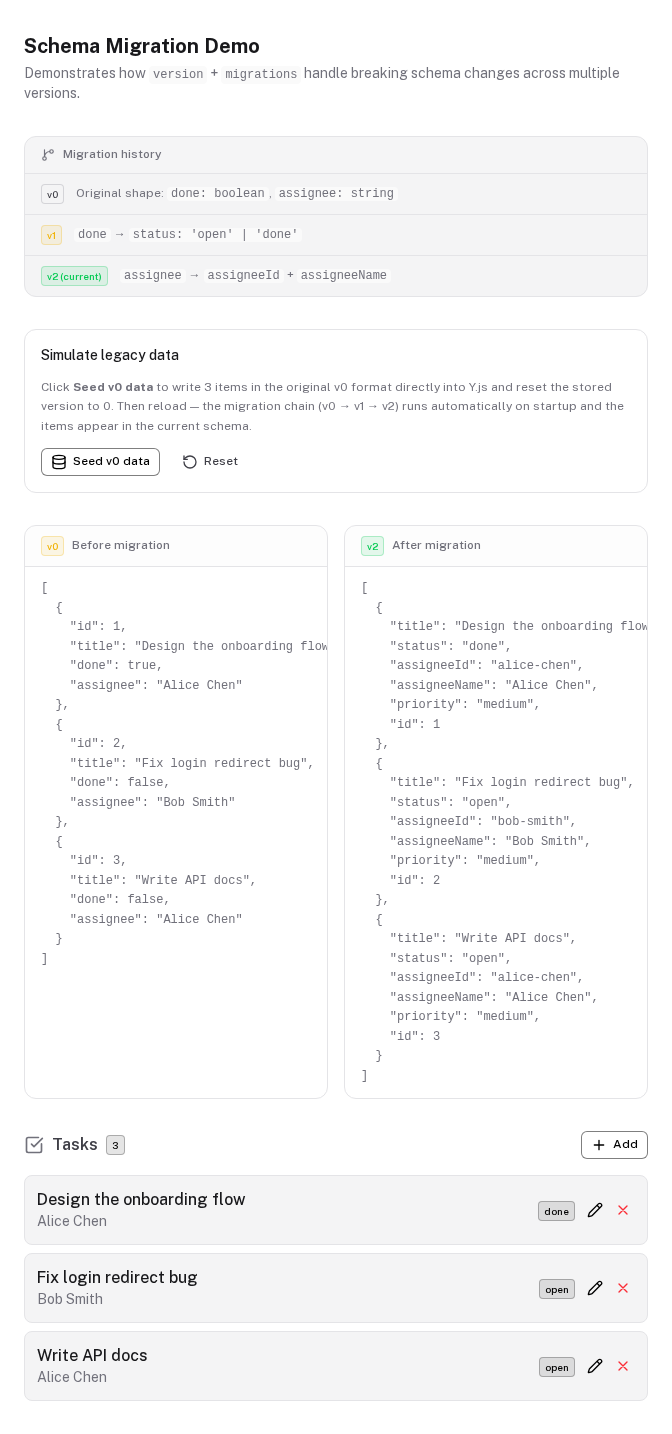
Renaming a field, changing its type, or transforming values requires bumping version and providing a migrations map. Each key is the target version — so if stored data is at v2 and current is v5, the runner applies migrations[3], migrations[4], migrations[5] in order. Steps with no entry are skipped.
collections: {
  tasks: {
    version: 2,
    migrations: {
      // v0 → v1: renamed done:boolean to status:string (destructure out the old field)
      1: ({ done, ...rest }) => ({
        ...rest,
        status: done ? 'done' : 'open',
      }),
      // v1 → v2: split assignee:string into assigneeId + assigneeName (remove old field)
      2: ({ assignee, ...rest }) => ({
        ...rest,
        assigneeId:   assignee?.toLowerCase().replace(/\s+/g, '-') ?? '',
        assigneeName: assignee ?? '',
      }),
    },
    fields: {
      status:      { type: 'select', label: 'Status', default: 'open', options: ['open', 'done'] },
      assigneeId:  { type: 'text',   label: 'Assignee ID',   default: '' },
      assigneeName:{ type: 'text',   label: 'Assignee Name', default: '' },
    },
    defaults: { status: 'open', assigneeId: '', assigneeName: '' },
  },
}
Each step function receives the raw stored item — exactly the fields that were written to Y.js at that version, with no defaults pre-applied. Destructure out the old field name and spread the rest to keep the shape clean. Migrations run once after the persistence layer has loaded stored data, rewrite all items in Y.js in a single transaction, and are skipped on every subsequent load.
Validation
Add a validate function to a collection schema to block saves when an item is invalid. Return true to allow saving, a string for a top-level error message, or a Record<string, string> to highlight specific fields red with per-field messages.
collections: {
  entries: {
    fields: { ... },
    // Field-level errors — each key matches a field name
    validate: (item) => {
      const errors: Record<string, string> = {}
      if (!item.name?.trim()) errors.name = 'Name is required.'
      if (item.score < 1 || item.score > 10) errors.score = 'Score must be between 1 and 10.'
      return Object.keys(errors).length ? errors : true
    },
  },
}
When a Record<string, string> is returned, each named field turns red with its error message displayed below it. A plain string return shows a single banner error instead. Saving is blocked until validate returns true.
Exposing collection aggregates via produces
produces: {
  avgScore:   'derived.avgScore',
  itemCount:  'derived.totalItems',
  topEntries: 'derived.topEntries',
}
Downstream tools can then consume these values directly without access to the raw collection.
CollectionSchema full type
interface CollectionSchema {
  label:              string
  singularLabel?:     string
  icon?:              string
  fields:             Record<string, FieldDef>
  defaults?:          Record<string, any>
  editMode?:          'inline' | 'modal'
  modalSize?:         'sm' | 'md' | 'lg' | 'xl' | '2xl' | '3xl' | '4xl' | '5xl'
  searchable?:        boolean
  sortable?:          boolean
  tableColumns?:      { key: string; label: string; sortable?: boolean }[]
  maxItems?:          number
  presets?:           PresetPack[]
  onboardingPresets?: PresetPack[]
  validate?:          (item: Record<string, any>) => true | false | string | Record<string, string>
  version?:           number
  migrations?:        Record<number, (item: Record<string, any>) => Record<string, any>>
}
Field Types
Complete reference for all FieldDef types — text, number, textarea, select, segmented, toggle, range, rating, color, date, tags, and linked-responses.
Derived & Computed
Derived values are pure functions computed reactively from field values, other derived values, upstream connections, and collection items.