
Field Types
Field Types
Every key in fields (or within a sections[].fields block) must be a FieldDef. All field types share a common base and then add type-specific options.
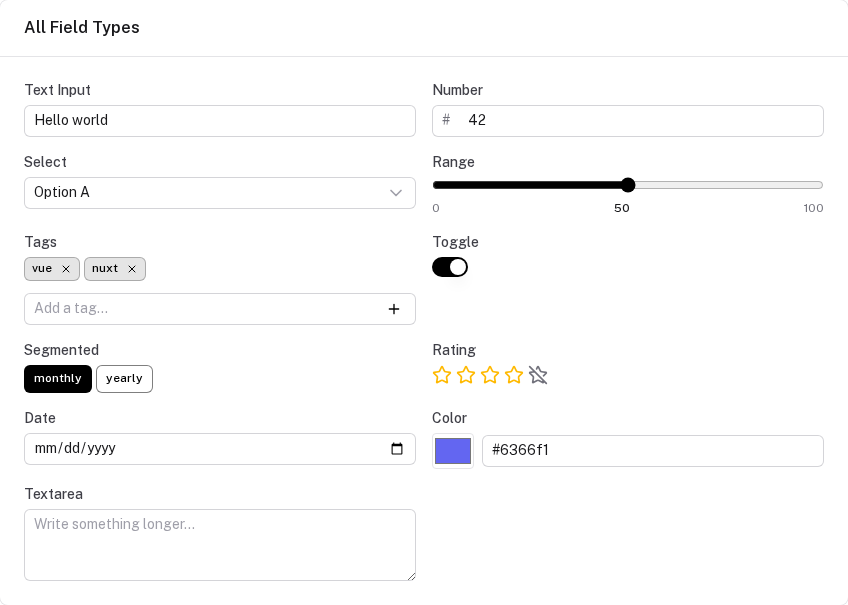
Common base properties
interface SimpleFieldDef<T = any> {
  type:         FieldType      // required — determines which input component renders
  label:        string         // displayed above the input
  default?:     T              // value the field reads until it is set (never written to Y.js)
  placeholder?: string
  required?:    boolean
  disabled?:    boolean
  help?:        string         // small hint text below the input
  colSpan?:     1 | 2         // grid column span (sections with cols:2)
  hidden?:      boolean | ((ctx: ComputeContext) => boolean)
}
text
Single-line text input.
name: { type: 'text', label: 'Full Name', placeholder: 'e.g. Jane Smith' }
number
Numeric input. Stored as a JavaScript number.
mrr: { type: 'number', label: 'MRR (€)', default: 10000 }
textarea
Multi-line text. Use for notes, descriptions, free-form content.
notes: { type: 'textarea', label: 'Notes', placeholder: 'Key observations…' }
select
Dropdown select from a fixed list of options.
category: {
  type: 'select',
  label: 'Category',
  options: [
    { value: 'direct',      label: 'Direct Competitor' },
    { value: 'indirect',    label: 'Indirect Competitor' },
    { value: 'substitute',  label: 'Substitute' },
  ],
  default: 'direct',
}
segmented
Segmented button group (radio-style). Better UX than select for 2–5 options.
fundingPath: {
  type: 'segmented',
  label: 'Funding Path',
  options: [
    { value: 'bootstrap', label: 'Bootstrap' },
    { value: 'vc',        label: 'VC-Backed' },
  ],
  default: 'bootstrap',
}
toggle
Boolean on/off switch.
includeVat: { type: 'toggle', label: 'Include VAT', default: false }
range
Slider input. Requires min, max, and optionally step.
willingness: {
  type: 'range',
  label: 'Willingness to Pay (0–10)',
  min: 0,
  max: 10,
  step: 1,
  default: 5,
}
rating
Star rating (1–5 by default). Stored as a number.
satisfaction: {
  type: 'rating',
  label: 'Overall Satisfaction',
  max: 5,
  default: 3,
}
color
Color picker. Stored as a hex string.
brandColor: { type: 'color', label: 'Brand Color', default: '#6366f1' }
date
Date picker. Stored as an ISO date string (YYYY-MM-DD).
launchDate: { type: 'date', label: 'Target Launch Date' }
tags
Multi-value tag input. Stored as string[].
painPoints: {
  type: 'tags',
  label: 'Pain Points',
  placeholder: 'Add a pain point and press Enter…',
}
linked-responses (collections only)
A special field type for per-question textarea responses within a collection item. Used when a collection of questions exists alongside a collection of sessions/interviews, and you want to record an answer per question inside each session record.
// In a collection's fields:
responses: {
  type: 'linked-responses',
  label: 'Responses',
  sourceCollection: 'questions',  // collection key to pull questions from
  questionField: 'text',          // which field of each question to show as the label
}
When rendered in ProtoCrudModal, this shows one textarea per question from the source collection. The stored value is Record<questionId, string>.
Conditional visibility
The hidden property accepts a function receiving the current ComputeContext:
advancedOptions: {
  type: 'textarea',
  label: 'Advanced Options',
  hidden: ({ fields }) => !fields.showAdvanced,
}
Sections with columns
When using sections, set cols: 2 on the section to get a two-column grid. Individual fields can span both columns with colSpan: 2:
sections: [
  {
    title: 'Financial Inputs',
    cols: 2,
    fields: {
      revenue:  { type: 'number', label: 'Revenue',  colSpan: 1 },
      expenses: { type: 'number', label: 'Expenses', colSpan: 1 },
      notes:    { type: 'textarea', label: 'Notes',  colSpan: 2 },
    }
  }
]
Schema migration
Adding a new field requires no migration — existing stored documents automatically get the field's default value on first read.
Renaming a field, changing its type, or transforming values requires bumping version and adding an entry to migrations. Each key is the target version — the runner steps from the stored version up to current, applying each function in order:
definePrototype({
  key: 'my-tool',
  version: 3,
  migrations: {
    // v0 → v1: renamed 'revenue' → 'monthlyRevenue' (destructure out the old field)
    1: ({ revenue, ...rest }) => ({ ...rest, monthlyRevenue: revenue ?? 0 }),
    // v1 → v2: added 'currency', no transform needed — filled from default automatically
    // v2 → v3: changed 'monthlyRevenue' from raw number to cents
    3: ({ monthlyRevenue, ...rest }) => ({ ...rest, monthlyRevenue: Math.round((monthlyRevenue ?? 0) * 100) }),
  },
  fields: {
    monthlyRevenue: { type: 'number', label: 'Monthly Revenue (cents)', default: 0 },
    currency:       { type: 'select', label: 'Currency', default: 'USD', options: ['USD', 'EUR'] },
  },
})
Each step function receives the raw stored item — only the fields that were actually written to Y.js at that version. Destructure out the old field name and spread the rest to keep the shape clean. Migrations run once after the persistence layer has loaded the stored data, write the result back to Y.js in a single transaction, and are skipped on every subsequent load. Version steps with no entry (like v2 above) are skipped — the runner moves straight to the next defined step.
Overview
The PrototypeSchema type controls every aspect of a tool — its fields, derived values, collections, results, visualizations, and layout.
Collections
Collections model CRUD lists of structured items. They map to Y.Arrays for offline-capable persistence with search, sort, modal/inline editing, and preset packs.