
Headless Mode
Headless Mode
protokit is not just a UI kit. Its core is a schema-driven Y.js storage layer that works independently of ProtoTool, ProtoForm, and every other built-in component. If you are building your own UI with Nuxt UI, custom components, or a completely different design system, you can use protokit purely for the storage infrastructure.
What "headless" means here
The built-in components (ProtoTool, ProtoForm, ProtoCrudList, etc.) consume the schema and render opinionated UI. The composables underneath them do the actual work:
usePrototype
├── useProtoDoc    — Y.js document, IndexedDB, BroadcastChannel, server sync
├── useProtoMap    — Y.Map ↔ reactive refs, bidirectional sync
├── useProtoList   — Y.Array CRUD (add / update / remove / move / reset)
├── useProtoText   — Y.Text ↔ reactive string
├── useProtoDraft  — draft persistence inside a Y.Map
└── useProtoDerived — reactive computed values from a schema + context
All of these are available standalone, fully auto-imported. The visual bricks only sit on top.
When to use headless
- You have your own form components and do not want ProtoForm's opinionated layout
- You are building a custom CRUD table, kanban board, or timeline with your own design
- You need persistent state (settings, preferences, wizard state) without any rendering
- You want offline-first persistence for a specific feature without adopting a full PrototypeSchema
- You are using protokit alongside another UI library and only need its data layer
defineHeadlessSchema
The standard PrototypeSchema requires visual-only fields (title, shortTitle, description, icon) that are only read by ProtoTool. When going headless, defineHeadlessSchema lets you skip them:
// ❌ Full PrototypeSchema — visual fields required even when unused
const schema = definePrototype({
  key: 'user-settings',
  title: 'User Settings',       // only needed by ProtoTool
  shortTitle: 'Settings',       // only needed by ProtoTool
  description: 'App settings',  // only needed by ProtoTool
  icon: 'i-lucide-settings',    // only needed by ProtoTool
  fields: { … },
})

// ✅ HeadlessSchema — only key + fields required
const schema = defineHeadlessSchema({
  key: 'user-settings',
  fields: { … },
})
defineHeadlessSchema returns a valid PrototypeSchema (visual fields default to '') that can be passed directly to usePrototype and every other composable.
Example: Persisted user settings
User preferences that survive page reloads, sync across tabs, but never touch the server:
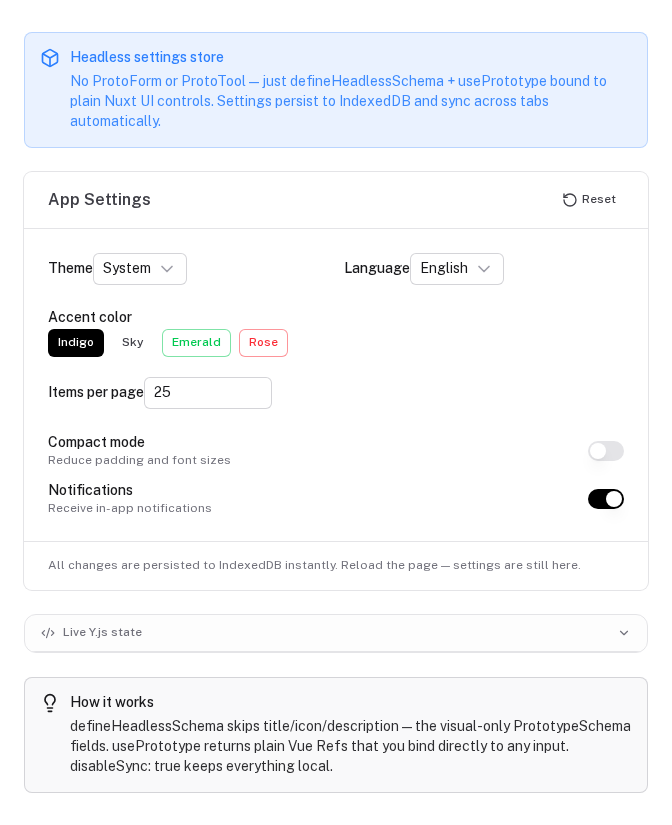
// composables/useAppSettings.ts
const settingsSchema = defineHeadlessSchema({
  key: 'app-settings',
  fields: {
    theme: {
      type: 'select',
      label: 'Theme',
      default: 'system',
      options: ['system', 'light', 'dark'],
    },
    language: {
      type: 'select',
      label: 'Language',
      default: 'en',
      options: ['en', 'de', 'fr', 'es'],
    },
    compactMode: {
      type: 'toggle',
      label: 'Compact mode',
      default: false,
    },
    itemsPerPage: {
      type: 'number',
      label: 'Items per page',
      default: 25,
    },
  },
})

export function useAppSettings() {
  const { state, isReady, reset } = usePrototype(settingsSchema, {
    disableSync: true, // local device only — no server involved
  })

  return {
    isReady,
    theme:         state.theme,
    language:      state.language,
    compactMode:   state.compactMode,
    itemsPerPage:  state.itemsPerPage,
    reset,
  }
}
<!-- In any component -->
<script setup lang="ts">
const { theme, compactMode, isReady } = useAppSettings()
</script>

<template>
  <ClientOnly>
    <div v-if="isReady">
      <select v-model="theme.value">
        <option value="system">System</option>
        <option value="light">Light</option>
        <option value="dark">Dark</option>
      </select>
      <input type="checkbox" v-model="compactMode.value" />
    </div>
  </ClientOnly>
</template>
state.theme.value is a standard Vue Ref<string>. Writing to it persists to IndexedDB and broadcasts to all open tabs automatically — no extra wiring needed.
Example: Custom CRUD list with your own table
Use useProtoList (or useProtoCollection) directly with your own table component:
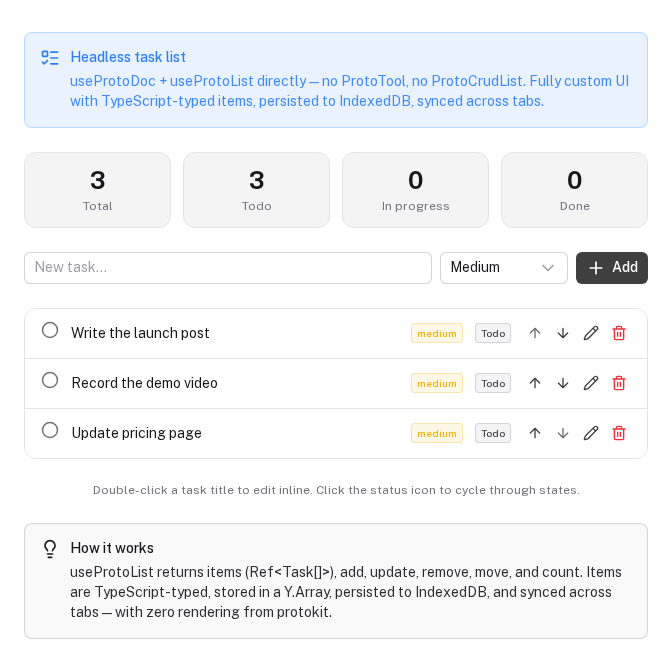
// composables/useTaskStore.ts
export function useTaskStore(workspaceId: string) {
  // One Y.Doc per workspace — shared across all tools
  const { doc, isReady } = useProtoDoc(`workspace-${workspaceId}`)

  // Raw Y.Array CRUD
  const tasks = useProtoList<{
    id: string
    title: string
    status: 'todo' | 'in-progress' | 'done'
    priority: 'low' | 'medium' | 'high'
    createdAt: number
  }>(doc, 'tasks', {
    defaults: {
      id: '',
      title: '',
      status: 'todo',
      priority: 'medium',
      createdAt: 0,
    },
  })

  function addTask(title: string) {
    tasks.add({
      id: crypto.randomUUID(),
      title,
      status: 'todo',
      priority: 'medium',
      createdAt: Date.now(),
    })
  }

  function completeTask(index: number) {
    tasks.update(index, { status: 'done' })
  }

  return { isReady, tasks, addTask, completeTask }
}
<script setup lang="ts">
const { isReady, tasks, addTask, completeTask } = useTaskStore(workspaceId)
const newTitle = ref('')
</script>

<template>
  <ClientOnly>
    <div v-if="isReady">
      <!-- Your own table — not ProtoCrudList -->
      <MyTable :rows="tasks.items.value">
        <template #actions="{ index, row }">
          <MyButton v-if="row.status !== 'done'" @click="completeTask(index)">
            Done
          </MyButton>
        </template>
      </MyTable>

      <input v-model="newTitle" placeholder="New task" />
      <button @click="addTask(newTitle); newTitle = ''">Add</button>
    </div>
  </ClientOnly>
</template>
Example: Rich text field with useProtoText
For a persisted text editor (rich text, markdown, notes) that syncs across tabs:
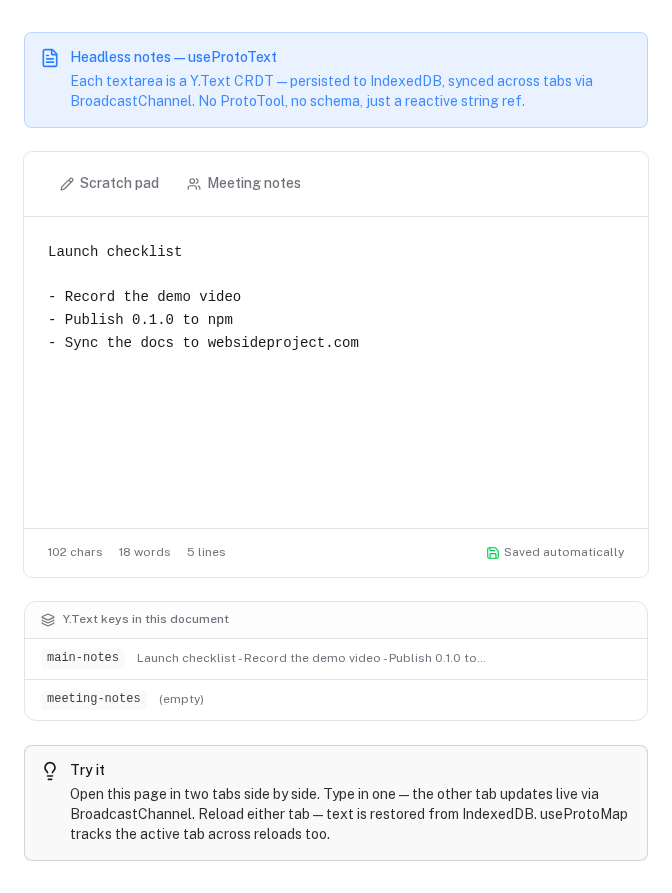
// composables/useProjectNotes.ts
export function useProjectNotes(projectId: string) {
  const { doc, isReady } = useProtoDoc(`project-${projectId}`)

  // Y.Text ↔ reactive string — bidirectional
  const { text: notes } = useProtoText(doc, 'notes')

  return { isReady, notes }
}
<script setup lang="ts">
const { isReady, notes } = useProjectNotes(projectId)
</script>

<template>
  <ClientOnly>
    <MyMarkdownEditor v-if="isReady" v-model="notes.value" />
  </ClientOnly>
</template>
notes.value is a Ref<string> backed by a Y.Text. Any change persists to IndexedDB and syncs to other tabs via BroadcastChannel.
Example: Wizard / multi-step form state
Persist a multi-step form so users can leave and return mid-flow:
const wizardSchema = defineHeadlessSchema({
  key: 'onboarding-wizard',
  fields: {
    step:          { type: 'number',   label: 'Current step',  default: 0 },
    companyName:   { type: 'text',     label: 'Company name',  default: '' },
    teamSize:      { type: 'select',   label: 'Team size',     default: '',
                     options: ['1', '2-10', '11-50', '50+'] },
    useCase:       { type: 'textarea', label: 'Use case',      default: '' },
    completed:     { type: 'toggle',   label: 'Completed',     default: false },
  },
})

export function useOnboardingWizard() {
  const { state, isReady, reset } = usePrototype(wizardSchema, {
    disableSync: true,
  })

  function advance() {
    state.step.value++
  }

  function finish() {
    state.completed.value = true
  }

  return { isReady, state, advance, finish, reset }
}
Example: Schema with migrations
Headless schemas support the same migration system as full schemas. When you rename a field or change its type, bump version and provide a migration step:
const settingsSchema = defineHeadlessSchema({
  key: 'user-settings',
  version: 2,
  migrations: {
    // v1 → v2: rename 'darkMode' (boolean) to 'theme' (string)
    2: (data) => ({
      ...data,
      theme: data.darkMode === true ? 'dark' : 'system',
      darkMode: undefined,
    }),
  },
  fields: {
    theme: { type: 'select', label: 'Theme', default: 'system',
             options: ['system', 'light', 'dark'] },
  },
})
Migrations run automatically after IndexedDB loads, before isReady becomes true.
Low-level: useProtoDoc + useProtoMap directly
Skip usePrototype entirely when you only need a subset of its features:
// composables/useMyFeatureStore.ts
export function useMyFeatureStore(userId: string) {
  // Scoped to this user — data never bleeds across users
  const { doc, isReady } = useProtoDoc(`feature-store`, {
    disableSync: false, // keep server sync
  })

  // Bidirectional Y.Map ↔ refs, with schema defaults
  const { state, set } = useProtoMap(doc, 'feature-settings', {
    pinned:     { type: 'toggle', label: 'Pinned',     default: false },
    sortField:  { type: 'text',   label: 'Sort field', default: 'name' },
    sortOrder:  { type: 'select', label: 'Order',      default: 'asc',
                  options: ['asc', 'desc'] },
  })

  // Y.Array for a list
  const bookmarks = useProtoList<{ url: string; label: string }>(
    doc, 'bookmarks', {
      defaults: { url: '', label: '' },
    },
  )

  return { isReady, state, bookmarks }
}
This gives you two Ref-backed fields and a CRUD list — all persisted to IndexedDB and synced across tabs — without any schema boilerplate or component rendering.
If you pass version and migrations to useProtoMap directly, pass the doc's isReady too (useProtoMap(doc, key, fields, { version, migrations, isReady })) so the migrations run on the stored data once IndexedDB has loaded it. usePrototype does this for you.
Disabling server sync for purely local stores
For preferences, UI state, or any data that should stay on-device:
// Local-only — no HTTP calls, no server dependency
const { state, isReady } = usePrototype(schema, { disableSync: true })
Or configure it at module level in nuxt.config.ts:
export default defineNuxtConfig({
  protokit: {
    serverSync: false, // all documents are local-only
  },
})
useProtoText is not part of usePrototype
useProtoText sits outside the usePrototype hierarchy because it targets Y.Text (character-by-character CRDT), whereas useProtoMap and useProtoList use Y.Map/Y.Array. Use it directly:
const { doc, isReady } = useProtoDoc('my-doc')
const { text } = useProtoText(doc, 'note-content')
// text is a Ref<string> — synced bidirectionally with Y.Text
useProtoText is especially useful when integrating with rich text editors (TipTap, Milkdown, CodeMirror) that also speak Y.js — pass ytext directly to the editor's Y.js provider.
Summary: what you get for free, headlessly
| Feature | Composable | Opt-out |
|---|---|---|
| IndexedDB persistence | useProtoDoc | enableIndexedDB: false |
| Cross-tab sync via BroadcastChannel | useProtoDoc | enableBroadcast: false |
| Server sync (push + pull) | useProtoDoc | disableSync: true |
| Schema-driven field defaults | useProtoMap | — |
| Schema migrations | useProtoMap, useProtoList | — |
| Reactive CRUD list | useProtoList | — |
| Draft persistence | useProtoDraft | — |
| Reactive text | useProtoText | — |
| Reactive derived values | useProtoDerived | — |
| Corruption recovery | useProtoDoc | — |
| Namespace / per-user isolation | usePrototype options | — |
| At-rest encryption (AES-GCM) | useProtoDoc | — |
Business Logic Guards
Extend role-based permission guards with reactive application state — project status, ownership, quotas, and other runtime conditions — using Vue's computed().
Overview
Install the nuxt-protokit Claude Code skill plugin to give Claude accurate API knowledge for building prototypes faster.