
Offline-First Architecture
Offline-First Architecture
protokit is offline-first by design. Every write goes to the browser's IndexedDB before any network is involved. The server is a resilient backup, not a gatekeeper.
The short answer
Yes — tools work fully offline. Y.js + IndexedDB means all reads and writes are local. When the device reconnects, Y.js syncs outstanding changes to the server automatically using CRDT merge — no manual action, no data loss, no conflicts.
How a write flows
User types in a field
        │
        ▼
Y.Doc (in memory)
        │  Y.js CRDT update (binary delta)
        ▼
IndexedDB (browser)    ← immediate, no network needed
        │
        │  (when online, 30s debounce)
        ▼
POST /api/yjs/sync     ← queued server push
Every change produces a small Y.js update — a compact binary delta encoding only what changed. This update is applied to the in-memory Y.Doc and written to IndexedDB before any Promise resolves. The network push is fire-and-forget.
The tool works identically on a fast connection, a slow connection, or no connection at all.
What works offline
Calculator and estimator tools
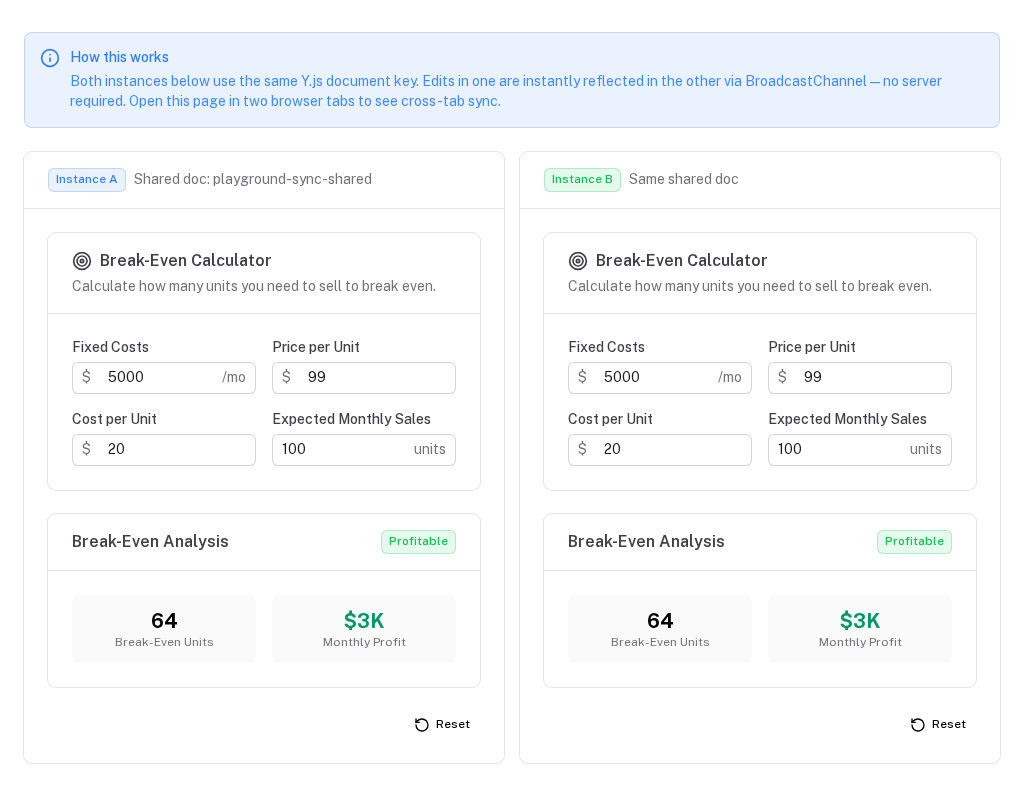
Ideal offline case. A user adjusts sliders and inputs on a flight, the tool recalculates, everything saves to IndexedDB. On landing, the device reconnects and silently syncs.
Form-heavy tools
Work identically offline. Field values are Y.Map entries written to IndexedDB immediately. Multi-section forms, segmented controls, date pickers — all local-first.
CRUD collections
Add, edit, delete — all work offline. Items are written to Y.Array in IndexedDB. If two tabs both make edits while offline, their changes merge automatically via CRDT semantics when either tab reconnects.
Structured note-taking and assessments
Questionnaire tools, scoring rubrics, and structured data entry work without any connectivity. Changes queue for server sync silently.
Collaborative features
When two users edit the same tool simultaneously (or the same user on two devices), Y.js CRDT semantics handle the merge. For Y.Map fields (form state), last-writer-wins per key. For Y.Array collections, concurrent inserts both appear; concurrent delete + edit resolves with the delete winning.
The isReady flag
The only user-visible consequence of offline-first architecture is isReady. When a component first mounts, IndexeddbPersistence asynchronously loads stored state. Until loading completes, field values show their schema default.
mount → isReady: false → render skeleton
IndexedDB loads (10–50 ms) → isReady: true → render stored values
Always guard with v-if="isReady" to prevent a flash of default values:
<ClientOnly>
  <ProtoTool v-if="isReady" :schema="schema" />
  <USkeleton v-else class="h-48" />
</ClientOnly>
ProtoTool handles this internally. You only need to guard isReady manually when using usePrototype or useProtoDoc directly.
Y.js CRDT merge semantics
| Scenario | Outcome |
|---|---|
| Two tabs edit the same field simultaneously | Last-write-wins per Y.Map key |
| Tab A adds item while offline, Tab B adds different item | Both items appear after sync |
| Tab A edits an item while Tab B deletes it | Delete wins (Y.Array semantics) |
| Network outage for hours — client diverges from server | Binary diff computed on reconnect, merged without conflicts |
No conflict resolution logic required. Y.js handles it.
Multi-tab sync (without server)
When the same document is open in two browser tabs:
- Tab A makes a change → written to IndexedDB → broadcast via
BroadcastChannel - Tab B receives the broadcast → applies the Y.js update → reactive refs update immediately
Both tabs stay in sync without a server round-trip. This works offline — BroadcastChannel is purely local.
Server sync details
protokit handles the client side of persistence only. Server sync requires a compatible backend that implements the Y.js sync API endpoints. You can use the separate yjs-sync companion module or build the endpoints yourself. Without a backend, set serverSync: false — no HTTP calls will be made and all data persists locally via IndexedDB.When protokit.serverSync is enabled and a compatible backend is available, useProtoDoc pushes updates every 30 seconds (debounced on document changes):
POST /api/yjs/sync               Stores binary Y.js updates in D1/SQLite
POST /api/yjs/snapshots/create   Creates a deduplicated JSON snapshot
Server sync provides:
- Cross-device continuity — open on laptop, continue on tablet
- Backup against browser storage loss — incognito mode, cache clear, browser reinstall
- Corruption recovery — server snapshots enable restore (see next page)
Configure in nuxt.config.ts:
protokit: {
  serverSync: true,                    // enabled (default), baseUrl: '/api/yjs'
  serverSync: false,                   // disabled — no HTTP calls at all
  serverSync: { baseUrl: '/api/yjs' }, // custom server implementation
}
What survives what
| Event | Outcome |
|---|---|
| Page refresh | ✅ All data preserved (IndexedDB) |
| Tab close and reopen | ✅ All data preserved (IndexedDB) |
| Browser crash | ✅ All data preserved (IndexedDB writes are synchronous) |
| Loss of internet for hours | ✅ Changes queue locally, sync on reconnect |
| Browser storage cleared by user | ⚠️ Local data lost — server copy preserved if sync ran |
| Private/incognito window | ⚠️ IndexedDB cleared on close — server copy preserved if synced |
| IndexedDB corruption | ⚠️ Auto-detected — recovery modal guides the user |
Using without the server module
Set serverSync: false in nuxt.config.ts to run in local-only mode. No HTTP calls are made — not even silent ones:
// nuxt.config.ts
protokit: {
  serverSync: false,
}
Or disable sync for a single tool with the disable-sync prop:
<ProtoTool :schema="mySchema" disable-sync />
The only consequences of disabling server sync:
- No cross-device sync
- No corruption recovery option (no server snapshots to restore from)
- The corruption modal shows only "Start fresh" if IndexedDB is damaged
yjs-sync but leave serverSync: true (the default), sync calls will 404 silently. This is harmless — local data is safe — but produces unnecessary network requests. Prefer serverSync: false when you know you have no server.ProtoItemPanel variants
Specialized panel components for extending a collection item's detail view — text template generation, time-series snapshots, and URL input.
Corruption Recovery
How protokit detects IndexedDB corruption, queries server snapshots, and guides users through recovery without data loss.