
Introduction
Introduction
protokit is a Nuxt 4 module for rapid product prototyping. It turns a plain TypeScript schema into a fully working interactive prototype — forms, CRUD lists, computed values, visualizations, and automatic offline persistence — so you can validate ideas and ship working demos without spending time on boilerplate.
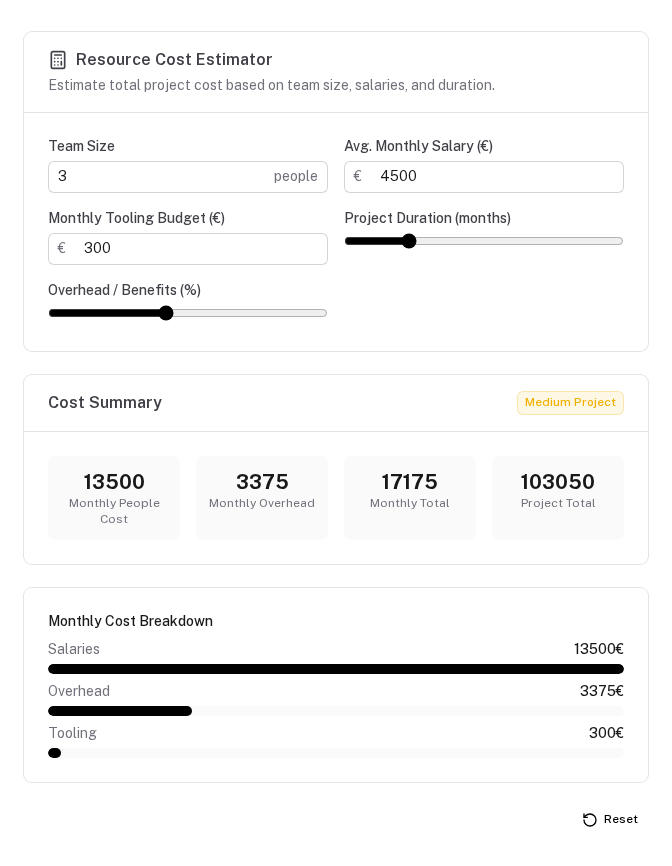
The problem it solves
Building interactive prototypes by hand is repetitive:
- Every calculator or configurator needs the same form wiring, computed watchers, and storage layer
- Every CRUD list needs the same add/edit/delete/search/sort boilerplate
- Every time a prototype needs to share data with another, you wire up custom state management
- Changing a field type means touching the template, the store, and the TypeScript types simultaneously
protokit removes this repetition. The schema is the single source of truth. The same object that describes which fields a prototype has also drives its form rendering, computed values, result display, visualizations, and IndexedDB key — all at once.
When to use it
protokit is designed for rapid product prototyping. If you need to go from idea to working, data-persistent interface fast — without spending time on form wiring, storage, or CRUD boilerplate — it's a good fit:
- Product configurators and pricing tools — cost models, pricing calculators, ROI estimators with live computed results
- Internal dashboards and trackers — CRUD-driven views with search, sort, and structured data entry (task trackers, item registries, pipeline boards)
- Assessment and evaluation prototypes — scoring rubrics, weighted questionnaires, comparison matrices
- Connected prototype suites — multiple screens sharing computed data through a reactive data graph
It is not designed for:
- General-purpose form libraries with arbitrary validation logic — use Vee-Validate or Formkit
- Production database-backed admin panels — use a headless CMS or Nuxt UI Pro data tables
- Real-time collaborative text editors — Y.js is the foundation, but you would be working at a lower level
Auto-imported API surface
After adding the module to nuxt.config.ts, the following are available globally without any import statement:
Utils
| Name | Description |
|---|---|
definePrototype | Type-safe schema definition helper (identity function for inference) |
defineHeadlessSchema | Minimal schema helper for headless use — only key + fields required |
defineCollection | Type-safe collection schema helper |
defineProtokitExtension | Register custom field and visualization types |
Composables
| Name | Description |
|---|---|
usePrototype | High-level facade — fields, derived, collections, reset, isReady |
useProtoDoc | Y.js document lifecycle — IndexedDB, BroadcastChannel, server sync |
useProtoMap | Bidirectional Y.Map ↔ reactive refs sync |
useProtoList | Low-level Y.Array CRUD |
useProtoCollection | High-level CRUD with search, sort, and item count |
useProtoDerived | Reactive derived value computation from a schema and context |
useProtoOutputs | Cross-prototype produces/consumes wiring via shared Y.Maps |
useProtoDraft | Draft persistence for modal item editors |
useProtoText | Bidirectional Y.Text ↔ reactive string ref |
useProtoCorruption | Corruption event queue and recovery flow |
useProtoRegistry | Global schema registry — register and look up schemas by key |
useProtoKitConfig | Read the module's runtime config (serverSync enabled, baseUrl) |
Only the public API is global: the use* composables, the define* helpers, and clearProtoNamespace,
clearProtoKeys and configureProtoPermissions. Everything else — formatters, calendar helpers, encryption
primitives, runMigrations — is imported explicitly, so generic names like formatDate never collide with your app's:
import { formatMoney, formatPercent, formatNumber, formatDate } from '#protokit/utils/formatters'
import { deriveKey, generateSalt } from '#protokit/utils/encryption'
Components (globally registered)
| Name | Description |
|---|---|
ProtoTool | Full prototype renderer — form, results, viz, collections, actions |
ProtoForm | Form fields only, driven by schema fields or sections |
ProtoCrudList | CRUD list or table for a single collection |
ProtoCrudModal | Modal item editor with automatic draft persistence |
ProtoStatGrid | Stat card grid from results.stats |
ProtoViz | Single visualization renderer |
ProtoActionBar | Copy / export / reset action toolbar |
ProtoDebugPanel | Dev-only Y.js state inspector |
ProtoCorruptionModal | Non-dismissible corruption recovery modal |
All field components (ProtoFieldText, ProtoFieldNumber, ProtoFieldSelect, …) and visualization components (VizProgressBar, VizBarChart, …) are also globally registered for custom layout use.
Server sync backend
protokit handles the client side of persistence only. Cross-device sync and server-backed corruption recovery require a backend that implements the Y.js sync API endpoints (POST /api/yjs/sync, GET /api/yjs/pull, GET /api/yjs/snapshots/:key). You can use the separate yjs-sync companion module or implement the endpoints yourself.
Client (protokit)                      Server (yjs-sync)
─────────────────                      ─────────────────
useProtoDoc                        ──► POST /api/yjs/sync
  ├─ IndexedDB persistence              └─ Stores binary updates in D1/SQLite
  ├─ BroadcastChannel tab sync     ──► POST /api/yjs/snapshots/create
  └─ 30s debounced server push          └─ Deduplicated JSON snapshots
                                   ◄── GET  /api/yjs/pull
                                   ◄── GET  /api/yjs/snapshots/{key}
The server module is required for cross-device sync and the full corruption recovery flow. Without it, prototypes still persist locally via IndexedDB — the corruption modal simply will not offer a "restore from server backup" option.
Server sync is controlled via the protokit.serverSync config key. See Server Sync →.
Overview
Schema-driven rapid prototyping for Nuxt 4 — from TypeScript schema to interactive prototype in minutes.
Core Concepts
The mental model behind protokit — schemas, Y.js documents, the produces/consumes data graph, and how everything connects.