
Multi-tenant & Per-user Isolation
Multi-tenant & Per-user Isolation
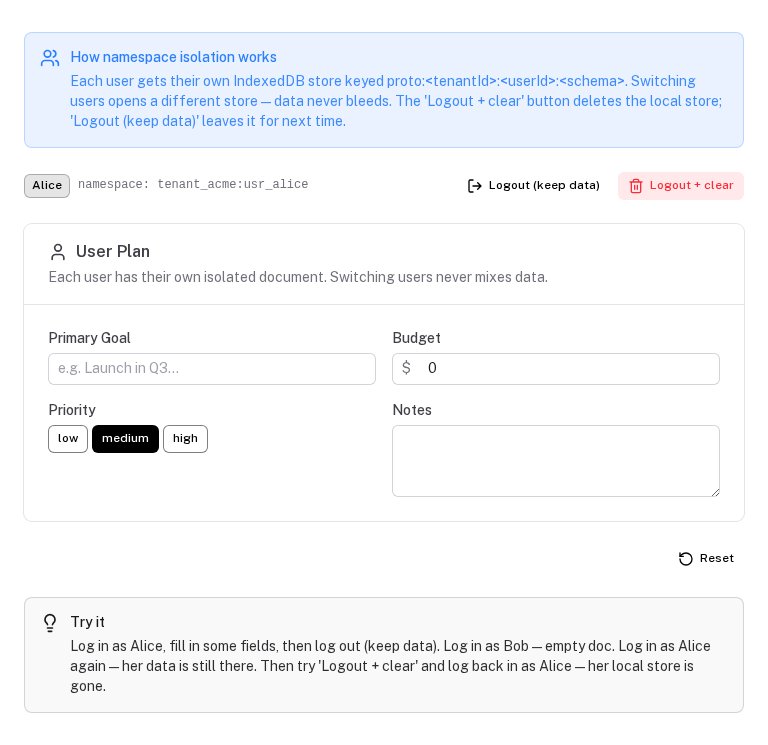
By default every prototype stores data under proto:<schema.key> — a single shared document per device. In apps with authentication or multi-tenancy, you need isolated documents per user, tenant, or workspace so one account's data never surfaces to another.
The namespace option
Pass a namespace string to usePrototype or the <ProtoTool> component. It is prepended to the doc key, creating fully isolated IndexedDB stores and BroadcastChannels.
IndexedDB key: proto:<namespace>:<schema.key>
You compose the namespace from whatever segments your app requires:
// Tenant-shared: all users in the org read and write the same document
const { state } = usePrototype(mySchema, { namespace: tenantId })

// Private per user within a tenant
const { state } = usePrototype(mySchema, { namespace: `${tenantId}:${userId}` })

// Private per user, single-tenant / no multi-tenancy
const { state } = usePrototype(mySchema, { namespace: userId })
<!-- Component usage -->
<ProtoTool :schema="mySchema" :namespace="`${tenantId}:${userId}`" />
When the namespace changes (user switches tenant, logs out, logs in as someone else), the component or composable receives a different key and opens a completely different document. No data bleeds across namespaces.
serverSync is enabled, the same namespaced key is sent to the server as the docKey. The backend stores each namespace separately, so server-side isolation matches client-side isolation automatically.Security concern: data at rest after logout
IndexedDB data persists on the device after a user logs out. A subsequent user on the same device cannot access it through normal app usage — the namespace ensures they open a different, empty document. However, on a shared or public device, a technically capable person could inspect the previous user's IndexedDB store directly via DevTools or a browser extension, without logging in.
When this is acceptable:
- Internal tools where employees each use their own device
- Single-user apps or MVPs
- Tools handling non-sensitive data (calculator inputs, estimates, planning worksheets)
When you should clean up on logout:
- Apps on shared/kiosk devices
- Handling PII, financial data, medical records, or other regulated data
- Any scenario where GDPR or similar regulations require data erasure on request
Cleanup on logout
Two utilities are exported for this. Call either one in your logout handler before clearing the session.
clearProtoNamespace(namespace) — recommended for most apps
Auto-discovers and deletes all IndexedDB stores for the namespace, including stores from previous sessions.
async function logout() {
  const { tenantId, userId } = useCurrentUser()

  await clearProtoNamespace(`${tenantId}:${userId}`)

  await $fetch('/api/auth/logout', { method: 'POST' })
  await navigateTo('/login')
}
Browser support: uses indexedDB.databases(), which is available in Chromium and Safari. On Firefox, only stores currently open in memory are cleaned up — stores from previous page loads remain on disk. If full Firefox support matters, use clearProtoKeys instead.
clearProtoKeys(namespace, schemaKeys) — cross-browser
Enumerate the schema keys explicitly. Works in all browsers including Firefox, because keys are deterministic.
import { budgetSchema, interviewSchema, roadmapSchema } from '~/schemas'

await clearProtoKeys(`${tenantId}:${userId}`, [
  budgetSchema.key,
  interviewSchema.key,
  roadmapSchema.key,
])
This requires keeping the list in sync with your schemas. A practical pattern is to export all schemas from a single ~/schemas/index.ts and derive the key list from it:
// schemas/index.ts
export const allSchemas = [budgetSchema, interviewSchema, roadmapSchema]

// logout handler
import { allSchemas } from '~/schemas'
await clearProtoKeys(`${tenantId}:${userId}`, allSchemas.map(s => s.key))
Nuxt auth composable pattern
A practical way to wire this up — put the cleanup in a shared auth composable so it runs consistently regardless of where logout is triggered:
// composables/useAuth.ts
export function useAuth() {
  const user = useSupabaseUser()  // or however you access the session

  async function logout() {
    if (user.value) {
      // Clean up local prototype data before the session ends
      await clearProtoNamespace(user.value.id)
      // Or for multi-tenant: await clearProtoNamespace(`${tenantId}:${user.value.id}`)
    }
    await $fetch('/api/auth/logout', { method: 'POST' })
    await navigateTo('/login')
  }

  return { user, logout }
}
What cleanup does
Both utilities perform the same teardown steps for each matching document:
- Cancel any pending debounced server-push timer
- Remove the
unhandledrejectionlistener used for corruption detection - Close the
BroadcastChannel - Destroy the
IndexeddbPersistenceprovider - Destroy the
Y.Docin memory - Remove all entries from the internal document, provider, and ref-count caches
- Delete the IndexedDB database from disk
After cleanup, the next login with the same namespace starts from a clean state — exactly as if it were a first-time user on this device.
Size & GC
How Y.js documents grow over time, how garbage collection compacts them, and what to expect for real-world prototyping workloads.
Encryption at Rest
How to encrypt IndexedDB data with AES-GCM so local storage is unreadable without the key — even via DevTools or direct file access.