
ProtoTool
ProtoTool
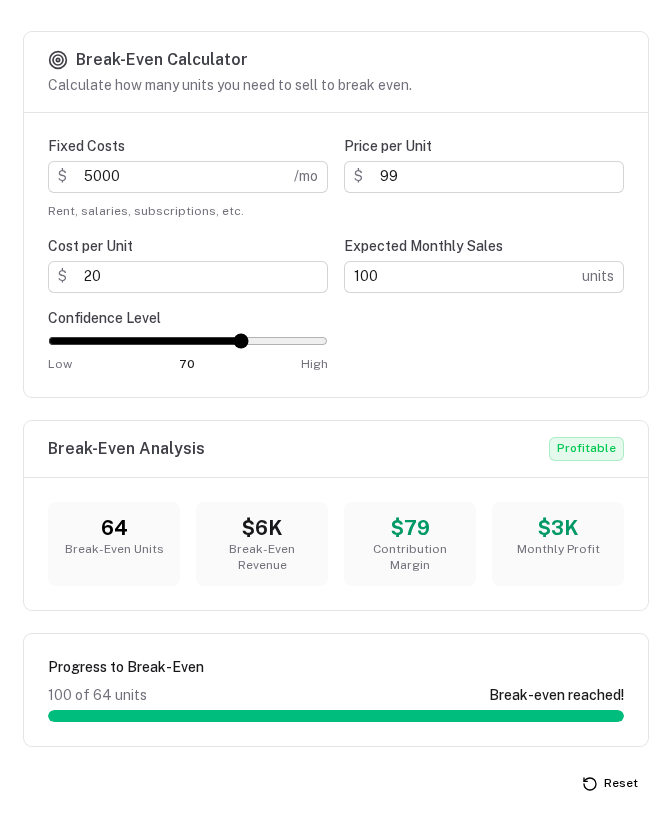
The main entry point component. Given a PrototypeSchema, it renders the complete tool UI: form, results, visualizations, collections, and action toolbar. All Y.js persistence is handled internally.
Props
| Prop | Type | Default | Description |
|---|---|---|---|
schema | PrototypeSchema | required | The tool schema object |
doc | Y.Doc | — | Pass an existing Y.Doc to share state with another component |
docKey | string | schema.key | Y.js document key — override to run multiple independent instances |
namespace | string | — | Namespace prefix for per-user / per-tenant isolation. Resulting key: proto:<namespace>:<docKey>. See Multi-tenant isolation. |
disableSync | boolean | false | Force local-only mode for this tool, regardless of the global protokit.serverSync config |
Basic usage
<template>
  <ClientOnly>
    <ProtoTool :schema="breakEvenSchema" />
  </ClientOnly>
</template>
Multiple instances of the same schema
<template>
  <!-- Two independent instances with separate storage -->
  <div class="grid grid-cols-2 gap-6">
    <ClientOnly>
      <ProtoTool :schema="breakEvenSchema" doc-key="break-even-optimistic" />
    </ClientOnly>
    <ClientOnly>
      <ProtoTool :schema="breakEvenSchema" doc-key="break-even-conservative" />
    </ClientOnly>
  </div>
</template>
Local-only / demo tools
Add disable-sync to suppress server sync for a specific tool, regardless of the global protokit.serverSync config. The tool still saves to the user's local IndexedDB — inputs survive page refresh. Only the server push is skipped.
<!-- Public demo — persists locally, never pushes to server -->
<ClientOnly>
  <ProtoTool :schema="demoSchema" disable-sync />
</ClientOnly>
This is the right choice for:
- Public marketing pages with embedded demo tools (you don't want every visitor's data on your server)
- Scratch pad tools that are intentionally ephemeral beyond the current browser
- Isolated test instances in development
Rendering logic
ProtoTool renders sections in this order:
- Form —
ProtoFormwith schema fields or sections - Results badge — from
schema.results.badge - Stats grid — from
schema.results.statsviaProtoStatGrid - Visualizations — one
ProtoVizper entry inschema.visualizations - Collections — one
ProtoCrudListper entry inschema.collections - Action toolbar —
ProtoActionBarifschema.actionsis defined - Reset button — if
showResetis true
If schema.layout is defined, ProtoTool delegates entirely to ProtoDashboard, which respects the custom tab/row/column layout.
Custom layout delegation
// When schema.layout is defined:
const mySchema = definePrototype({
  key: 'interviews',
  layout: {
    tabs: [
      { id: 'questions',  label: 'Questions',  … },
      { id: 'interviews', label: 'Interviews', … },
      { id: 'patterns',   label: 'Patterns',   … },
    ]
  },
  // rest of schema…
})
ProtoTool detects schema.layout and renders ProtoDashboard instead of the default sequential layout.
ClientOnly wrapper
Always wrap ProtoTool in <ClientOnly> — it uses IndexeddbPersistence which requires browser APIs. Provide a fallback skeleton:
<ClientOnly>
  <ProtoTool :schema="mySchema" />
  <template #fallback>
    <div class="space-y-4 animate-pulse">
      <div class="h-10 bg-muted rounded" />
      <div class="h-10 bg-muted rounded" />
      <div class="h-24 bg-muted rounded" />
    </div>
  </template>
</ClientOnly>
Using usePrototype for custom layout
If the built-in rendering doesn't fit your design, use usePrototype directly and compose your own UI:
<script setup lang="ts">
const props = defineProps<{ schema: PrototypeSchema }>()

const { state, derived, collections, computeContext, isReady, reset } =
  usePrototype(props.schema)

const badge = computed(() =>
  props.schema.results?.badge?.(computeContext.value))
</script>

<template>
  <ClientOnly>
    <div v-if="!isReady">Loading…</div>
    <template v-else>
      <!-- Completely custom layout -->
      <aside>
        <ProtoForm :schema="props.schema" :state="state" />
      </aside>
      <main>
        <UBadge v-if="badge" :color="badge.color">{{ badge.label }}</UBadge>
        <!-- Custom charts, tables, whatever -->
      </main>
    </template>
  </ClientOnly>
</template>
Overview
All globally registered components — ProtoTool, ProtoCrudModal, ProtoForm, ProtoDebugPanel, ProtoItemPanel variants, field components, and visualization components.
ProtoCrudModal
Modal editor for a single collection item with automatic draft persistence — unsaved changes survive tab switches and browser refreshes.