
Business Logic in Permission Guards
Business Logic in Permission Guards
Role guards answer the question who can do something. Business logic answers when something can be done. The two concerns are distinct, and nuxt-protokit keeps them that way deliberately — schema permissions handle roles, while Vue's computed() handles everything else.
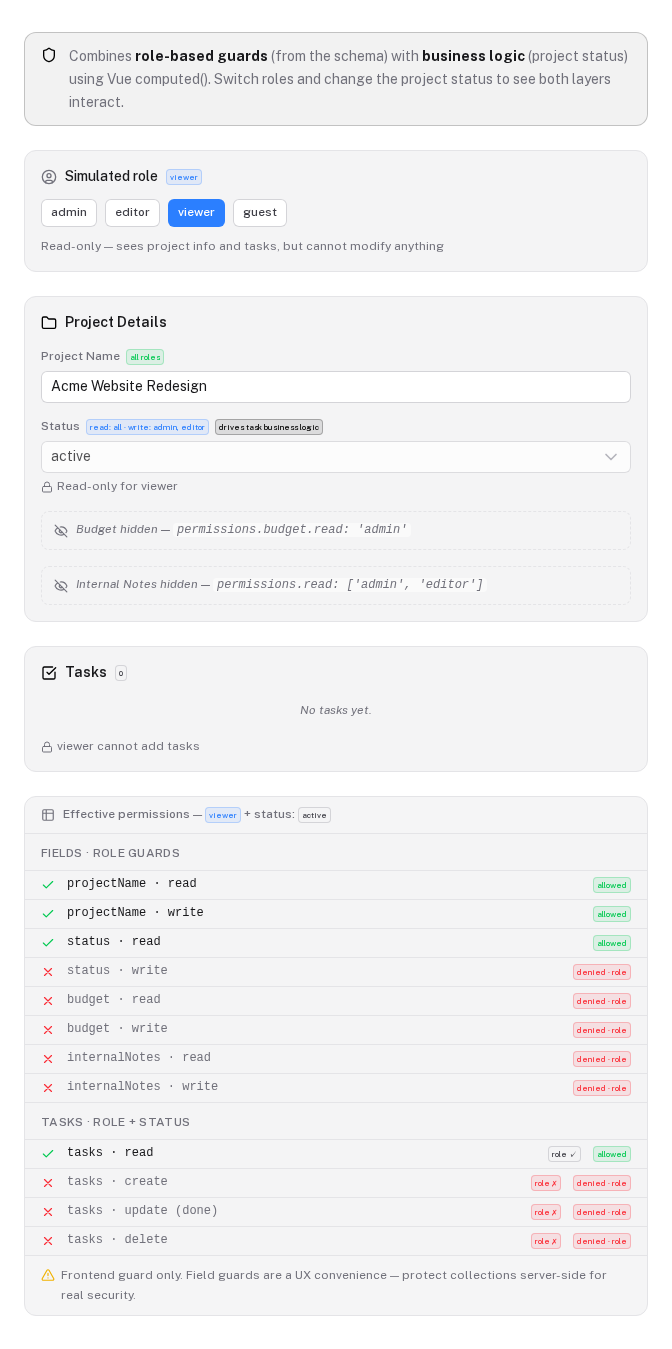
The two layers
When usePrototype or useProtoCollection returns collectionPermissions, each flag reflects only the role guard defined in the schema. That is intentional. Role guards belong in the schema because they are static rules that do not depend on the current document state.
collections: {
  tasks: {
    permissions: {
      read:   ['admin', 'editor', 'viewer'],
      create: ['admin', 'editor'],
      update: ['admin', 'editor'],
      delete: 'admin',
    },
  },
}
Business logic — "tasks cannot be modified once the project is completed" — is a separate concern. It depends on a runtime value (state.status), which changes while the user interacts with the app. Putting runtime state into a static schema definition couples two things that should stay apart.
The solution is to compose a new set of reactive flags on top of the schema-derived ones.
The computed composition pattern
After calling usePrototype, wrap the schema permissions with computed() calls that add your business rules. Both layers are Vue ComputedRef<boolean> values, so they compose naturally.
const { state, collections, collectionPermissions } = usePrototype(schema)

// Schema-derived (role only)
const roleTaskPerms = collectionPermissions.tasks

// Effective permissions — role AND status must both allow the action
const taskPerms = {
  canRead: roleTaskPerms.canRead,
  canCreate: computed(() =>
    roleTaskPerms.canCreate.value && state.status.value !== 'completed',
  ),
  canUpdate: computed(() =>
    roleTaskPerms.canUpdate.value && state.status.value === 'active',
  ),
  canDelete: computed(() =>
    roleTaskPerms.canDelete.value && state.status.value === 'active',
  ),
}
You can now use taskPerms exactly like collectionPermissions.tasks in your template. When the project status changes, every dependent binding updates automatically — no watchers, no event buses, no manual synchronisation.
<UCheckbox
  :model-value="task.done"
  :disabled="!taskPerms.canUpdate.value"
  @update:model-value="tasks.update(i, { done: $event })"
/>
Communicating why access is denied
Distinguishing why an action is blocked helps users understand what to do next. A user who lacks the right role needs to contact an administrator. A user who lacks the right project status needs to change the status first. Keep the two reasons separate in your UI.
// Tells the template the status-level reason, regardless of role
const statusLockReason = computed<string | null>(() => {
  if (state.status.value === 'completed') return 'Project completed — tasks are frozen'
  if (state.status.value === 'paused')    return 'Project paused — tasks are read-only'
  return null
})
<div v-if="statusLockReason" class="warning-banner">
  {{ statusLockReason }}
</div>

<p v-else-if="!taskPerms.canCreate.value">
  Your role does not allow adding tasks.
</p>
More patterns
Owner-only editing
A user can always edit their own items, but only admins can edit items belonging to others.
const { session } = useAuth()

function canEditItem(item: { ownerId: string }) {
  return computed(() =>
    collectionPermissions.entries.canUpdate.value
    && (item.ownerId === session.value?.userId || session.value?.role === 'admin'),
  )
}
Call canEditItem(item) per row in a v-for loop to get a per-item computed flag.
ownerId lives in the Y.js document. A user can overwrite it via devtools before triggering an edit, making the check trivially bypassable. If ownership matters for data integrity, validate it server-side on every write.Quota-based creation
Prevent new items from being added once a limit is reached, regardless of role.
const MAX_ENTRIES = 10
const entries = collections.entries

const canAddEntry = computed(() =>
  collectionPermissions.entries.canCreate.value
  && entries.count.value < MAX_ENTRIES,
)

const addEntryReason = computed(() => {
  if (!collectionPermissions.entries.canCreate.value) return 'Insufficient role'
  if (entries.count.value >= MAX_ENTRIES) return `Limit of ${MAX_ENTRIES} reached`
  return null
})
entries.count is derived from the Y.Array in the browser. A user can insert items directly into the array, bypassing the quota check entirely. Enforce quotas server-side if they carry real business weight.Multi-field condition
Lock a field once a dependent field reaches a terminal state. Here, the invoiceNumber field becomes read-only after the invoice is marked as paid.
const canEditInvoiceNumber = computed(() =>
  fieldPermissions.invoiceNumber.canWrite.value
  && state.paymentStatus.value !== 'paid',
)
<UInput
  v-model="state.invoiceNumber.value"
  :disabled="!canEditInvoiceNumber.value"
/>
Using function guards in the schema
For simpler cases where the business condition does not depend on document state but on a value available at schema-definition time, a function guard works well. The guard runs inside a Vue computed(), so any reactive value it closes over will trigger re-evaluation.
// A ref that exists before the schema is defined
const featureEnabled = useFeatureFlag('advanced-editing')

const schema = definePrototype({
  collections: {
    tasks: {
      permissions: {
        // Combines role check and a feature-flag check in one guard
        update: (ctx) =>
          ['admin', 'editor'].some(r => ctx.roles.includes(r))
          && featureEnabled.value,
      },
    },
  },
})
featureEnabled) to be defined before the schema object. It does not work for values that come from usePrototype itself, since the schema must exist before the composable is called.When you need to combine roles with document state (values from state.*), always use the computed composition pattern described above. Function guards cannot reference values that do not yet exist at the time the schema object is constructed.
Limitations
All of the patterns described in this document are UI guards. None of them prevent a determined user from writing directly to the Y.js document.
The condition itself can be modified
This is the critical difference between business logic guards and role guards. A role guard checks a value that comes from outside the document (a session token, a JWT claim). A business logic guard typically checks a value that lives inside the document — the project status, an item's owner field, the array length.
A user who wants to bypass a status check does not need to understand Vue or the permission system at all. They only need to modify the document value that the guard reads — state.status in this case — before performing the operation. The computed flag recalculates immediately, and the UI allows the action.
In production, Vue DevTools are disabled and bundled module internals are not directly accessible from the console. The document is however persisted in IndexedDB under the key proto:<docKey>, which any user can inspect via the browser's Application tab. The stored data is Y.js binary — not human-readable and not editable through the DevTools UI — but a developer who loads the Y.js library from a CDN, reads the IndexedDB updates, constructs a valid CRDT update, and writes it back can modify any field. That is meaningful technical effort, but it is feasible for someone with the motivation.
What this means in practice
Business logic guards are appropriate for:
- Preventing accidental edits — a "completed" badge that greys out the task list stops most users from making unintended changes.
- Improving UX clarity — hiding controls that do not apply in the current state reduces noise and confusion.
- Encoding workflow expectations — making the intended flow obvious through the interface.
They are not appropriate for:
- Preventing deliberate modifications by a motivated user.
- Enforcing data integrity rules that carry legal, financial, or security consequences.
- Any check where the consequence of bypass is data corruption or unauthorised access.
Enforcing business rules server-side
nuxt-protokit ships client-side only. The server sync endpoint (/api/yjs/sync by default) is implemented by you. After every local change, useProtoDoc debounces and POSTs the full document state to that endpoint:
POST /api/yjs/sync
{
  docKey: "proto:my-project",
  docType: "custom",
  updates: [{ update: "<base64-encoded Y.js state>", timestamp: 1234567890 }],
  clientId: "proto-abc123"
}
The update field is Y.encodeStateAsUpdate(doc) — the entire document encoded as base64, not a per-field diff.
Why rejecting the push does not work
The natural instinct is to return a 403 when a rule is violated. This does not work with the current sync design. pushDocToServer wraps every request in a catch {} that swallows all errors silently (designed for offline resilience — the push should never crash the app). A rejected push is invisible to the client. The local IndexedDB and in-memory Y.Doc remain in the invalid state, and the next debounced push 30 seconds later retries with the same content.
Pull-based reconciliation
The correct approach for this architecture is to accept the push, then correct it. The server applies a compensating Y.js update that enforces the rule, stores the corrected state, and returns it on the next pull. The client reconciles automatically when it calls pullFromServer — which happens on every fresh page load.
import * as Y from 'yjs'

export default defineEventHandler(async (event) => {
  const { docKey, updates } = await readBody(event)

  // Load previously stored state (your database implementation)
  const stored = await db.yjsDocuments.findUnique({ where: { key: docKey } })

  // Build a doc from stored state, then apply the incoming update
  const doc = new Y.Doc()
  if (stored?.data) Y.applyUpdate(doc, Buffer.from(stored.data))

  const incoming = Buffer.from(updates[0].update, 'base64')
  Y.applyUpdate(doc, incoming)

  // Check and enforce business rules against the merged state
  const bare = docKey.replace(/^proto:/, '')
  const map = doc.getMap(bare)

  if (stored?.data) {
    // Revert any changes if the previously-stored project was already completed.
    // Re-apply only the last known-good state so the stored record stays correct.
    const previousDoc = new Y.Doc()
    Y.applyUpdate(previousDoc, Buffer.from(stored.data))
    const previousStatus = previousDoc.getMap(bare).get('status')
    previousDoc.destroy()

    if (previousStatus === 'completed') {
      // Discard the incoming changes — persist the stored state unchanged
      doc.destroy()
      return { success: true, corrected: true }
    }
  }

  // Persist the accepted state
  const finalState = Y.encodeStateAsUpdate(doc)
  await db.yjsDocuments.upsert({
    where: { key: docKey },
    update: { data: Buffer.from(finalState) },
    create: { key: docKey, data: Buffer.from(finalState) },
  })
  doc.destroy()

  return { success: true }
})
The client will reconcile on the next pull (page reload or tab focus). Until then there is a window where the local state is technically invalid — this is the inherent trade-off of local-first architecture.
Immediate feedback via a separate lock endpoint
If you need the UI to reflect the locked state promptly rather than waiting for a pull cycle, add a lightweight REST endpoint alongside the Y.js sync:
export default defineEventHandler(async (event) => {
  const project = await db.projects.findUnique({
    where: { id: getRouterParam(event, 'id') },
    select: { status: true },
  })
  return { editable: project?.status !== 'completed' }
})
Poll this from the client on mount and whenever a relevant event occurs (e.g. another user completes the project). Use the result to lock the entire UI independently of the Y.js permission layer:
const { data: lock } = await useFetch(`/api/projects/${id}/editable`)
const isEditable = computed(() => lock.value?.editable ?? true)
This gives you a server-authoritative lock signal that the UI respects immediately, while the Y.js layer continues to handle persistence and sync. The two concerns stay separate: Y.js owns the data, the REST endpoint owns the access decision.
Choosing the right approach
| Condition source | Approach |
|---|---|
| User role only | Schema permissions guard (string or string) |
| Role + external flag (feature toggle, config) | Function guard as closure in schema |
Role + document state (state.*, collections.*) | Computed composition after usePrototype |
Per-item conditions (item.ownerId === currentUser) | Per-item computed in template logic |
The schema handles static identity rules. computed() handles everything dynamic.
Permissions
Control collection and field visibility with role-based permission guards. Understand what is enforced in the UI, what requires server-side protection, and how to wire up your own role resolver.
Headless Mode
Use protokit as a pure storage layer — Y.js IndexedDB persistence, BroadcastChannel tab sync, schema migrations, and optional server sync — without rendering any built-in components.