
Quick Start
Quick Start
This guide builds a resource cost estimator from scratch. By the end you have a fully working tool with reactive computed results and automatic IndexedDB persistence — in about 30 lines of schema code.
Step 1: Add the module
npm install @websideproject/nuxt-protokit yjs y-indexeddb @nuxt/ui tailwindcss
export default defineNuxtConfig({
  modules: ['@nuxt/ui', '@websideproject/nuxt-protokit'],
  css: ['~/assets/css/main.css'],

  protokit: {
    serverSync: false, // local only — no HTTP requests
    // serverSync: true,                    // default: push to /api/yjs for server backups
    // serverSync: { baseUrl: '/api/yjs' }, // custom server base URL
  },
})
The components are styled with Tailwind classes, so Tailwind has to scan the module. Add one @source line to your
stylesheet (the path is relative to the CSS file):
@import "tailwindcss";
@import "@nuxt/ui";

@source "../../../node_modules/@websideproject/nuxt-protokit";
serverSync defaults to true: the client pushes snapshots to a backend that implements the Y.js sync endpoints. Without one the requests fail silently and IndexedDB still works; serverSync: false skips them entirely.Protokit's components are styled with Tailwind utilities, and Tailwind v4 only generates the classes it
finds by scanning. It skips node_modules, so add protokit to your app's Tailwind entry (the CSS file
that imports @nuxt/ui), with the path relative to that file:
@import "tailwindcss";
@import "@nuxt/ui";

@source "../../../node_modules/@websideproject/nuxt-protokit/dist";
Without it, anything protokit uses that your own app does not (the calendar's grid placement, for one)
renders unstyled. Protokit needs @nuxt/ui 4.5 or later.
Step 2: Define the schema
Create a schema file anywhere in your project:
import { formatMoney } from '#protokit/utils/formatters'

export const resourceEstimator = definePrototype({
  key: 'resource-estimator-v1', // unique — also the IndexedDB key
  title: 'Resource Cost Estimator',
  shortTitle: 'Estimator',
  description: 'Estimate total project cost from team size, salaries and duration.',
  icon: 'i-lucide-calculator',

  fields: {
    teamSize: { type: 'number', label: 'Team Size', default: 3, trailing: 'people' },
    avgMonthlySalary: { type: 'number', label: 'Avg. Monthly Salary', default: 4500, leading: '$' },
    toolingCosts: { type: 'number', label: 'Monthly Tooling Budget', default: 300, leading: '$' },
    projectDurationMonths: { type: 'range', label: 'Project Duration (months)', min: 1, max: 24, step: 1, default: 6 },
    overheadPercent: { type: 'range', label: 'Overhead / Benefits (%)', min: 0, max: 60, step: 5, default: 25 },
  },

  derived: {
    monthlySalaryCost: {
      compute: ({ fields }) => fields.teamSize * fields.avgMonthlySalary,
      format: 'money',
    },
    monthlyOverhead: {
      compute: ({ fields, derived }) => derived.monthlySalaryCost * (fields.overheadPercent / 100),
      format: 'money',
    },
    monthlyTotal: {
      compute: ({ fields, derived }) => derived.monthlySalaryCost + derived.monthlyOverhead + fields.toolingCosts,
      format: 'money',
    },
    projectTotal: {
      compute: ({ fields, derived }) => derived.monthlyTotal * fields.projectDurationMonths,
      format: 'money',
    },
  },

  results: [
    {
      title: 'Cost Summary',
      statCols: 4,
      badge: ({ derived }) => {
        const cost = derived.projectTotal
        if (cost < 50_000) return { label: 'Small Project', color: 'primary' }
        if (cost < 200_000) return { label: 'Medium Project', color: 'warning' }
        return { label: 'Large Project', color: 'error' }
      },
      stats: ({ derived }) => [
        { label: 'Monthly People Cost', value: formatMoney(derived.monthlySalaryCost) },
        { label: 'Monthly Overhead', value: formatMoney(derived.monthlyOverhead) },
        { label: 'Monthly Total', value: formatMoney(derived.monthlyTotal) },
        { label: 'Project Total', value: formatMoney(derived.projectTotal) },
      ],
    },
  ],

  visualizations: [
    {
      type: 'bar-chart',
      title: 'Monthly Cost Breakdown',
      config: {
        type: 'bar-chart',
        data: ({ fields, derived }) => [
          { label: 'Salaries', value: derived.monthlySalaryCost },
          { label: 'Overhead', value: derived.monthlyOverhead },
          { label: 'Tooling', value: fields.toolingCosts },
        ],
        unit: '$',
      },
    },
  ],
})
definePrototype is a no-op identity function — it exists only for TypeScript inference. You can omit it and use a plain object if you prefer.Step 3: Render it
<script setup lang="ts">
import { resourceEstimator } from '~/schemas/resourceEstimator'
</script>

<template>
  <div class="max-w-2xl mx-auto p-6">
    <ClientOnly>
      <ProtoTool :schema="resourceEstimator" />
      <template #fallback>
        <div class="animate-pulse space-y-4">
          <div class="h-10 bg-muted rounded" />
          <div class="h-10 bg-muted rounded" />
        </div>
      </template>
    </ClientOnly>
  </div>
</template>
Step 4: See it work
npm run dev
Visit /estimator. Adjust the sliders. The derived values update instantly. Refresh the page — your values are still there, loaded from IndexedDB. No server call was needed to save them.
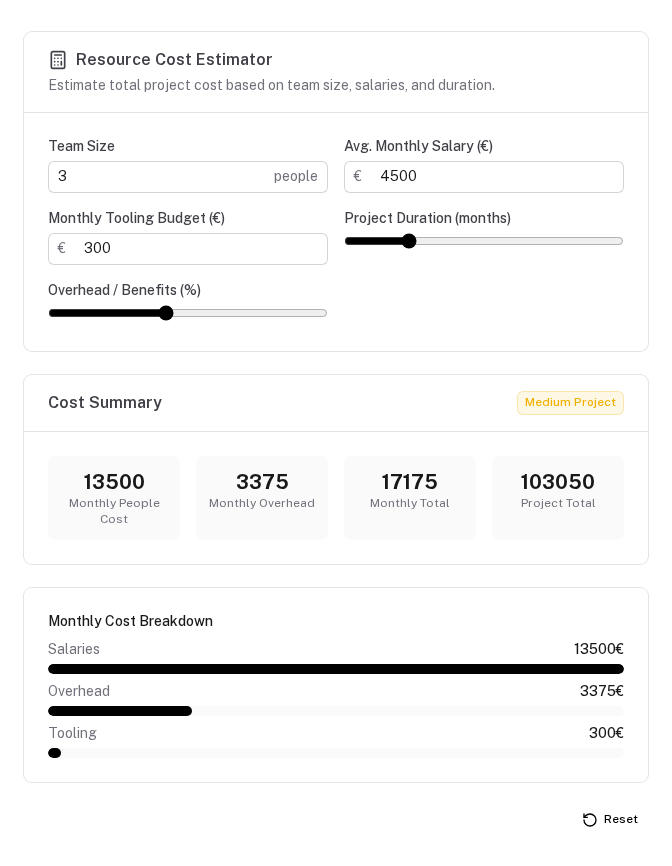
What you got for free
| Feature | Source in schema |
|---|---|
| Form with labels and default values | fields |
| Range sliders for duration and overhead | type: 'range' fields |
| Reactive computed totals | derived |
| Project size badge | results[].badge |
| Four stat cards below the form | results[].stats |
| Bar chart of monthly breakdown | visualizations |
| IndexedDB persistence (survives refresh) | Automatic via Y.js |
| Server backups | When protokit.serverSync is enabled and a backend implements the sync endpoints |
| Corruption recovery modal | Automatic via useProtoDoc |
Multiple independent instances
Provide a custom doc-key to run multiple instances of the same schema with separate storage:
<ClientOnly>
  <ProtoTool :schema="resourceEstimator" doc-key="estimator-project-a" />
</ClientOnly>
<ClientOnly>
  <ProtoTool :schema="resourceEstimator" doc-key="estimator-project-b" />
</ClientOnly>
Local-only / demo tools
Add disable-sync to any tool that should never push to the server — regardless of the global config. Useful for public demo pages where you don't want to accumulate server snapshots per visitor:
<ClientOnly>
  <ProtoTool :schema="resourceEstimator" disable-sync />
</ClientOnly>
The tool still saves to the user's local IndexedDB — inputs survive page refresh. Only the server push is suppressed.
Next steps
- Schema reference → — all field types, collection options, derived formatting
- Offline-first → — how Y.js + IndexedDB work and what survives what
- Composables → — use
usePrototypedirectly for custom rendering
Core Concepts
The mental model behind protokit — schemas, Y.js documents, the produces/consumes data graph, and how everything connects.
Overview
The PrototypeSchema type controls every aspect of a tool — its fields, derived values, collections, results, visualizations, and layout.