
Corruption Recovery
Corruption Recovery
IndexedDB corruption is rare but real. Browser crashes mid-write, certain browser extensions, and disk-level errors can leave a y-indexeddb store in an inconsistent state. protokit detects this automatically and provides a guided recovery flow.
The error signature
The canonical sign of y-indexeddb corruption is an unhandled promise rejection with the message "Unexpected case". It surfaces when IndexeddbPersistence tries to load stored updates but finds an unexpected internal structure.
This error cannot be caught at the call site — it appears as an unhandled rejection. useProtoDoc intercepts it via:
window.addEventListener('unhandledrejection', (event) => {
  if (event.reason?.message?.includes('Unexpected case')) {
    handleCorruption(docKey)
  }
})
Recovery flow
IndexedDB corruption detected
        │
        ▼
Query GET /api/yjs/snapshots/{docKey}
        │
        ├── Snapshot found ─────────────────────────────►
        │                                                │
        │                                   ProtoCorruptionModal:
        │                                   "Restore from server backup"
        │                                   (shows snapshot age)
        │                                                │
        │              ┌──────────────────────────────────┘
        │              │
        │      User clicks "Restore"
        │              │
        │              ▼
        │    POST /api/yjs/snapshots/restore
        │    GET  /api/yjs/pull  (all updates)
        │    Apply to fresh in-memory Y.Doc
        │    Delete corrupted IndexedDB store
        │    Create fresh IndexedDB from in-memory doc
        │
        └── No snapshot ──────────────────────────────►
                                                       │
                                          ProtoCorruptionModal:
                                          "Start fresh"
                                                       │
                                          User clicks "Start Fresh"
                                                       │
                                          Delete corrupted IndexedDB
                                          Create empty IndexedDB
ProtoCorruptionModal
A non-dismissible modal that appears over the full page when corruption is detected. The user must choose an action before continuing.
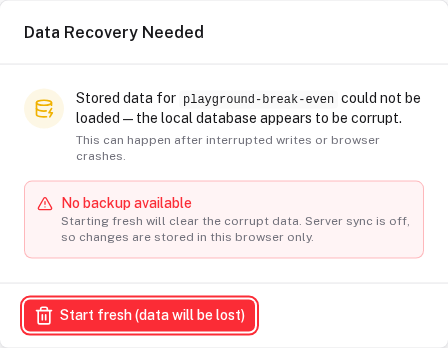
Register it once in app.vue:
<!-- app.vue -->
<template>
  <NuxtPage />
  <ProtoCorruptionModal />
</template>
The modal displays:
- Which document is affected (tool name or doc key)
- Whether a server snapshot exists and how old it is
- Two options: Restore from server backup or Start fresh
If no server snapshot exists, only "Start fresh" is shown.
useProtoCorruption
The corruption system uses a module-level singleton queue to decouple detection (in useProtoDoc) from display (in ProtoCorruptionModal):
interface CorruptionEvent {
  id:                  string        // UUID for this event
  fullKey:             string        // Y.js doc key, e.g. 'proto:saaskit-idea-abc123'
  displayName:         string        // name shown in the modal
  latestSnapshotId:    string | null // null if no server snapshot exists
  latestSnapshotAge:   number | null // milliseconds since the snapshot was taken
  latestSnapshotLabel: string | null // human-readable label
  syncEnabled:         boolean       // server sync on for this doc — the modal only promises backups when it is
  reason:              string        // raw error message
}
Internal flow:
// In useProtoDoc — called on "Unexpected case" detection:
const action = await reportCorruption({
  fullKey,
  displayName: docKey,
  latestSnapshotId,     // from GET <syncBase>/snapshots/:key, only when sync is on
  latestSnapshotAge,
  latestSnapshotLabel,
  syncEnabled,
  reason: msg,
})
// reportCorruption returns a Promise that resolves with 'restore' or 'fresh' when the user chooses

// ProtoCorruptionModal calls internally:
resolveCorruption(eventId, 'restore')  // or 'fresh'
You should not need to call these functions directly — useProtoDoc and ProtoCorruptionModal handle the complete flow.
Server snapshot storage
The yjs-sync module stores two representations for each snapshot:
| Format | Purpose |
|---|---|
| Binary Y.js updates | CRDT-correct restore — exact document state reconstruction |
| JSON | Human-readable, shown in ProtoDebugPanel, used for deduplication |
Snapshots are deduplicated server-side — if the document content has not changed since the last snapshot, a new snapshot is not created.
Snapshots are created:
- After every successful server sync (30-second debounce in
useProtoDoc) - Manually from
ProtoDebugPanelduring development
ProtoDebugPanel
Enable in development to inspect sync state and test recovery:
<ClientOnly>
  <ProtoTool :schema="mySchema" :show-debug="true" />
</ClientOnly>
The panel (triggered by a fixed tab on the viewport edge) lets you:
- View all active docs and their sync status
- Copy the full doc state as JSON
- Create a manual server snapshot
- Inject garbage into the Y.Doc to simulate corruption
- Delete the local IndexedDB store to test cold restore from server
When recovery cannot restore data
Recovery from a server backup requires both:
- A compatible sync backend is available and reachable (the
yjs-synccompanion module, or a custom implementation) - At least one server sync has completed for that document
If neither condition is met — for example, the tool was used entirely offline from first open — the modal shows only "Start fresh". The local data from that session is unrecoverable.
Mitigation: Encourage users to work online at least once after creating significant data. The 30-second debounce means that after 30 seconds of connectivity, a snapshot almost certainly exists.
False positives
The "Unexpected case" rejection can occasionally fire spuriously during very fast component mount/unmount cycles. useProtoDoc applies a short debounce and verifies the doc is genuinely unreadable before showing the modal to the user.
Offline First
How protokit works completely offline using Y.js CRDTs and IndexedDB, with automatic conflict-free sync when connectivity is restored.
Size & GC
How Y.js documents grow over time, how garbage collection compacts them, and what to expect for real-world prototyping workloads.