
Custom Fields & Viz Types
Custom Fields & Viz Types
nuxt-protokit's built-in field and visualization types cover the most common use cases, but sometimes you need something the module does not ship — a rich text editor, a date range picker, a specialized chart. The extensibility system lets you register custom components without forking or patching the module.
Namespace convention
All extension types use a namespace:name format:
- Built-in types use bare names:
number,text,progress,bar-chart - Extension types must use the colon-separated format:
myapp:rich-text,charts:heatmap
TypeScript enforces this at compile time via a \${string}:${string}`` template literal type — using a bare name for a custom field is a type error.
Reserved namespaces: proto, protokit, nuxt, vue
defineProtokitExtension()
Creates a typed extension bundle. Pass it a namespace, an optional fields map, and an optional vizTypes map:
import MyRichText from '~/components/MyRichText.vue'

const ext = defineProtokitExtension({
  namespace: 'myapp',
  fields: {
    // Registered as 'myapp:rich-text'
    'rich-text': { component: MyRichText },

    // Async (lazy-loaded on first use)
    'date-range': { component: () => import('~/components/MyDateRange.vue') },
  },
  vizTypes: {
    // Registered as 'myapp:heatmap'
    heatmap: { component: () => import('~/components/MyHeatmap.vue') },
  },
})
Keys inside fields and vizTypes are the short names — the namespace is prepended automatically.
useProtoExtensionRegistry()
Call registerExtension to make the extension available to ProtoForm and ProtoViz:
// plugins/extensions.ts
export default defineNuxtPlugin(() => {
  const ext = defineProtokitExtension({ namespace: 'myapp', fields: { ... } })
  const { registerExtension } = useProtoExtensionRegistry()
  registerExtension(ext)
})
The registry is module-level — all composable calls share the same maps. Registering in a plugin guarantees it runs once before any component renders.
Using extension types in a schema
definePrototype({
  key: 'my-tool',
  fields: {
    body: {
      type: 'myapp:rich-text',   // namespaced — TypeScript accepts this
      label: 'Content',
      default: '',
      props: {
        // Keys from props are passed verbatim as component props
        toolbar: ['bold', 'italic', 'link'],
        minHeight: 200,
      },
    },
    dates: {
      type: 'myapp:date-range',
      label: 'Active Period',
      default: null,
    },
  },
  visualizations: [
    {
      type: 'myapp:heatmap',
      title: 'Activity Heatmap',
      config: {
        // config is passed as a :config prop to the viz component
        weeks: 16,
        data: (ctx) => ctx.derived.activityData,
      },
    },
  ],
})
Custom field component interface
A custom field component receives modelValue / onUpdate:modelValue for v-model, plus any keys from props in the field definition:
<!-- components/MyRichText.vue -->
<script setup lang="ts">
defineProps<{
  modelValue: string
  toolbar?: string[]
  minHeight?: number
}>()

const emit = defineEmits<{ 'update:modelValue': [value: string] }>()
</script>

<template>
  <!-- your editor here -->
</template>
Custom viz component interface
A custom viz component receives config (the config object from the schema) and context (the full ComputeContext):
<!-- components/MyHeatmap.vue -->
<script setup lang="ts">
import type { ComputeContext } from '@websideproject/nuxt-protokit'

defineProps<{
  config: Record<string, any>
  context: ComputeContext
}>()
</script>

<template>
  <!-- your chart here, driven by config and context -->
</template>
protokit:register-extension hook
Nuxt module authors who ship companion extension packages can use this hook to add component and import directories at build time, without requiring users to manually configure anything:
// modules/my-charts/index.ts
import { defineNuxtModule, addComponentsDir, addImportsDir, createResolver } from '@nuxt/kit'

export default defineNuxtModule({
  meta: { name: 'my-charts' },
  setup(_options, nuxt) {
    const resolver = createResolver(import.meta.url)

    nuxt.hook('protokit:register-extension', ({ addComponentsDir, addImportsDir }) => {
      // These dirs are registered via nuxt-protokit's own setup,
      // so components are available globally and composables are auto-imported.
      addComponentsDir(resolver.resolve('./runtime/components'))
      addImportsDir(resolver.resolve('./runtime/composables'))
    })
  },
})
Users of your companion module can then use namespace:name types in their schemas with zero extra configuration.
Full example
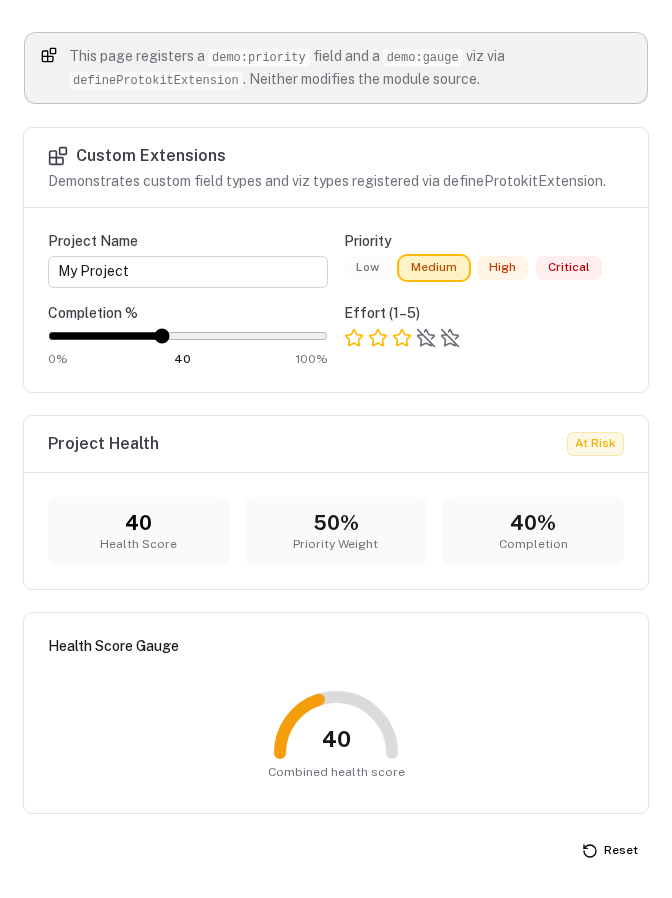
The playground includes a working demo at /custom-extensions that registers a demo:priority field (a colored priority selector) and a demo:gauge viz (an SVG gauge chart) entirely at the page level — no plugin, no module config.
// pages/custom-extensions.vue
import CustomPriorityField from '~/components/CustomPriorityField.vue'
import CustomGaugeViz from '~/components/CustomGaugeViz.vue'

const ext = defineProtokitExtension({
  namespace: 'demo',
  fields: {
    priority: { component: CustomPriorityField },
  },
  vizTypes: {
    gauge: { component: CustomGaugeViz },
  },
})

const { registerExtension } = useProtoExtensionRegistry()
registerExtension(ext)

const schema: PrototypeSchema = {
  fields: {
    priority: {
      type: 'demo:priority',   // custom field
      label: 'Priority',
      default: 'medium',
      props: { options: ['low', 'medium', 'high', 'critical'] },
    },
  },
  visualizations: [
    {
      type: 'demo:gauge',      // custom viz
      title: 'Health Score',
      config: { value: (ctx) => ctx.derived.healthScore, max: 100 },
    },
  ],
}
Schema Patterns
Real-world schema patterns — multi-threshold badges, null-safe connections, collection-driven charts, linked question responses, tab layouts with badges, and action toolbars.
Permissions
Control collection and field visibility with role-based permission guards. Understand what is enforced in the UI, what requires server-side protection, and how to wire up your own role resolver.