
Encryption at Rest
Encryption at Rest
By default, Y.js updates are stored in IndexedDB as raw binary. Anyone with access to the browser's DevTools or the underlying SQLite file on disk can read the data. For sensitive use cases — health records, financial data, confidential planning — you can enable AES-GCM encryption so the stored blobs are unreadable without the key.
How it works
When encryption is enabled, protokit replaces the standard y-indexeddb persistence with a custom EncryptedIdbPersistence that:
- Opens its own IndexedDB database (key prefix:
proto:enc:instead ofproto:) - Encrypts each Y.js update with AES-GCM (256-bit) before writing — format:
[IV (12 bytes)][ciphertext] - On load, reads all stored blobs, decrypts them, and applies them to the in-memory Y.Doc
- After 50 stored updates, compacts to a single full-state snapshot to prevent unbounded growth
Key derivation (when a password is supplied): PBKDF2 with 100 000 iterations, SHA-256, and a random 16-byte salt. The salt is stored in the IDB meta store — it is not secret, it prevents pre-computation attacks.
Basic usage
With a password
// Composable
const { state } = usePrototype(schema, {
  encryption: { password: userPassword },
})
<!-- Component — password-string prop only (use composable for CryptoKey) -->
<ProtoTool :schema="schema" :encryption-password="userPassword" />
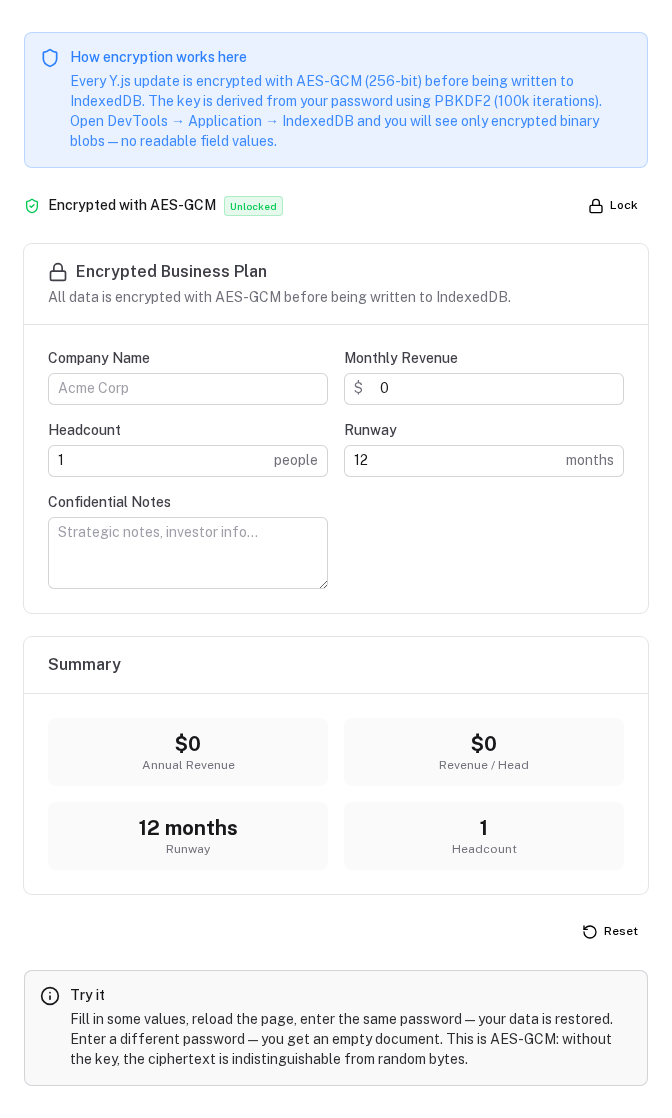
The password is derived into a key on first open. The salt is stored in the IDB so the same password always produces the same key for that document.
With a pre-derived CryptoKey
Use this when your app manages key derivation externally — for example, a key wrapped by a server-issued token, a hardware key, or WebAuthn.
import { deriveKey, generateSalt } from '#protokit/utils/encryption'

// Derive once (or load from secure key store)
const salt = generateSalt()  // store this alongside your user record
const key = await deriveKey(userPassword, salt)

const { state } = usePrototype(schema, {
  encryption: { key },
})
importRawKey(bytes) is also exported if you receive a raw 256-bit key from your backend.
Security properties
| Property | Detail |
|---|---|
| Algorithm | AES-GCM 256-bit (authenticated encryption) |
| Key derivation | PBKDF2, 100 000 iterations, SHA-256 |
| IV | 12 bytes, random per update — same plaintext encrypts differently every time |
| Authentication | GCM tag verifies integrity — tampered ciphertext throws, not silently corrupts |
| Salt | 16 bytes random, stored in IDB meta store (not secret) |
Important limitations
Server sync sends unencrypted data
When serverSync is enabled, the server push (POST /api/yjs/sync) sends the raw in-memory Y.Doc state — not the encrypted blobs. Encryption is a local-at-rest measure only.
For true end-to-end encryption where the server never sees plaintext, combine with disableSync: true:
usePrototype(schema, {
  encryption: { password: userPassword },
  disableSync: true,  // never push to server — local-only
})
Losing the key means losing the data
There is no recovery path. If a user forgets their password, the encrypted IDB is unreadable. Design your UX accordingly — consider a recovery key or server-side key escrow if data recovery matters.
Changing encryption settings starts fresh
Encrypted and unencrypted stores use different IDB keys (proto:enc: vs proto:). Switching a document from unencrypted to encrypted (or vice versa) opens a blank document — the old store is untouched but no longer used.
No corruption recovery modal when encrypted
The corruption recovery flow (which detects y-indexeddb Unexpected case rejections) does not apply to the encrypted path. If an encrypted IDB becomes corrupt, the document loads empty. Server sync + snapshots are the recommended backup strategy in that scenario.
Combining encryption with namespace isolation
Both options compose naturally. The resulting IDB key is proto:enc:<namespace>:<schema.key>:
usePrototype(schema, {
  namespace: `${tenantId}:${userId}`,
  encryption: { password: userPassword },
})
Cleanup via clearProtoNamespace and clearProtoKeys handles both proto: and proto:enc: stores automatically.
Exported utilities
The encryption primitives are imported explicitly (they are not auto-imported):
import { generateSalt, deriveKey, importRawKey, encryptBytes, decryptBytes } from '#protokit/utils/encryption'

// Key derivation
const salt = generateSalt()                          // 16 random bytes
const key  = await deriveKey(password, salt)         // PBKDF2 → CryptoKey
const key  = await importRawKey(bytes)               // 32-byte buffer → CryptoKey

// Encryption / decryption (low-level — use EncryptedIdbPersistence for persistence)
const blob  = await encryptBytes(key, uint8Array)    // AES-GCM encrypt
const plain = await decryptBytes(key, arrayBuffer)   // AES-GCM decrypt (throws if wrong key)
EncryptedIdbPersistence is also exported if you need to manage persistence directly outside of useProtoDoc.
When to use encryption
| Scenario | Recommendation |
|---|---|
| Internal tool, company devices | Not needed — namespace isolation is sufficient |
| SaaS, user-owned devices, non-sensitive data | Not needed |
| Financial / health / legal data on shared devices | Enable encryption |
| Compliance requirement (HIPAA, GDPR sensitive data) | Enable encryption + disableSync: true |
| Public kiosk / untrusted device | Encryption + namespace + clearProtoNamespace on session end |
Multi-tenant Isolation
How to scope Y.js documents per user, tenant, or workspace — and how to clean up IndexedDB on logout.
Overview
Advanced patterns for Nuxt Protokit — reusable toolkits, schema patterns, extensibility, permission guards and headless mode.