
Plugin Catalog
Plugin Catalog
This document lists all shipped plugins for @websideproject/nuxt-auto-api.
See Plugin System for how plugins work and how to create your own.
Pipeline Capabilities Reference
Before reading the plugin list, understand what the plugin system can do:
| Capability | How | Notes |
|---|---|---|
| Modify data before write | beforeCreate/beforeUpdate return modified data | Works |
| Block an operation | Throw from any middleware or before-hook | Works |
| Side effects after mutation | afterCreate/afterUpdate/afterDelete hooks | Works |
| Enrich request context | extendContext() — adds data to HandlerContext | Runs once per request |
| Access database | context.db (full Drizzle instance) in any hook/middleware | No transaction control across hooks |
| Add new endpoints | buildSetup → addServerHandler() | Build-time only |
| Modify response data | Return values from afterGet/afterList/afterCreate/afterUpdate hooks | Hooks returning undefined are side-effect only (backward compatible) |
| Modify list query/filters | Push SQL conditions into context.additionalFilters in beforeList or middleware | List handler merges with and() |
| Short-circuit with cached data | Set context.shortCircuit = { data } in pre-execute middleware | Skips handler, returns cached data directly |
| Access "before" state on delete | Must manually fetch via context.db in beforeDelete | beforeDelete(id, context) — no data param |
Shipped Plugins
Rate Limiting (createRateLimitPlugin)
Protects API endpoints from abuse with a pluggable backing store or a decision-based limiter.
- Hooks used:
pre-authmiddleware (runs after context extenders →ctx.user/ctx.requestMeta.billingavailable) - Backends:
store— counter-based (InMemoryRateLimitStoredefault; supply Cloudflare KV / Redis for multi-isolate). Gives fullX-RateLimit-*headers.limiter— decision-based; shape matches the Cloudflare Workers RateLimit binding exactly, soenv.RATE_LIMITERis passed straight through (native distributed counting, no Durable Object). Takes precedence overstore.
- Extras:
Retry-Afteron 429,failOpen(defaulttrue). Keys onCF-Connecting-IPonly on Cloudflare, and onX-Forwarded-Foronly withtrustProxy— elsewhere a client could set them and dodge the limit. - Use case: Brute-force/DDoS protection, per-plan API quotas (pick the binding by
ctx.requestMeta.billing).
// counter store (default in-memory; KV for Workers)
createRateLimitPlugin({ windowMs: 60000, max: 100, byIp: true })

// Cloudflare RateLimit binding, plan-aware (free vs paid)
createRateLimitPlugin({
  byUser: true,
  limiter: (ctx) => {
    const env = ctx.event.context.cloudflare?.env
    const paid = ctx.requestMeta?.billing?.isActive || ctx.requestMeta?.billing?.isTrialing
    return paid ? env?.PAID_USER_RATE_LIMITER : env?.FREE_USER_RATE_LIMITER
  },
})
See Rate Limiting for the store/limiter interfaces and Cloudflare setup.
Request Metadata (createRequestMetadataPlugin)
Extracts request metadata (IP, geo, user-agent) from HTTP headers and optionally auto-populates database columns on create/update.
- Hooks used: Context extender +
beforeCreate/beforeUpdateglobal hooks - Approach: Reads the connection address and, on Cloudflare only, its
CF-*headers (X-Forwarded-ForwithtrustProxy), populatescontext.requestMeta. Optional before-hooks write metadata to DB columns via data return value. - Use case: Signup geo-tracking, last-seen IP, fraud detection, analytics
createRequestMetadataPlugin({ autoPopulate: { ip: 'signupIp', country: 'signupCountry' }, resources: ['users'] })
Better Auth (createBetterAuthPlugin)
Integrates Better Auth sessions into the HandlerContext.
- Hooks used: Context extender
- Approach: Reads session from
event.contextor a customgetSessionfunction, maps tocontext.userandcontext.permissions - Use case: Authentication for all auto-api endpoints without manual middleware
createBetterAuthPlugin({ getSession: async (event) => auth.api.getSession({ headers: event.headers }) })
Audit Log (createAuditLogPlugin)
Records every create, update, and delete operation in a dedicated audit log table.
- Hooks used:
beforeUpdate/beforeDelete(snapshot current state),afterCreate/afterUpdate/afterDelete(write log entry),buildSetup(GET /api/audit-logs) - Approach: After each mutating operation, write a row to an audit table with: resource, operation, record ID, user, timestamp, before/after data, IP.
- Reading it: the audit table is a registered resource, and
GET /api/audit-logsis its list — through that resource's own authorization (read, tenant,listFilter, hidden fields), newest first (ties broken by the key).?resource=,?recordId=and?userId=are shorthands forfilter;limit/page/cursorpage as on any list. Adds a route, so list it innuxt.config(see Plugin Registration). - Use case: Compliance (SOC2, GDPR), admin dashboards, debugging
createAuditLogPlugin({
  table: 'auditLogs',
  resources: ['users', 'orders'], // or '*' for all
  excludeFields: ['password'],
  async: true,
})
Webhook (createWebhookPlugin)
Sends HTTP webhook notifications when resources change.
- Hooks used:
afterCreate,afterUpdate,afterDeleteglobal hooks - Approach: After mutations, POST a JSON payload to configured webhook URLs. Fire-and-forget with HMAC signing and retry logic.
- Use case: Third-party integrations (Slack, Zapier, n8n), event-driven architectures
createWebhookPlugin({
  endpoints: [
    { url: 'https://hooks.slack.com/...', events: ['users.create'] },
    { url: 'https://n8n.example.com/webhook/...', events: ['*'] },
  ],
  signing: { secret: process.env.WEBHOOK_SECRET!, algorithm: 'sha256' },
  retry: { attempts: 3, backoffMs: 1000 },
})
Activity Feed (createActivityFeedPlugin)
Maintains a user-facing activity feed of changes across resources.
- Hooks used:
afterCreate,afterUpdate,afterDeleteglobal hooks +buildSetup(GET /api/activities) - Approach: After mutations, write a human-readable activity entry to a table via
context.db. - Reading it:
GET /api/activitiesis the activity table's list, through that resource's own authorization — the same as the audit-log route above. Adds a route, so list it innuxt.config(see Plugin Registration). - Use case: Dashboard "recent activity", notification center, collaboration features
createActivityFeedPlugin({
  table: 'activities',
  resources: ['articles', 'users', 'comments'],
  template: '{user.email} {operation}d a {resource}',
})
Slug Generation (createSlugPlugin)
Automatically generates URL slugs from a source field on create/update.
- Hooks used:
beforeCreate(generate slug),beforeUpdate(regenerate if source changed) - Approach: Transliterate to ASCII, kebab-case, check uniqueness via
context.db, append-2,-3if needed. - Use case: Blog articles, categories, any resource with URL-friendly identifiers
createSlugPlugin({
  resources: {
    articles: { source: 'title', target: 'slug' },
    categories: { source: 'name', target: 'slug' },
  },
  separator: '-',
  maxLength: 80,
})
Data Validation (createSchemaValidationPlugin)
Adds runtime schema validation to create/update operations. Works with any library implementing .safeParse() (Zod, Valibot, ArkType).
- Hooks used:
beforeCreate/beforeUpdatehooks (throw on validation failure) - Approach: Run validation schema against incoming data. Throw 422 with structured errors on failure.
- Use case: Complex cross-field validation, conditional rules, schema enforcement
import { z } from 'zod'
createSchemaValidationPlugin({
  resources: {
    users: {
      create: z.object({ email: z.string().email(), age: z.number().min(18) }),
      update: z.object({ email: z.string().email().optional() }),
    },
  },
})
Data Export (createExportPlugin)
Adds GET /api/{resource}/export?format=csv|json to every resource (or those in resources).
- Hooks used:
buildSetup(one route per resource) - Approach: An export is the resource's list, page after page, up to
maxRows: the same caller, tenant,readpermission, row visibility, hidden and readable fields, and the samefilter/sort/fieldsparameters. CSV cells that a spreadsheet would run as formulas (=,+,-,@) are prefixed with'. Adds a route, so list it innuxt.config(see Plugin Registration). - Use case: Admin panel "Export" buttons, reporting, data migration
createExportPlugin({
  formats: ['csv', 'json'],
  maxRows: 10000,
  resources: ['users', 'orders', 'articles'],
})
File Upload (createFileUploadPlugin)
Handles file uploads tied to resource records.
- Hooks used:
buildSetup(POST/DELETE /api/{resource}/:id/uploadfor each configured resource) - Approach: An upload is an update of the record: the caller needs
updateon the resource, the row must be visible to them (tenant,listFilter,objectLevel) and they must be allowed to write the file column. The file is stored under a server-generated name (local filesystem or NuxtHub Blob) and its URL saved in the column;DELETEclears it and only ever removes a file inside the upload directory.acceptis checked against the type the client declares — do not serve uploads from your app's origin as HTML/SVG. Adds a route, so list it innuxt.config(see Plugin Registration). - Use case: Profile avatars, article cover images, document attachments
createFileUploadPlugin({
  storage: 'local',
  resources: {
    users: { field: 'avatarUrl', maxSize: '2mb', accept: ['image/*'] },
    articles: { field: 'coverImage', maxSize: '5mb', accept: ['image/*'] },
  },
})
Revision History (createRevisionPlugin)
Stores a full history of every version of a record, enabling rollback.
- Hooks used:
afterCreate/afterUpdate/afterDelete(write a snapshot of the committed state),beforeDelete(stash the row) - Approach: Every write stores a numbered snapshot (sensitive fields stripped via
excludeFields), pruned tomaxRevisionsPerRecord. The plugin adds no routes: the revisions table is a registered resource — read it withGET /api/revisions?filter=…under its own authorization; restoring a version is an update of the record with that snapshot. - Use case: CMS content versioning, document editing, compliance, undo
createRevisionPlugin({
  resources: ['articles', 'pages'],
  maxRevisionsPerRecord: 50,
  table: 'revisions',
})
Cache (createCachePlugin)
Caching for list/get operations with automatic invalidation on mutations, via a pluggable store.
- Hooks used:
pre-executemiddleware (serve from cache viacontext.shortCircuit),post-executemiddleware (store the response —dataandmeta, so cursors and totals survive — and, after any successful write to the resource, including bulk, restore and M2M, drop its entries) - Keys: resource, operation, path, query, user and tenant by default (
keyGeneratorto change). Only the written resource is invalidated: a cached list that?include=s another resource can show that resource's older rows for up tottlMs. - Backend:
store—InMemoryCacheStoredefault (TTL + LRU eviction + per-prefix invalidation). Supply aCacheStoreover Cloudflare KV for cross-isolate caching/invalidation on Workers. - Use case: Reduce database load for read-heavy workloads
createCachePlugin({
  ttlMs: 30000,
  maxEntries: 500,
  resources: ['articles', 'categories'],
  invalidateOn: ['create', 'update', 'delete'],
  // store: new KvCacheStore(env.CACHE_KV)   // on Cloudflare Workers
})
Cloudflare caveat: the default in-memory store is per-isolate — low hit-rate and no cross-isolate invalidation on Workers. Pass a KV-backed
CacheStorethere. Tenant-scoped resources must include the auth scope in the cache key (keyGenerator) or setresourcesto public read-mostly tables only.
Search (createSearchPlugin)
Adds substring search (?q=) over configured columns to list queries, on every engine.
- Hooks used: Resource-specific
beforeListhooks (push conditions tocontext.additionalFilters) - Approach: Read
?q=searchterm(at leastminLength, default 2), buildlower(col1) LIKE '%q%' OR lower(col2) LIKE …(the term's%/_match literally;caseInsensitive: falsedropslower()) and push it intocontext.additionalFilters. Columns not in the table are skipped. - Use case: Search bars, filtering by text across multiple fields
createSearchPlugin({
  resources: {
    articles: { fields: ['title', 'body'], minLength: 3 },
    users: { fields: ['name', 'email'] },
  },
  queryParam: 'q',
})
Field Encryption (createEncryptionPlugin)
Transparently encrypts fields before write and decrypts after read using AES-256-GCM.
- Hooks used:
beforeCreate/beforeUpdate(encrypt),afterGet/afterList(decrypt via return value) - Approach: AES-256-GCM with random IV. Format:
iv:tag:ciphertext(base64). - Use case: PII protection, HIPAA compliance, sensitive data at rest
createEncryptionPlugin({
  secret: process.env.ENCRYPTION_KEY!,
  resources: {
    users: ['ssn', 'taxId'],
    payments: ['cardNumber'],
  },
})
API Token (createApiTokenPlugin)
Full API token management with Bearer authentication, scope enforcement, caching, and token rotation. This is the most feature-rich shipped plugin — it covers the full lifecycle from token creation to request authentication.
- Hooks used: Context extender (Bearer auth),
pre-authmiddleware (scope enforcement),beforeCreate/afterCreate(hash + one-time reveal),afterGet/afterList(mask hash),beforeUpdate/afterUpdate(block secret writes, rotation),afterDelete(cache invalidation),buildSetup(introspection endpoint) - Use case: API key management, service-to-service auth, CI/CD tokens, team/org-scoped tokens
How It Works
The plugin operates at two levels:
- Token CRUD lifecycle — hooks on your token resource(s) handle hashing on create, masking on read, rotation on update, and cache invalidation on delete. A token always belongs to the caller who creates it (and, with
orgField, their active organization): an owner or organization in the request body is ignored, and an update cannot move a token to someone else. - Request authentication — a context extender reads
Authorization: Bearer <token>, hashes the raw token, looks it up in the DB (or cache), loads the owning user, and setscontext.user+context.permissions. A separate pre-auth middleware then enforces token scopes.
Request with Bearer token
  │
  ├─ Context Extender (runs for every request)
  │   ├─ Already authenticated (session/cookie)? → skip
  │   ├─ Hash the raw token with SHA-256
  │   ├─ Check in-memory cache → hit? validate expiry, set context
  │   ├─ Cache miss → query all configured token tables
  │   ├─ Load user row via foreign key
  │   └─ Set context.user, context.permissions, context.tenant (org tokens)
  │
  ├─ Pre-auth Middleware (scope enforcement)
  │   ├─ No scopes or "*" → pass through (unrestricted)
  │   ├─ Map operation: list/get → "read"
  │   └─ Check "resource:operation" against token scopes → 403 if denied
  │
  └─ Normal authorize() runs (resource auth config — functions, object-level, field-level)
Both the scope check AND the resource auth config must pass. A token with articles:read scope still goes through any function-based permission check like read: (ctx) => ctx.user?.role === 'editor'.
Minimal Setup
createApiTokenPlugin({
  resources: {
    apiKeys: {
      userRelation: { field: 'userId', resource: 'users' },
    },
  },
})
This gives you: token hashing, one-time reveal, Bearer auth, in-memory cache, and hash masking on read. Scopes, expiry, and lastUsedAt are opt-in via additional columns.
Full Setup
createApiTokenPlugin({
  resources: {
    apiKeys: {
      secretField: 'key',                            // column storing the hash (default: 'key')
      userRelation: { field: 'userId', resource: 'users' },
      scopeField: 'scopes',                          // JSON array column
      expiresField: 'expiresAt',                     // timestamp column
      lastUsedField: 'lastUsedAt',                   // auto-updated on auth
    },
    teamApiKeys: {                                    // second token table (org-scoped)
      userRelation: { field: 'userId', resource: 'users' },
      orgField: 'organizationId',                    // sets context.tenant on auth
      scopeField: 'scopes',
    },
  },
  auth: {
    tokenPrefix: 'sk_',                              // prefix prepended to generated tokens
    // header: 'Authorization',                      // default
    // prefix: 'Bearer',                             // default
  },
  // hashAlgorithm: 'sha256',                        // default
  // tokenLength: 32,                                // bytes of randomness (default)
  cache: {
    enabled: true,                                    // default
    ttlMs: 300_000,                                   // 5 min (default)
    maxEntries: 1_000,                                // default
  },
  lastUsedDebounceMs: 60_000,                         // 1 min (default)
  mapUser: (row) => ({ id: row.id, email: row.email, roles: [row.role] }),
  getPermissions: (row) => row.role === 'admin' ? ['admin'] : [],
})
Configuration Reference
| Option | Type | Default | Description |
|---|---|---|---|
resources | Record<string, ApiTokenResourceConfig> | required | Token table(s) and their column config |
auth.enabled | boolean | true | Enable Bearer token authentication |
auth.header | string | 'Authorization' | HTTP header to read |
auth.prefix | string | 'Bearer' | Header value prefix |
auth.tokenPrefix | string | '' | Prefix prepended to generated tokens (e.g. 'sk_') |
hashAlgorithm | 'sha256' | 'sha512' | 'sha256' | Hash algorithm for token storage |
tokenLength | number | 32 | Random bytes in generated tokens (64 hex chars) |
cache.enabled | boolean | true | Enable in-memory token cache |
cache.ttlMs | number | 300000 | Cache TTL in milliseconds |
cache.maxEntries | number | 1000 | Max cached entries (oldest evicted first) |
lastUsedDebounceMs | number | 60000 | Debounce window for lastUsedAt DB writes |
mapUser | (row) => AuthUser | auto-map | Custom user mapping from DB row |
getPermissions | (row) => string[] | user.permissions | Extract permission strings from user row |
Per-resource config (ApiTokenResourceConfig):
| Option | Type | Default | Description |
|---|---|---|---|
secretField | string | 'key' | Column that stores the hashed token |
userRelation.field | string | 'userId' | FK column on the token table |
userRelation.resource | string | 'users' | User table name |
orgField | string | — | Organization FK column (enables team tokens) |
scopeField | string | — | JSON array column for scopes |
expiresField | string | — | Timestamp column for token expiry |
lastUsedField | string | — | Timestamp column, auto-updated on each auth |
authEnabled | boolean | true | Whether tokens from this table can authenticate |
Scopes
Scopes are a coarse pre-filter that runs before the resource auth config. They answer "is this token allowed to touch this resource/operation at all?" — not "does the user have permission?" (that's the resource auth config's job).
Format: resource:operation strings stored as a JSON array in the scope column.
| Scope | Meaning |
|---|---|
"articles:read" | Read (list/get) articles only |
"articles:create" | Create articles only |
"articles:*" | All operations on articles |
"*:read" | Read any resource |
"*" | Unrestricted (all resources, all operations) |
null / empty | Unrestricted (backward compatible — simple tokens without scopes) |
Operations are mapped: list and get both check against read. Other operations (create, update, delete) match directly.
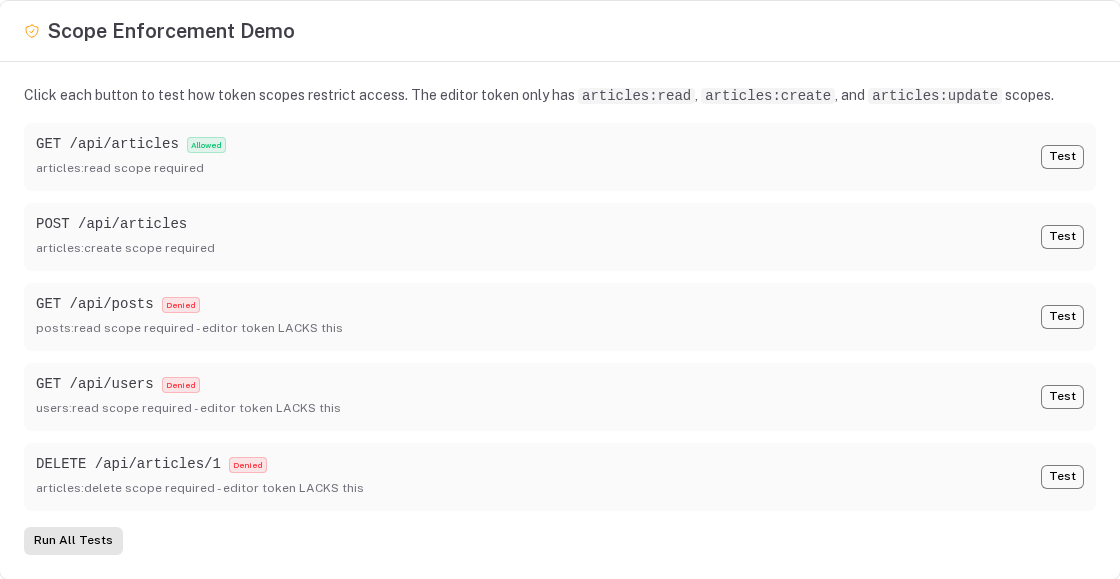
Example flow — token with ["articles:read", "articles:create"]:
GET /api/articles→ scope check:articles:readmatches → pass → resource auth runsPOST /api/articles→ scope check:articles:creatematches → pass → resource auth runsDELETE /api/articles/1→ scope check:articles:deletenot in scopes → 403GET /api/users→ scope check:users:readnot in scopes → 403
Token Lifecycle
Create — POST /api/apiKeys { "name": "CI Key", "scopes": ["articles:read"] }
The plugin generates a random token (e.g. sk_a1b2c3d4...), hashes it with SHA-256, stores the hash. The response includes the raw token once — it is never returned again.
{ "data": { "id": 1, "name": "CI Key", "key": "sk_a1b2c3d4e5f6...", "scopes": ["articles:read"] } }
The owner (userId) is always the caller (context.user.id) and, for team tokens, orgField is always their active organization (context.tenant.id) — values sent in the body are ignored.
Read — GET /api/apiKeys or GET /api/apiKeys/1
The hash is replaced with a masked preview: sk_...f6e5. The full hash is never exposed.
Update — PATCH /api/apiKeys/1 { "name": "Renamed Key" }
Direct writes to the secret field are blocked. The name, scopes, and other fields can be updated normally.
Rotate — PATCH /api/apiKeys/1 { "_rotate": true }
Generates a new token, hashes it, invalidates the cache for the old token. The response includes the new raw token (one-time). The old token stops working immediately.
Delete — DELETE /api/apiKeys/1
Deletes the token record and invalidates the cache entry.
Introspection Endpoint
GET /api/_token/introspect — requires a valid Bearer token in the request.
Returns metadata about the token without exposing the hash:
{
  "data": {
    "resource": "apiKeys",
    "id": 1,
    "name": "CI Key",
    "scopes": ["articles:read"],
    "expiresAt": "2025-12-31T00:00:00.000Z",
    "lastUsedAt": "2025-06-15T10:30:00.000Z",
    "organizationId": null
  }
}
Returns 401 if the request is not authenticated via an API token.
Cache Strategy
The plugin maintains an in-memory cache with two maps:
Map<hash, CachedToken>— O(1) lookup by token hashMap<"resource:id", hash>— O(1) invalidation by record
Cache entries expire after ttlMs (default 5 min), checked on lookup — there is no timer (Cloudflare Workers do not allow one at startup). When max entries is reached, expired entries are swept and then the oldest entry is evicted (Map insertion order). Delete and rotate operations invalidate the cache immediately via the reverse map.
Security
| Concern | Mitigation |
|---|---|
| Brute force | 256-bit entropy (32 random bytes) makes guessing infeasible. Pair with rate limit plugin for additional protection. |
| Timing attacks | SHA-256 hash lookup in SQL. Constant-time comparison is not needed because the hash itself is the lookup key — a miss reveals nothing about valid hashes. |
| Token leakage | Configurable prefix (e.g. sk_) enables secret scanning tools (GitHub, GitGuardian) to detect leaked tokens in commits. |
| Over-privilege | Scopes are a coarse gate. Resource auth config (functions, object-level, field-level) runs on top. Both must pass. |
| Stale tokens | Expiry check on every auth. Cache TTL (5 min default) limits the window for deleted/expired tokens. |
| Hash exposure | Hash replaced with masked preview (sk_...f6e5) in GET/LIST. Raw token only returned on create and rotate. |
| Minting for someone else | The owner (userRelation.field) and organization (orgField) are set from the caller on create and cannot be changed by an update. |
Usage with Other Auth
The token plugin is designed to coexist with any session-based auth. The context extender skips when context.user is already set, so session auth always takes priority.
// server/autoapi-plugins.ts
export default [
  createBetterAuthPlugin({ ... }),   // Session auth for browsers
  createApiTokenPlugin({ ... }),     // Token auth for API clients — skips if session already set user
]
With a plain Nitro auth plugin (no Better Auth):
// server/plugins/auth.ts
export default defineNitroPlugin((nitro) => {
  nitro.hooks.hook('request', async (event) => {
    const session = getCookie(event, 'session')
    if (session) event.context.user = await getUserFromSession(session)
    // Token plugin handles API requests that don't have a session
  })
})
Audit Stamps (createAuditStampPlugin)
Fills createdBy / updatedBy (the audit() preset) from the
request user. Not on by default — register it:
- Hooks used:
beforeCreate/beforeUpdateglobal hooks, on tables that have the columns - Approach:
createdByon create,updatedByon create and update (null without a user). Request bodies can never set these columns, so without the plugin they stayNULL.
createAuditStampPlugin()
Soft Delete
Built into core — not a plugin.
The delete handler soft-deletes rows of tables with a soft-delete marker (deletedAt / deleted_at /
deletedDate, nullable or with the preset's companion columns) and cascades to children; list, get and every
other route hide trashed rows. See Soft Deletes.
Summary
| Plugin | Status | Hooks Used |
|---|---|---|
| Rate Limiting | Shipped | pre-auth middleware |
| Request Metadata | Shipped | Context extender + before hooks |
| Better Auth | Shipped | Context extender |
| Audit Log | Shipped | before + after hooks + buildSetup |
| Webhook | Shipped | after hooks |
| Activity Feed | Shipped | after hooks + buildSetup |
| Slug Generation | Shipped | before hooks + context.db |
| Data Validation | Shipped | before hooks (throw on failure) |
| Data Export | Shipped | buildSetup (new endpoints) |
| File Upload | Shipped | buildSetup + endpoints |
| Revision History | Shipped | before/after hooks |
| Cache | Shipped | pre-execute middleware + context.shortCircuit |
| Search | Shipped | beforeList + context.additionalFilters |
| Field Encryption | Shipped | before hooks + after hooks (return value) |
| API Token | Shipped | Context extender + pre-auth middleware + before/after hooks + buildSetup |
| Audit Stamps | Shipped (register it) | before hooks |
| Soft Delete | Core feature | N/A |
Request Metadata Plugin
The Request Metadata Plugin automatically captures request metadata (IP address, geolocation, user-agent, etc.) and makes it available throughout your API handlers. It supports both context-only access (for hooks and authorization) and optional database persistence.
Configuration Reference
Every module option, every resource registration field and every authorization key in one place. The guides explain when to use them; this page lists what exists.