
Lifecycle Hooks
Lifecycle Hooks
Lifecycle hooks allow you to execute custom logic before and after CRUD operations. Perfect for audit logging, notifications, data transformation, and business logic.
Available Hooks
| Hook | When it runs | Can modify data | Use cases |
|---|---|---|---|
beforeCreate | Before inserting record | ✅ Yes | Set defaults, validate, transform |
afterCreate | After inserting record | ✅ Response (return a replacement; not on bulk routes) | Send notifications, log audit |
beforeUpdate | Before updating record | ✅ Yes | Validate changes, transform |
afterUpdate | After updating record | ✅ Response (return a replacement; not on bulk routes) | Notify users, sync services |
beforeDelete | Before deleting record | ❌ No | Check dependencies, validate |
afterDelete | After deleting record | ❌ No | Clean up relations, log audit |
beforeList | Before listing records | ❌ No | Log access (rarely needed) |
afterList | After listing records | ✅ Response (return a replacement array) | Log access, decorate rows |
beforeGet | Before fetching single record — (id, ctx) | ❌ No | Log access (rarely needed) |
afterGet | After fetching single record | ✅ Response (return a replacement) | Track views, decorate |
beforeM2MSync / beforeM2MAdd | Before linking — (relation, ids, ctx); may return replacement ids | ✅ Ids | Enforce link rules |
afterM2MSync / afterM2MAdd / afterM2MRemove | After an M2M write — (relation, result, ctx) | ❌ No | Audit, notify |
beforeM2MRemove | Before unlinking — (relation, ids, ctx) | ❌ No | Guard removals |
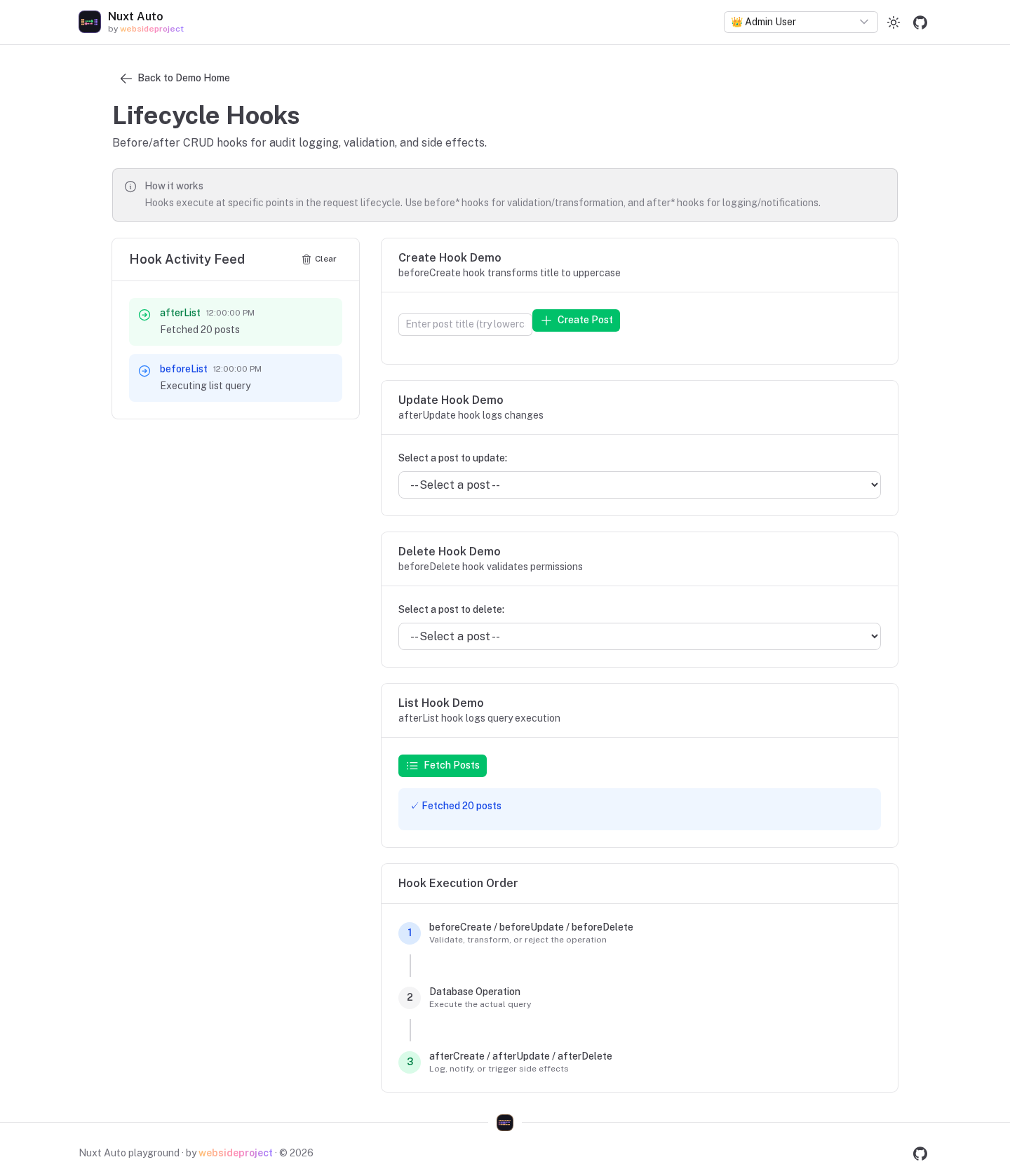
The playground's hooks page illustrates the order in which hooks run around each request; its activity feed is drawn in the browser — the playground registers no server hooks.
Hook Configuration Methods
Hooks are registered with the resource (in a module) or at runtime (in a Nitro plugin).
Method 1: Per-Resource (via Module Registration)
Best for module-based architecture. These run last, after plugin hooks.
// modules/base/index.ts
import { defineNuxtModule, createResolver } from '@nuxt/kit'
import { createModuleImport } from '@websideproject/nuxt-auto-api'

export default defineNuxtModule({
  setup(options, nuxt) {
    const resolver = createResolver(import.meta.url)

    nuxt.hook('autoApi:registerSchema', (registry) => {
      registry.register('users', {
        schema: createModuleImport(resolver.resolve('./schema'), 'users'),
        authorization: createModuleImport(resolver.resolve('./auth'), 'usersAuth'),
        hooks: createModuleImport(resolver.resolve('./hooks'), 'userHooks'),
      })
    })
  },
})
// modules/base/hooks.ts
import type { ResourceHooks } from '@websideproject/nuxt-auto-api'

export const userHooks: ResourceHooks = {
  beforeCreate: async (data, context) => {
    data.status = data.status || 'active'
    return data
  },

  afterCreate: async (user, context) => {
    console.log(`User ${user.id} created by ${context.user?.id ?? 'system'}`)
    // Send welcome email, create audit log, etc.
  },
}
createModuleImport is not processed by Nitro's auto-imports: import what you
use (createError from h3, eq from drizzle-orm, your tables) and read config from context.runtimeConfig,
not useRuntimeConfig(). Hooks registered from a Nitro plugin (Method 2) have the auto-imports.Method 2: Plugin-Based (Runtime Registration)
Best for cross-cutting concerns, or hooks that live in the app rather than in a module:
// server/plugins/user-hooks.ts
import { addResourceHook, addGlobalHook } from '@websideproject/nuxt-auto-api/plugins'

export default defineNitroPlugin(() => {
  addResourceHook('users', {
    afterCreate: async (user, context) => {
      await sendEmail({ to: user.email, template: 'welcome', data: { name: user.name } })
    },
    afterUpdate: async (user) => {
      await clearCache(`user:${user.id}`)
    },
  })

  // Every resource
  addGlobalHook({
    afterDelete: async (id, context) => {
      console.log(`${context.resource} ${id} deleted by ${context.user?.id}`)
    },
  })
})
Assigning functions onto globalThis.__autoApiHooks[resource] (the older form) still works and runs first.
nuxt.config.ts: config reaches the server through runtimeConfig, which is
serialized, so functions never arrive. Setting autoApi.hooks fails the build — use one of the two methods
above.Hook Priority & Merging
When multiple hooks exist for the same event:
- Legacy hooks (
globalThis.__autoApiHooks[resource]) run first - Plugin hooks (
addGlobalHook/addResourceHook) next - Registry hooks (the resource's
hooksviacreateModuleImport) run last
A before* hook that returns data passes it to the next hook; the last returned value is written.
Before Hooks (Data Modification)
Before hooks can modify data before it's saved:
import { createError } from 'h3'

export const productHooks = {
  beforeCreate: async (data, context) => {
    // Set defaults
    data.status = data.status || 'draft'
    data.createdBy = context.user?.id // a server-owned column: only a hook can set it

    // Generate slug from title
    data.slug = slugify(data.title) // your helper

    // Validate business rules (a plain Error would be a 500)
    if (data.price < 0) {
      throw createError({ statusCode: 422, message: 'Price cannot be negative' })
    }

    // Transform data
    data.name = data.name.trim().toLowerCase()

    // Return modified data
    return data
  },

  beforeUpdate: async (id, data, context) => {
    // Track who modified
    data.modifiedBy = context.user?.id
    data.modifiedAt = new Date()

    // `createdBy` / `createdAt` are already dropped from update bodies (server-owned columns)
    return data
  }
}
After Hooks (Side Effects)
After hooks are for side effects (no data modification):
export const orderHooks = {
  afterCreate: async (order, context) => {
    // Send confirmation email
    await sendEmail({
      to: order.customerEmail,
      template: 'order-confirmation',
      data: { orderNumber: order.id, total: order.total }
    })

    // Create audit log
    await context.db.insert(auditLogs).values({
      action: 'order.created',
      userId: context.user?.id,
      resourceId: order.id,
      timestamp: new Date()
    })

    // Notify external service
    await fetch('https://analytics.example.com/track', {
      method: 'POST',
      body: JSON.stringify({
        event: 'order_created',
        orderId: order.id,
        total: order.total
      })
    })
  },

  afterUpdate: async (order, context) => {
    // If status changed to 'shipped'
    if (order.status === 'shipped') {
      await sendEmail({
        to: order.customerEmail,
        template: 'order-shipped',
        data: { trackingNumber: order.trackingNumber }
      })
    }
  },

  afterDelete: async (id, context) => {
    // Clean up related records
    await context.db.delete(orderItems).where(eq(orderItems.orderId, id))

    // Log deletion
    console.log(`Order ${id} deleted by user ${context.user?.id}`)
  }
}
Hook Context
All hooks receive a HandlerContext object:
interface HandlerContext {
  db: any                    // Database instance
  schema: any                // Drizzle schema
  user: AuthUser | null      // Current user
  permissions: string[]      // User permissions
  params: Record<string, string>   // Route params
  query: Record<string, any>       // Query parameters
  validated: {               // Validated data
    body?: any
    query?: any
  }
  event: H3Event             // H3 event object
  resource: string           // Resource name (e.g., 'users')
  operation: string          // Operation type
  tenant?: {                 // Multi-tenancy info
    id: string | number
    field: string
    canAccessAllTenants: boolean
  }
  resourceConfig?: ResourceRegistration  // Resource configuration
}
Using context:
export const postHooks = {
  beforeCreate: async (data, context) => {
    // Auto-set author from authenticated user
    data.authorId = context.user.id

    // Auto-set tenant
    if (context.tenant) {
      data.organizationId = context.tenant.id
    }

    // Access query parameters
    if (context.query.publishNow === 'true') {
      data.publishedAt = new Date()
    }

    return data
  },

  afterCreate: async (post, context) => {
    // Log to database
    await context.db.insert(auditLogs).values({
      action: 'post.created',
      userId: context.user.id,
      postId: post.id
    })
  }
}
Error Handling
Before Hooks
Before hooks throw to block the operation. The hook's own error reaches the client — throw
createError({ statusCode, message }) to answer with that status (a plain Error becomes a 500):
import { createError } from 'h3'
import { eq } from 'drizzle-orm'
import { users } from '../../server/database/schema'

beforeCreate: async (data, context) => {
  // Validation error - blocks creation
  if (!data.email || !data.email.includes('@')) {
    throw createError({ statusCode: 422, message: 'Invalid email address' })
  }

  // Business rule error - blocks creation
  const existingUser = await context.db.query.users.findFirst({
    where: eq(users.email, data.email)
  })

  if (existingUser) {
    throw createError({ statusCode: 409, message: 'Email already exists' })
  }

  return data
}
After Hooks
After hooks run once the write has happened. By default their errors are logged and the request still
succeeds; with hookConfig.errorHandling: 'throw' the request fails with the hook's error — the write is not
undone (single-record writes are not wrapped in a transaction; bulk writes in transactional mode are):
// Default behavior: log errors, don't rollback
afterCreate: async (user, context) => {
  try {
    await sendWelcomeEmail(user.email)
  } catch (error) {
    // Error is logged but operation continues
    console.error('Failed to send welcome email:', error)
  }
}
Configure error handling:
export default defineNuxtConfig({
  autoApi: {
    hookConfig: {
      // after-hooks: 'log' (default) logs and continues; 'throw' fails the request
      // before-hooks: always throw, unless set to 'log'
      errorHandling: 'log',

      // Hook timeout in milliseconds
      timeout: 5000,

      // Execute multiple hooks in parallel
      parallel: false
    }
  }
})
Hook Execution in Bulk Operations
Hooks execute for each item in bulk operations:
// Bulk create 100 users
POST /api/users/bulk { items: [/* 100 users */] }

// beforeCreate runs 100 times (once per user)
// afterCreate runs 100 times (once per user)
Common Use Cases
Audit Logging
const auditHooks = {
  afterCreate: async (record, context) => {
    await context.db.insert(auditLogs).values({
      action: `${context.resource}.created`,
      userId: context.user?.id,
      resourceId: record.id,
      changes: JSON.stringify(record)
    })
  },

  afterUpdate: async (record, context) => {
    await context.db.insert(auditLogs).values({
      action: `${context.resource}.updated`,
      userId: context.user?.id,
      resourceId: record.id,
      changes: JSON.stringify(record)
    })
  }
}
Notifications
const notificationHooks = {
  afterCreate: async (comment, context) => {
    // Notify post author about new comment
    const post = await context.db.query.posts.findFirst({
      where: eq(posts.id, comment.postId)
    })

    if (post && post.authorId !== context.user?.id) {
      await sendNotification(post.authorId, {
        type: 'new_comment',
        message: `${context.user?.name} commented on your post`
      })
    }
  }
}
Data Validation
const validationHooks = {
  beforeCreate: async (data, context) => {
    // Complex business rule validation
    if (data.price > 1000 && !context.permissions.includes('admin')) {
      throw createError({ statusCode: 403, message: 'Only admins can create items over $1000' })
    }

    // Cross-field validation
    if (data.discountPercent > 0 && !data.discountCode) {
      throw createError({ statusCode: 422, message: 'Discount code required when discount is applied' })
    }

    return data
  }
}
Cache Invalidation
const cacheHooks = {
  afterUpdate: async (record, context) => {
    await clearCache(`${context.resource}:${record.id}`)
    await clearCache(`${context.resource}:list`)
  },

  afterDelete: async (id, context) => {
    await clearCache(`${context.resource}:${id}`)
    await clearCache(`${context.resource}:list`)
  }
}
External Service Integration
const integrationHooks = {
  afterCreate: async (customer, context) => {
    // Sync to CRM
    await fetch('https://crm.example.com/api/customers', {
      method: 'POST',
      body: JSON.stringify(customer)
    })

    // Add to mailing list
    await mailchimp.lists.addMember({
      email: customer.email,
      firstName: customer.firstName,
      lastName: customer.lastName
    })
  }
}
Best Practices
- Keep hooks focused: One responsibility per hook
- Handle errors: Use try-catch in after hooks
- Don't query in before hooks: Data should already be validated
- Use after hooks for async operations: Email, webhooks, etc.
- Return modified data from before hooks: Always return the data object
- Don't modify data in after hooks: Too late, data is already saved
- Log important operations: Especially in production
- Test hooks thoroughly: They can break your API if buggy
- Use transactions carefully: After hooks run outside transaction scope
- Monitor hook performance: Set appropriate timeouts
Migration Path
If you have custom handlers, migrate to hooks:
// Before: Custom handler
export default defineEventHandler(async (event) => {
  const body = await readBody(event)

  // Custom logic
  body.createdBy = event.context.user.id
  body.status = 'active'

  const user = await db.insert(users).values(body).returning()

  // Send email
  await sendWelcomeEmail(user.email)

  return { data: user }
})

// After: Use hooks
export const userHooks = {
  beforeCreate: async (data, context) => {
    data.createdBy = context.user?.id
    data.status = 'active'
    return data
  },

  afterCreate: async (user, context) => {
    await sendWelcomeEmail(user.email)
  }
}
Benefits:
- Automatic validation
- Authorization checks
- Multi-tenancy support
- Consistent error handling
- Works with bulk operations
Aggregations
Nuxt Auto API provides powerful aggregation capabilities for analyzing your data, including simple aggregates on list endpoints and complex grouped aggregations.
Many-to-Many (M2M) Relationships
This guide covers how to work with many-to-many relationships in @websideproject/nuxt-auto-api.