
Aggregations
Aggregations
Nuxt Auto API provides powerful aggregation capabilities for analyzing your data, including simple aggregates on list endpoints and complex grouped aggregations.
Simple Aggregations
Add aggregate functions to list requests using the aggregate query parameter:
// GET /api/orders?aggregate=count&page=1

{
  "data": [/* order records */],
  "meta": {
    "limit": 20,
    "page": 1,
    "total": 150,  // `page` and `total` are only in the response when the request sends `page`
    "aggregates": {
      "count": 150
    }
  }
}
Multiple Aggregates
Combine multiple aggregate functions:
// GET /api/orders?aggregate=count,sum(amount),avg(amount)

{
  "data": [/* order records */],
  "meta": {
    "aggregates": {
      "count": 150,
      "sum_amount": 45000.00,
      "avg_amount": 300.00
    }
  }
}
Available Functions
| Function | Description | Example |
|---|---|---|
count | Count records | aggregate=count |
sum(field) | Sum of field values | aggregate=sum(amount) |
avg(field) | Average of field values | aggregate=avg(price) |
min(field) | Minimum value | aggregate=min(price) |
max(field) | Maximum value | aggregate=max(price) |
count, sum and avg are numbers on every database (sum and avg are null when no row matches). min and
max keep the column's type, so they work on dates and text too. A sum beyond Number.MAX_SAFE_INTEGER
(2⁵³ − 1) loses precision; money stored in minor units stays far below it.
Aggregates with Filters
Combine aggregations with filters:
// GET /api/orders?aggregate=sum(amount),count&filter[status]=completed

{
  "data": [/* completed orders */],
  "meta": {
    "aggregates": {
      "count": 100,
      "sum_amount": 30000.00
    }
  }
}
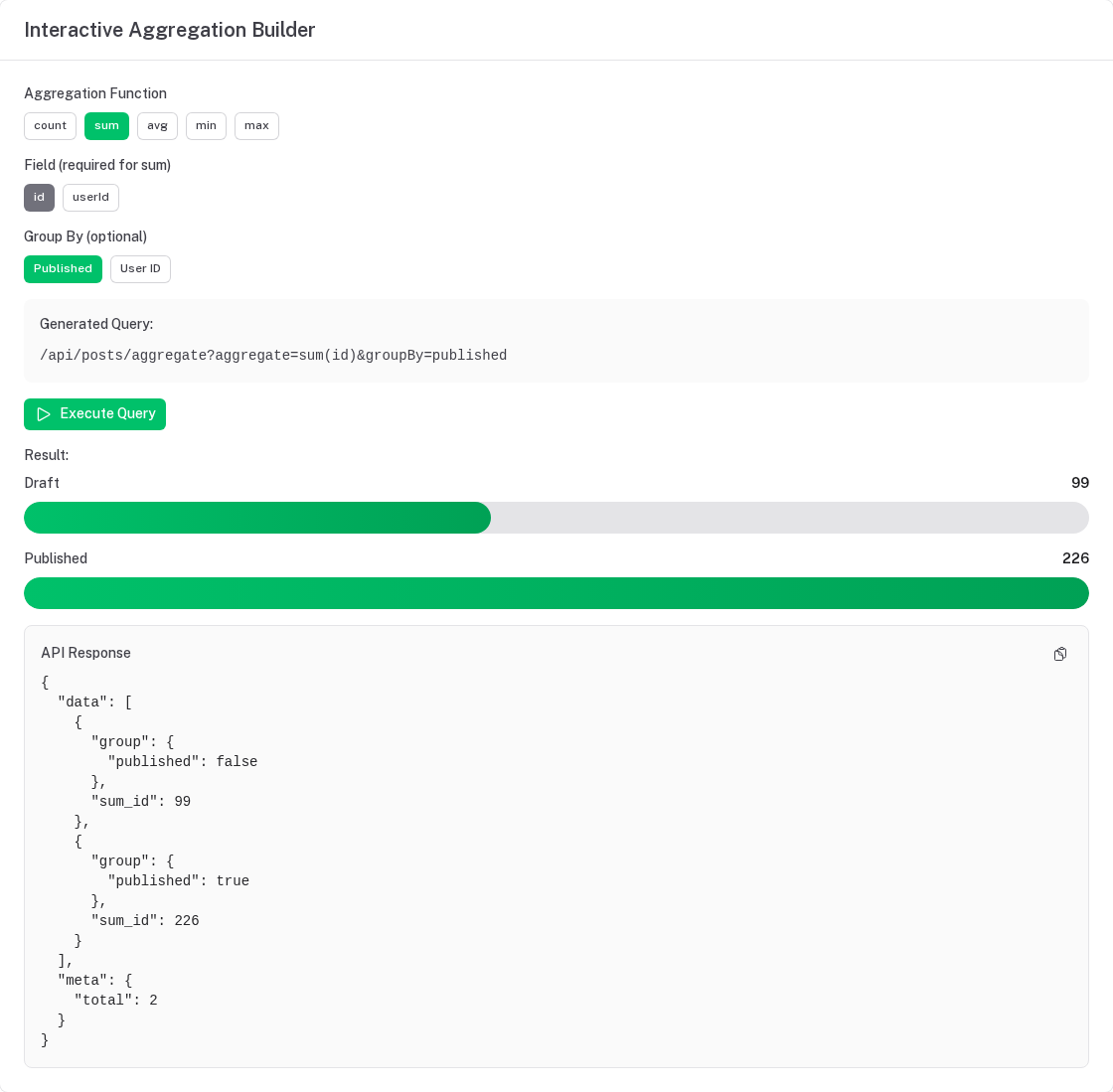
Complex Aggregations (Grouped)
Use the dedicated /aggregate endpoint for complex grouped aggregations:
// GET /api/orders/aggregate?aggregate=count,sum(amount)&groupBy=status

{
  "data": [
    {
      "group": { "status": "pending" },
      "count": 50,
      "sum_amount": 15000.00
    },
    {
      "group": { "status": "completed" },
      "count": 100,
      "sum_amount": 30000.00
    }
  ],
  "meta": {
    "total": 2
  }
}
Multiple Group By Fields
// GET /api/orders/aggregate?aggregate=count,sum(amount)&groupBy=status,paymentMethod

{
  "data": [
    {
      "group": {
        "status": "completed",
        "paymentMethod": "credit_card"
      },
      "count": 60,
      "sum_amount": 18000.00
    },
    {
      "group": {
        "status": "completed",
        "paymentMethod": "paypal"
      },
      "count": 40,
      "sum_amount": 12000.00
    }
  ]
}
Having Clause
Filter groups using the having parameter:
// GET /api/orders/aggregate?aggregate=count,sum(amount)&groupBy=userId&having={"count":{"$gt":5}}

{
  "data": [
    {
      "group": { "userId": 1 },
      "count": 10,
      "sum_amount": 3000.00
    },
    {
      "group": { "userId": 2 },
      "count": 7,
      "sum_amount": 2100.00
    }
    // Only groups with count > 5
  ]
}
Having Operators
| Operator | Description | Example |
|---|---|---|
$gt | Greater than | {"count":{"$gt":10}} |
$gte | Greater than or equal | {"sum_amount":{"$gte":1000}} |
$lt | Less than | {"avg_price":{"$lt":50}} |
$lte | Less than or equal | {"count":{"$lte":5}} |
$eq | Equal | {"count":{"$eq":0}} |
$ne | Not equal | {"count":{"$ne":0}} |
Filters with Aggregations
Apply filters before aggregation using the filter parameter:
// GET /api/orders/aggregate?aggregate=count,sum(amount)&groupBy=status&filter[createdAt][$gte]=2024-01-01

{
  "data": [
    {
      "group": { "status": "completed" },
      "count": 50,
      "sum_amount": 15000.00
    }
    // Only orders created after 2024-01-01
  ]
}
Frontend Usage
With Composables
// Simple aggregations alongside a list
const { data } = useAutoApiList('orders', {
  aggregate: 'count,sum(amount),avg(amount)',
  filter: { status: 'completed' },
})

// data.value.meta.aggregates → { count: 100, sum_amount: 30000, avg_amount: 300 }
// Grouped aggregations
const { data } = useAutoApiAggregate('orders', {
  aggregate: ['count', 'sum(amount)'],
  groupBy: 'status',
  having: { count: { $gt: 10 } },
})

// data.value.data → [{ group: { status: 'completed' }, count: 100, sum_amount: 30000 }]
Real-World Examples
Sales Dashboard
groupBy takes real columns only — an expression such as "month of createdAt" is a 400. To group by month,
store it in its own column (e.g. orderMonth: text('order_month'), set in a beforeCreate hook):
// Total sales by month
const salesByMonth = await $fetch('/api/orders/aggregate', {
  query: {
    aggregate: 'sum(amount),count',
    groupBy: 'orderMonth',  // a stored column, e.g. '2024-01'
    filter: {
      createdAt: {
        $gte: '2024-01-01'
      }
    }
  }
})
User Activity Report
// Active users by number of orders
const activeUsers = await $fetch('/api/orders/aggregate', {
  query: {
    aggregate: 'count',
    groupBy: 'userId',
    having: {
      count: { $gte: 5 }
    }
  }
})
Product Performance
// Best-selling products
const topProducts = await $fetch('/api/orderItems/aggregate', {
  query: {
    aggregate: 'sum(quantity),sum(total)',
    groupBy: 'productId',
    filter: {
      createdAt: {
        $gte: new Date(Date.now() - 30 * 24 * 60 * 60 * 1000).toISOString()
      }
    }
  }
})
Revenue by Payment Method
const revenueByPayment = await $fetch('/api/orders/aggregate', {
  query: {
    aggregate: 'sum(amount),count,avg(amount)',
    groupBy: 'paymentMethod',
    filter: {
      status: 'completed'
    }
  }
})
Configuration
export default defineNuxtConfig({
  autoApi: {
    aggregations: {
      // Enable/disable aggregations (default: true)
      enabled: true,

      // Allow groupBy (default: true)
      allowGroupBy: true,

      // Maximum number of groupBy fields (default: 5)
      maxGroupByFields: 5
    }
  }
})
Authorization
- Gated by
permissions.aggregate, falling back toread—aggregate: falseturns aggregation off for a resource that is otherwise readable. - Aggregates run over exactly the rows the caller could list: tenant scope,
listFilterand soft delete apply (?includeDeleted/?onlyDeletedwithviewDeleted). - Aggregated, grouped and filtered fields must be readable — hidden fields and fields whose
readrule denies the caller are a 400. Otherwisemin(password)orgroupBy=passwordwould return the values of a column the caller can never see.
Performance Considerations
Database Indexes
Create indexes on fields used in:
groupByclausesfilterclauses- Aggregate functions (for some databases)
-- Index for grouping
CREATE INDEX idx_orders_status ON orders(status);

-- Index for filtering
CREATE INDEX idx_orders_created_at ON orders(created_at);

-- Composite index for group + filter
CREATE INDEX idx_orders_status_created ON orders(status, created_at);
Query Optimization
Aggregations can be slow on large tables:
// Good: Filter before aggregating
GET /api/orders/aggregate?
  aggregate=count,sum(amount)&
  groupBy=status&
  filter[createdAt][$gte]=2024-01-01

// Less efficient: Aggregate entire table
GET /api/orders/aggregate?aggregate=count,sum(amount)&groupBy=status
Limit Group Count
Avoid grouping by high-cardinality fields:
// Bad: Too many groups (one per user)
GET /api/orders/aggregate?aggregate=count&groupBy=userId

// Better: Limit with having clause
GET /api/orders/aggregate?
  aggregate=count&
  groupBy=userId&
  having={"count":{"$gte":10}}
Caching
Cache aggregation results for expensive queries:
// Frontend caching with TanStack Query
const { data } = useQuery({
  queryKey: ['orders', 'aggregate', 'by-status'],
  queryFn: () => $fetch('/api/orders/aggregate', {
    query: {
      aggregate: 'count,sum(amount)',
      groupBy: 'status'
    }
  }),
  staleTime: 5 * 60 * 1000,  // 5 minutes
})
Server-side caching: register the cache plugin for the
resource — it caches aggregate responses per caller and tenant and drops them on every write. (A Nitro route
that $fetches /api/orders/aggregate itself would call the API without the caller's session.)
Common Patterns
Dashboard Stats
// Single request for multiple stats
const stats = await Promise.all([
  // Total revenue
  $fetch('/api/orders', {
    query: { aggregate: 'sum(amount)' }
  }),

  // Orders by status
  $fetch('/api/orders/aggregate', {
    query: {
      aggregate: 'count',
      groupBy: 'status'
    }
  }),

  // Top customers
  $fetch('/api/orders/aggregate', {
    query: {
      aggregate: 'sum(amount),count',
      groupBy: 'customerId',
      having: { count: { $gte: 5 } }
    }
  })
])
Time-Series Data
// Group by day — `orderDate` is a stored column ('2024-01-15'), not an expression on created_at
const dailySales = await $fetch('/api/orders/aggregate', {
  query: {
    aggregate: 'sum(amount),count',
    groupBy: 'orderDate',
    filter: {
      createdAt: {
        $gte: '2024-01-01',
        $lt: '2024-02-01'
      }
    }
  }
})
Conversion Metrics
// Calculate conversion rates
const funnelStats = await $fetch('/api/leads/aggregate', {
  query: {
    aggregate: 'count',
    groupBy: 'stage'
  }
})

const conversionRate = {
  leadToQualified: funnelStats.data.find(s => s.group.stage === 'qualified').count /
                   funnelStats.data.find(s => s.group.stage === 'lead').count,
  qualifiedToCustomer: funnelStats.data.find(s => s.group.stage === 'customer').count /
                       funnelStats.data.find(s => s.group.stage === 'qualified').count
}
Limitations
- No nested aggregations: Can't aggregate on computed aggregates
- Columns only:
groupByand aggregated fields name stored columns, never SQL expressions - Limited having operators: Only basic comparison operators
- No percentile functions: Use custom SQL for advanced statistics
- Group limit: Maximum 5 group by fields (configurable)
For complex analytics beyond these limitations, consider:
- Custom API endpoints with raw SQL
- Analytics tools (Metabase, Looker)
- Data warehouse solutions
Error Handling
Everything invalid is a 400 — never silently ignored:
GET /api/orders?aggregate=median(amount)                  // 400 Unknown aggregate function 'median'
GET /api/orders?aggregate=sum(nonexistent)                // 400 Unknown field 'nonexistent' in aggregate
GET /api/users/aggregate?aggregate=count&groupBy=password // 400 (hidden field)
GET /api/orders/aggregate?aggregate=count&groupBy=a,b,c,d,e,f // 400 Group by is limited to 5 fields
GET /api/orders?aggregate=count&groupBy=status            // 400 — grouped results come from /aggregate
GET /api/orders/aggregate?aggregate=count&having={"nope":1}   // 400 Unknown aggregate 'nope' in having
GET /api/orders/aggregate?aggregate=count                 // 404 when aggregations.enabled is false
TypeScript Support
interface OrderAggregates {
  count: number
  sum_amount: number
  avg_amount: number
}

const { data } = useAutoApiList('orders', { aggregate: 'count,sum(amount),avg(amount)' })
const aggregates = computed(() => data.value?.meta.aggregates as OrderAggregates | undefined)
Best Practices
- Index fields: Always index fields used in groupBy and filters
- Filter first: Apply filters to reduce dataset before aggregating
- Use having wisely: Filter groups to reduce result set size
- Cache results: Cache expensive aggregations with appropriate TTL
- Monitor performance: Track slow aggregation queries
- Limit groups: Avoid high-cardinality groupBy fields
- Use simple aggregates: Prefer simple aggregates on list endpoint for basic stats
- Dedicate endpoint: Use
/aggregateendpoint for complex grouped queries
Getting Started
Nuxt Auto API automatically generates type-safe REST APIs from your Drizzle ORM schemas with built-in authorization, validation, and multi-tenancy support.
Lifecycle Hooks
Lifecycle hooks allow you to execute custom logic before and after CRUD operations. Perfect for audit logging, notifications, data transformation, and business logic.