
M2M Relationships
M2M Relationships
This guide covers how M2M relationships work in the auto-admin interface.
Overview
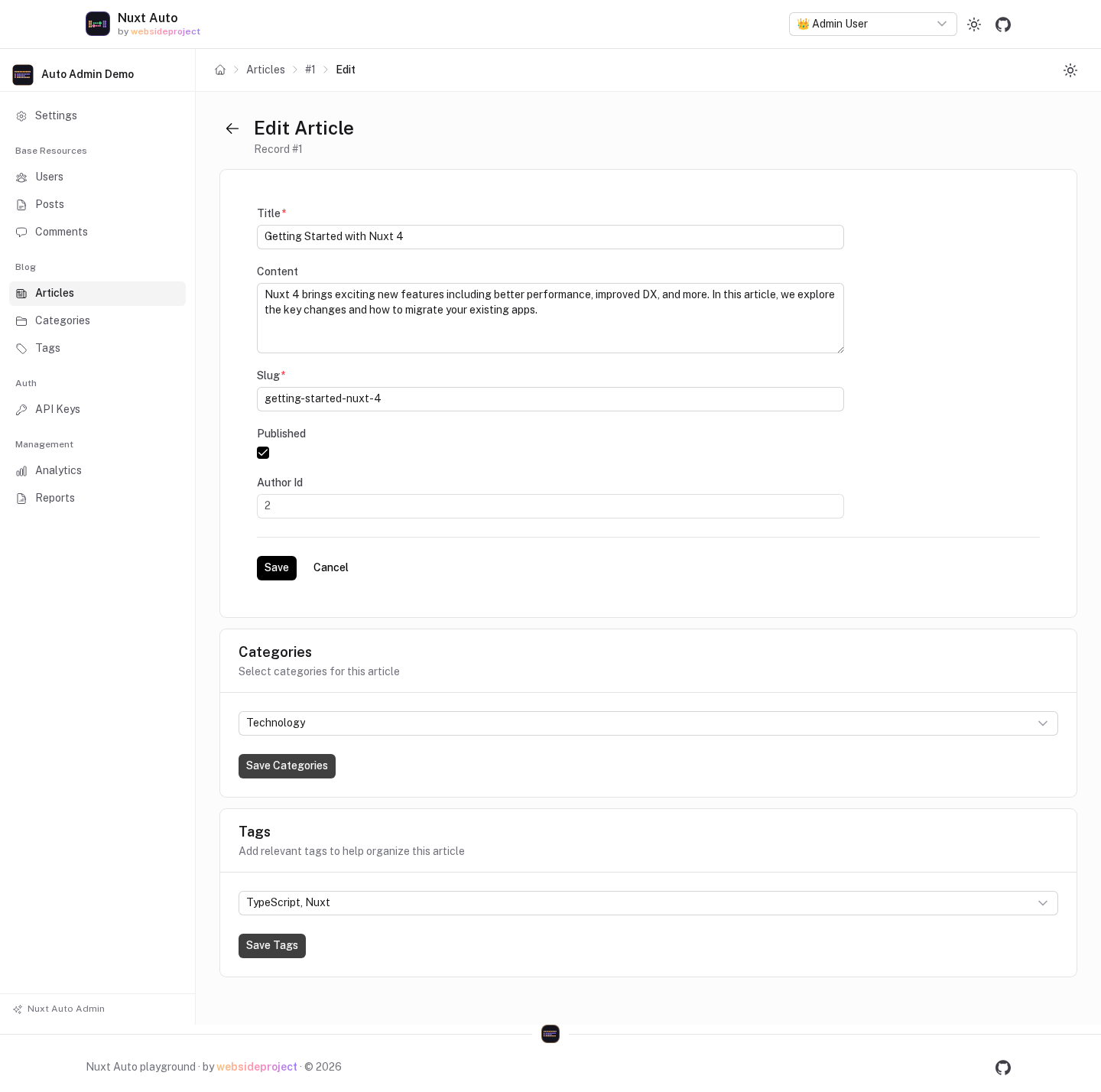
The edit form of a resource shows one card per many-to-many relation, with a multi-select and its own save button.
The admin asks the API which relations a resource has (GET /api/_m2m/detect/:resource), and the cards read and
write through the API's M2M routes (/api/{resource}/:id/relations/{relation}), under the caller's permissions.
📝 Note: Detection is by name, not by Drizzle
.references(). See the API M2M Guide.
Quick Start
1. Define the junction table
// modules/blog/schema.ts
export const articleCategories = sqliteTable('article_categories', {
  articleId: integer('article_id').notNull()
    .references(() => articles.id, { onDelete: 'cascade' }),
  categoryId: integer('category_id').notNull()
    .references(() => categories.id, { onDelete: 'cascade' }),
}, table => [
  primaryKey({ columns: [table.articleId, table.categoryId] }),
])
Export it from the schema you pass to drizzle(…, { schema }). articles and categories are registered
resources; the junction does not have to be.
2. Tell the admin about the relation
Either list it in m2m.relations (recommended — no route is exposed for the junction):
// nuxt.config.ts
export default defineNuxtConfig({
  autoApi: {
    m2m: {
      relations: {
        articles: {
          categories: {
            label: 'Categories',  // ← Custom label for admin UI
            help: 'Select categories for this article',  // ← Help text
            displayField: 'name',  // ← Field shown in dropdown
          }
        }
      }
    }
  }
})
or register the junction table as a resource: discovery then finds it among the registered resources
(with m2m.autoDetect, the default). Registering it also exposes CRUD routes for the junction, so give it a
tight authorization.
3. Result
The admin:
- ✅ Shows a card per relation in the edit form (page and modal)
- ✅ Saves each card with one sync request (
POST /api/{resource}/:id/relations/{relation}) - ✅ Hides registered junction tables from the sidebar
Naming Convention Support
Junctions are found by the export name of the table and the property names of its key columns:
// ✅ found for articles ↔ categories
export const articleCategories = sqliteTable('article_categories', {
  articleId: integer('article_id'),
  categoryId: integer('category_id'),
}, …)

// ✅ also: articleCategory, article_categories, categoryArticles (export names)
Names that don't follow the pattern need junctionTable / leftKey / rightKey in m2m.relations.
Junction Table Hiding
Registered junction tables are hidden from the sidebar and the dashboard. A table is treated as a junction when
discovery recognizes it (no id column, two key columns named after registered resources, a name made of both)
or when you configure type: 'junction'.
Manual Override
If you need to control detection for a specific table:
// Force junction table hidden
autoAdmin: {
  resources: {
    customJunction: {
      type: 'junction'  // Force hide from sidebar
    }
  }
}

// Force regular resource visible (despite junction pattern)
autoAdmin: {
  resources: {
    orderItems: {
      type: 'resource',  // Show in sidebar
      displayName: 'Order Items',
    }
  }
}
For more details, see the API M2M Guide.
Configuration
Labels, Help Text, and Display Field
Configure how M2M relations appear in the admin UI:
autoApi: {
  m2m: {
    relations: {
      articles: {
        categories: {
          // ... junction config
          label: 'Article Categories',        // Field label in form
          help: 'Select categories to organize this article',  // Help text below field
          displayField: 'name',              // What shows in dropdown options
        }
      }
    }
  }
}
If not provided:
label- Defaults to capitalized relation name ("Categories")help- Not showndisplayField- Tries common fields automatically:'name','title','label','email'
Display Field Examples:
// For categories (has 'name' field)
categories: {
  displayField: 'name'  // Shows: "Technology", "Business", etc.
}

// For users (has 'email' and 'name')
users: {
  displayField: 'email'  // Shows: "user@example.com"
}

// For articles (has 'title')
relatedArticles: {
  displayField: 'title'  // Shows: "How to Build..."
}

// Custom format (if needed)
products: {
  displayField: 'sku'  // Shows: "PROD-12345"
}
Display Modes
Control how edit/view forms open:
autoAdmin: {
  ui: {
    editMode: 'page',  // 'modal' | 'page'
    viewMode: 'modal'  // 'modal' | 'page'
  }
}
Modal Mode (default):
- Quick edits
- Compact view
- Good for simple forms
Page Mode (recommended for M2M):
- Full-page layout
- Better for complex forms with M2M relations
- More space for multiple relation fields
How It Works
Automatic Detection
When you open an edit form, the admin automatically:
- Fetches M2M config from the API module
- Loads current relations for the record
- Displays multi-select for each relation
- Syncs changes when you save
Manual Override
You can manually configure M2M fields in admin config (not recommended):
autoAdmin: {
  resources: {
    articles: {
      formFields: {
        edit: [
          // Regular fields
          { name: 'title', widget: 'TextInput' },

          // Manual M2M field (not recommended - use API config instead)
          {
            name: 'categories',
            widget: 'MultiRelationSelect',
            label: 'Categories',
            options: {
              resource: 'categories',
              displayField: 'name',
              junctionTable: 'articleCategories',
              junctionLeftKey: 'articleId',
              junctionRightKey: 'categoryId',
            }
          }
        ]
      }
    }
  }
}
⚠️ Not Recommended: Manual admin config is verbose and duplicates API config. Use API module config instead!
UI Behavior
Edit Form
M2M relations appear as cards below the main form, each saved on its own:
View Modal
M2M relations shown as read-only chips:
┌─────────────────────────────┐
│ Article Title                │
│ by John Doe                  │
│                              │
│ Categories                   │
│ [Technology] [Business]      │
│                              │
│ Tags                         │
│ [JavaScript] [Vue] [Nuxt]    │
└─────────────────────────────┘
Permissions
M2M fields respect resource permissions:
// modules/blog/auth.ts
export const articlesAuth = {
  async canUpdate(user) {
    // Controls both form fields AND M2M relations
    return user?.role === 'editor'
  }
}
If user lacks update permission:
- M2M fields shown but disabled
- Save buttons are disabled
- Or hidden based on
unauthorizedButtonsconfig
Advanced
Hiding Relations
Hide specific relations from admin UI:
autoAdmin: {
  resources: {
    articles: {
      hiddenFields: ['internalCategoryId'],  // Won't show in any form
    }
  }
}
Custom Relation Widget
Create custom widget for special cases:
<!-- components/admin/CustomRelationWidget.vue -->
<template>
  <div>
    <!-- Your custom multi-select UI -->
  </div>
</template>

<script setup>
const props = defineProps<{
  modelValue: number[]
  options: any[]
}>()

const emit = defineEmits<{
  'update:modelValue': [value: number[]]
}>()
</script>
Register in admin config:
autoAdmin: {
  resources: {
    articles: {
      formFields: {
        edit: [
          {
            name: 'categories',
            widget: 'CustomRelationWidget',  // Your widget
            options: {
              // Custom options
            }
          }
        ]
      }
    }
  }
}
Metadata Support
Junction tables with metadata columns:
// Schema
export const articleCategories = sqliteTable('article_categories', {
  articleId: integer('article_id')...
  categoryId: integer('category_id')...
  sortOrder: integer('sort_order'),  // Metadata
  isPrimary: integer('is_primary', { mode: 'boolean' }),
})

// Config
autoApi: {
  m2m: {
    relations: {
      articles: {
        categories: {
          junctionTable: 'articleCategories',
          leftKey: 'articleId',
          rightKey: 'categoryId',
          metadataColumns: ['sortOrder', 'isPrimary'],
        }
      }
    }
  }
}
The admin UI will:
- Show basic multi-select (no metadata editing by default)
- Metadata preserved on save
- Custom widget needed for editing metadata
Best Practices
1. Configure in API Module
// ✅ GOOD: Single source of truth
autoApi: {
  m2m: {
    relations: {
      articles: {
        categories: {
          junctionTable: 'articleCategories',
          leftKey: 'articleId',
          rightKey: 'categoryId',
          label: 'Categories',  // For admin
        }
      }
    }
  }
}

// ❌ BAD: Duplicating config in admin module
autoAdmin: {
  resources: {
    articles: {
      formFields: {
        edit: [
          { /* manual M2M config */ }
        ]
      }
    }
  }
}
2. Use Descriptive Labels
label: 'Article Categories',  // ✅ Clear
help: 'Organize this article by selecting relevant categories'  // ✅ Helpful

label: 'cats',  // ❌ Unclear
3. Use Page Mode for Complex Forms
autoAdmin: {
  ui: {
    editMode: 'page',  // ✅ Better for M2M
  }
}
4. Test Permissions
Verify M2M fields respect permissions:
- Disabled when no update permission
- Hidden/shown based on config
Troubleshooting
Relations Not Showing
Problem: M2M fields don't appear in edit form
Solutions:
- Check the relation is listed in
autoApi.m2m.relations— or that the junction table is a registered resource (discovery only auto-detects among registered resources) - Check
GET /api/_m2m/detect/articleslists it (signed in, withreadon the resource) - Check browser console for errors
- Test M2M endpoint directly:
GET /api/articles/10/relations/categories
Can't Save Relations
Problem: Save button doesn't work or shows errors
Solutions:
- Check permissions (need
canUpdate) - Verify related records exist
- Check browser network tab for API errors
- Ensure the junction's export name and key columns follow the naming pattern, or configure them explicitly
Wrong Labels
Problem: Relation shows wrong label
Solution: Update label in API config:
autoApi: {
  m2m: {
    relations: {
      articles: {
        categories: {
          // ...
          label: 'Correct Label Here',  // ← Update this
        }
      }
    }
  }
}
Examples
Basic Setup
// nuxt.config.ts
export default defineNuxtConfig({
  autoApi: {
    m2m: {
      // Auto-detection enabled by default
      // Only customize labels if needed
      relations: {
        articles: {
          categories: {
            label: 'Categories',
            displayField: 'name',
          },
          tags: {
            label: 'Tags',
            help: 'Add relevant tags',
          }
        }
      }
    }
  },

  autoAdmin: {
    ui: {
      editMode: 'page',  // Use page mode for M2M
    }
  }
})
Multiple Resources
autoApi: {
  m2m: {
    // Listed relations always show; registered junctions are also auto-detected
    // Customize labels/help as needed
    relations: {
      articles: {
        categories: {
          label: 'Categories',
        },
        tags: {
          label: 'Tags',
        },
      },
      users: {
        roles: {
          label: 'User Roles',
          help: 'Assign roles to control permissions',
        }
      },
      products: {
        categories: {
          label: 'Product Categories',
        }
      }
    }
  }
}
See Also
- API M2M Configuration - How to configure M2M relations
- Form Fields - Customizing form fields
- Permissions - Controlling access
- Configuration & Theming - Modal vs page mode
Custom Pages
Add custom pages to your admin panel for features beyond standard CRUD operations.
Custom Actions
Add your own buttons next to the built-in ones: publish a draft, archive the selected rows, sync a resource with another system.