
Nested Relations
Nested Relations
Nuxt Auto API supports advanced nested relation loading with field selection, filtering, and pagination at each level of nesting.
Basic Nested Relations
The simplest form uses dot notation to load nested relations:
// GET /api/users?include=posts.comments.author

{
  "data": [
    {
      "id": 1,
      "name": "John Doe",
      "posts": [
        {
          "id": 1,
          "title": "Hello World",
          "comments": [
            {
              "id": 1,
              "body": "Great post!",
              "author": {
                "id": 2,
                "name": "Jane Smith"
              }
            }
          ]
        }
      ]
    }
  ]
}
Field Selection
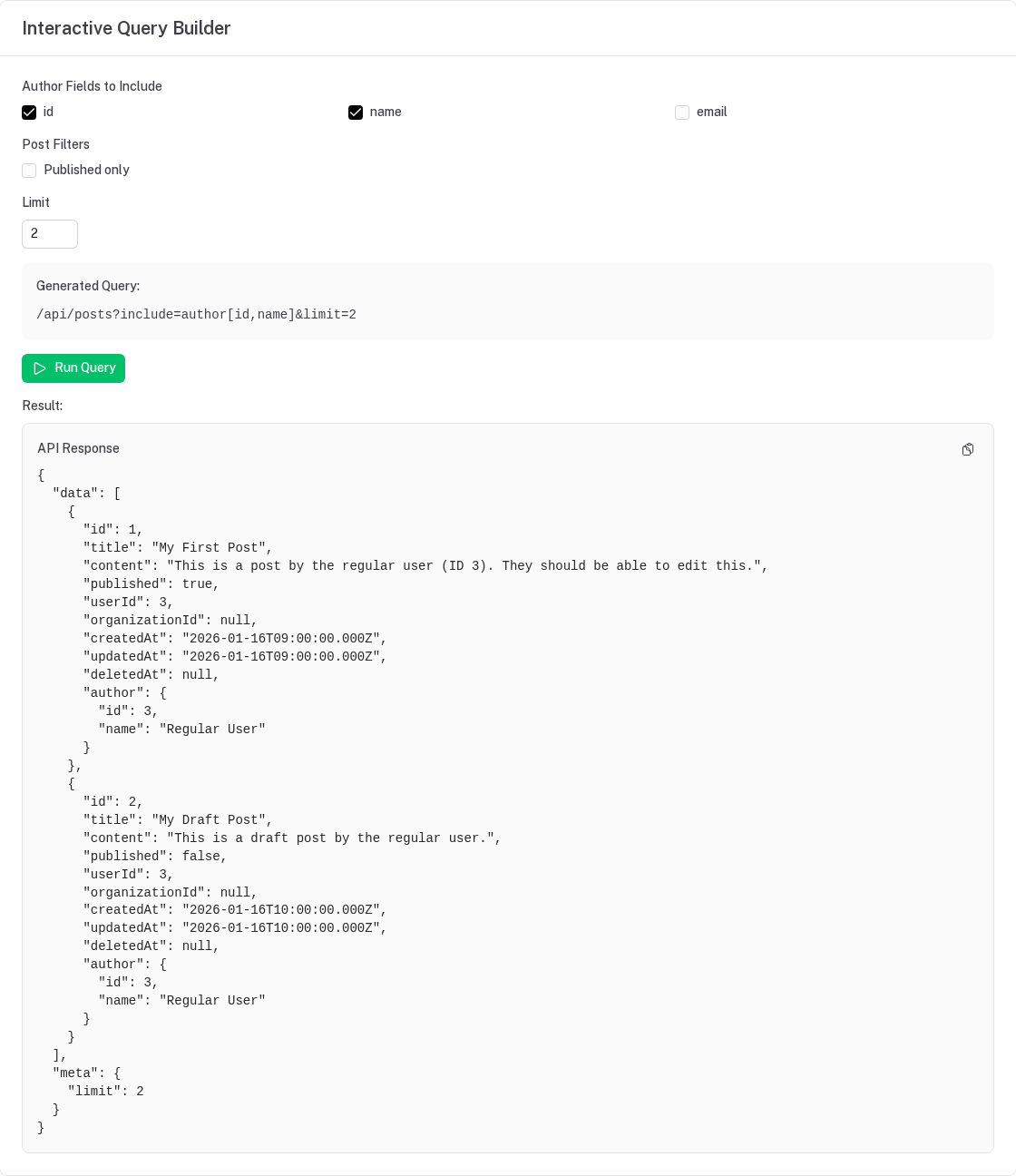
Select specific fields from relations using bracket syntax:
// GET /api/users?include=posts[id,title,createdAt]

{
  "data": [
    {
      "id": 1,
      "name": "John Doe",
      "posts": [
        {
          "id": 1,
          "title": "Hello World",
          "createdAt": "2024-01-01T00:00:00Z"
          // Only selected fields included
        }
      ]
    }
  ]
}
Filtering Relations
Filter related records using curly brace syntax:
// GET /api/users?include=posts{filter:{published:true}}

// Only published posts will be included
{
  "data": [
    {
      "id": 1,
      "name": "John Doe",
      "posts": [
        // Only posts where published = true
      ]
    }
  ]
}
Advanced Filtering
Use the same filter operators as the main list endpoint ($eq $ne $gt $gte $lt $lte $like $in $nin $null):
// GET /api/users?include=posts{filter:{createdAt:{$gte:"2024-01-01"}}}
// GET /api/users?include=posts{filter:{title:{$like:"nuxt"}}}
Filtering and pagination (limit, offset) apply to to-many relations only; on a to-one relation they
are a 400.
Pagination on Relations
Limit and offset related records:
// GET /api/users?include=posts{limit:5}

{
  "data": [
    {
      "id": 1,
      "name": "John Doe",
      "posts": [
        // Only first 5 posts
      ]
    }
  ]
}
With offset:
// GET /api/users?include=posts{limit:5,offset:10}
Combining Features
Combine field selection, filtering, and pagination:
// GET /api/users?include=posts[id,title]{limit:10,filter:{published:true}}

{
  "data": [
    {
      "id": 1,
      "name": "John Doe",
      "posts": [
        {
          "id": 1,
          "title": "Hello World"
          // Only id and title, only published, max 10
        }
      ]
    }
  ]
}
Deep Nesting
Combine all features with deep nesting:
// GET /api/users?include=posts[id,title]{limit:5,filter:{published:true}}.comments[id,body]{limit:3}.author[id,name]

{
  "data": [
    {
      "id": 1,
      "name": "John Doe",
      "posts": [
        {
          "id": 1,
          "title": "Hello World",
          "comments": [
            {
              "id": 1,
              "body": "Great post!",
              "author": {
                "id": 2,
                "name": "Jane Smith"
              }
            }
          ]
        }
      ]
    }
  ]
}
Multiple Relations
Include multiple relations at the same level:
// GET /api/users?include=posts[id,title],comments[id,body],profile[bio,avatar]

{
  "data": [
    {
      "id": 1,
      "name": "John Doe",
      "posts": [...],
      "comments": [...],
      "profile": {
        "bio": "...",
        "avatar": "..."
      }
    }
  ]
}
Configuration
Configure nested relations behavior in nuxt.config.ts:
export default defineNuxtConfig({
  autoApi: {
    relations: {
      // Maximum nesting depth (default: 3)
      maxDepth: 5,

      // Maximum number of relations in one request (default: 20)
      maxIncludes: 20,

      // Allow field selection (default: true)
      allowFieldSelection: true,

      // Allow filtering on relations (default: true)
      allowFiltering: true,

      // Allow pagination on relations (default: true)
      allowPagination: true,
    }
  }
})
Limits
- Depth — at most
relations.maxDepthlevels (default 3). Deeper is a 400. - Count — at most
relations.maxIncludesrelations per request (default 20). - Relation page size — a
limitinside an include abovepagination.maxLimitis a 400. - Relations must be passed to Drizzle —
?include=uses Drizzle's relational queries, so therelations()must be in the schema you givedrizzle(…, { schema }); otherwise the request fails with a 500 naming the resource.
Authorization on included relations
An included relation is authorized exactly like the resource that owns the related table:
- Operation — the caller needs
readon that resource, or the request is a 403 (401 when anonymous). A missing relation is never silently dropped: the answer to "may I include this?" is visible. - Row visibility — the related resource's tenant scope,
listFilter, soft delete andobjectLevelapply. Rows the caller may not see are removed from to-many relations and nulled on to-one relations. - Fields — its hidden fields and field-level
readrules strip the same columns they strip from its own responses, and field selection and filters may only name its readable columns (anything else is a 400). - Unregistered tables — a related table that is not a registered resource (a junction table the app never exposed) is treated as part of its parent: no permission of its own, but tenant and soft-delete visibility still apply.
// 403 when the caller may not read users:
// GET /api/posts?include=author

// 400 — `password` is hidden on users, so it cannot be selected or filtered on:
// GET /api/posts?include=author[id,password]
Performance Considerations
Database Queries
Each level of nesting may result in additional database queries. The exact number depends on your database client and Drizzle's query optimization.
Indexes
For optimal performance with filtering on relations:
-- Index the fields you filter by
CREATE INDEX idx_posts_published ON posts(published);
CREATE INDEX idx_posts_created_at ON posts(created_at);
Field Selection Benefits
Selecting only needed fields reduces:
- Network bandwidth
- JSON serialization time
- Client memory usage
// Good: Only fetch what you need
include=posts[id,title]

// Less efficient: Fetch everything
include=posts
Pagination Benefits
Limit relation results to avoid loading huge datasets:
// Good: Limit related records
include=posts{limit:10}

// Potentially slow: Load all posts for each user
include=posts
Common Patterns
Blog Posts with Recent Comments
GET /api/posts?include=comments[id,body,createdAt]{limit:5,filter:{createdAt:{$gte:"2024-01-01"}}}.author[name,avatar]
Users with Recent Activity
GET /api/users?include=posts[id,title]{limit:3},comments[id,body]{limit:5}
Nested Categories
GET /api/categories?include=subcategories.products[id,name,price]{limit:10}
Error Handling
GET /api/users?include=nonexistent          // 400 — Unknown relation 'nonexistent'
GET /api/users?include=posts[id,nope]       // 400 — Unknown field 'nope' in include 'posts'
GET /api/users?include=profile{limit:1}     // 400 — only to-many relations can be paginated
GET /api/users?include=a.b.c.d              // 400 — nested deeper than maxDepth
GET /api/posts?include=author               // 403 — caller may not read users
TypeScript Support
Type the included shape with the composable's type parameter:
const { data } = useAutoApiList<User & { posts: Array<Post & { comments: Comment[] }> }>('users', {
  include: 'posts.comments.author',
})

// Pass the shape you include as the type parameter
data.value?.data[0]?.posts[0]?.comments
Comparison with GraphQL
While not as flexible as GraphQL, nested relations provide similar capabilities:
| Feature | Nested Relations | GraphQL |
|---|---|---|
| Field selection | ✅ | ✅ |
| Nested loading | ✅ | ✅ |
| Filtering | ✅ | ✅ |
| Pagination | ✅ | ✅ |
| Type safety | ✅ (TypeScript) | ✅ |
| No schema required | ✅ | ❌ |
| Learning curve | Low | Medium |
Best Practices
- Always select fields: Don't load more data than needed
- Use pagination: Limit related records to prevent performance issues
- Filter early: Apply filters at the relation level when possible
- Monitor depth: Keep nesting to 2-3 levels for best performance
- Index filter fields: Create database indexes for filtered fields
- Cache responses: Use HTTP caching for frequently accessed nested data
Migration from Simple Includes
Existing code with simple includes continues to work:
// Old syntax (still works)
GET /api/users?include=posts,comments

// New enhanced syntax (more powerful)
GET /api/users?include=posts[id,title]{limit:10},comments[id,body]{limit:5}
The system automatically detects and handles both syntaxes.
Better-Auth Integration
A complete setup with better-auth: email/password and OAuth sign-in, organizations as tenants, platform roles and per-organization roles driving auto-api permissions, and a Nuxt UI front end.
Bulk Operations
Nuxt Auto API provides atomic bulk operations for creating, updating, and deleting multiple records in a single request.