
Configuration
Configuration
All options live under the cookieConsent key in nuxt.config.ts.
Options
| Option | Type | Default | Description |
|---|---|---|---|
locale | string | 'en' | Initial UI locale. Changeable at runtime via $consent.setLocale(). |
fallbackLocale | string | 'en' | Locale used when a key is missing in the active locale. |
colors | Partial<ColorOptions> | shadcn-like defaults | CSS color values used by the built-in components. |
darkColors | Partial<ColorOptions> | false | shadcn-like dark defaults | Used instead of colors under a .dark ancestor — the class Nuxt's color mode (and Nuxt UI) puts on <html>. false keeps colors in dark mode. |
texts | Record<string, any> | EN/DE/ES/FR built-ins | Translations, deep-merged over the defaults. |
linkMap | Record<string, string> | { privacy, imprint } | Maps {placeholder} link tokens used in texts to routes. |
categories | Record<string, CategoryOptions> | { necessary: { readonly: true } } | The cookie and tracking categories your site uses. |
cookieName | string | 'cookie_consent' | Name of the cookie that stores the decision. Renaming it makes every visitor decide once more. |
CategoryOptions
interface CategoryOptions {
  readonly?: boolean        // user cannot toggle (e.g. necessary)
  kind?: 'cookie' | 'tracking'  // default 'cookie' — see below
  description?: LocalizedString // shown in the modal (falls back to the i18n key)
  requiresBanner?: boolean  // category-level; overrides the per-cookie heuristic
  defaultEnabled?: boolean  // state before the visitor chooses — see below
  cookies?: CookieDefinition[]
}

interface CookieDefinition {
  id: string                // cookie name, e.g. '_ga'
  descriptionKey: string    // i18n key for the description
  provider: LocalizedString // e.g. 'Google LLC'
  duration: LocalizedString // e.g. '2 years', or { en: '2 years', de: '2 Jahre' }
  requiresBanner?: boolean  // defaults to true
}

// one string for every locale, or one per locale — see Internationalization
type LocalizedString = string | Record<string, string>
The intelligent banner (requiresBanner)
The module shows the initial consent banner only if necessary:
- A non-essential cookie that requires a banner (analytics, marketing): omit
requiresBanneror set it totrue. - A non-essential cookie that should not trigger a banner (e.g. a theme preference set on-demand): set
requiresBanner: false, and manage it withuseConsentCookieso it's only written after consent.
If all non-essential cookies set requiresBanner: false, no banner appears on first visit — only the floating settings button.
See Preferences without a banner for the theme and
language pattern: the modal asks when the visitor first uses the feature, and nothing is stored before.
Cookies vs cookieless tracking (kind)
kind: 'cookie'(default) — backed by real device storage. The modal renders the provider/duration table fromcookies[]; the per-cookierequiresBannerdecides the banner.kind: 'tracking'— something that is not a cookie, e.g. cookieless analytics (Umami, Plausible) or session replays. Nocookies[]; the modal renders a labelled toggle with the categorydescription. A tracking category shows the banner only when its category-levelrequiresBanneristrue.
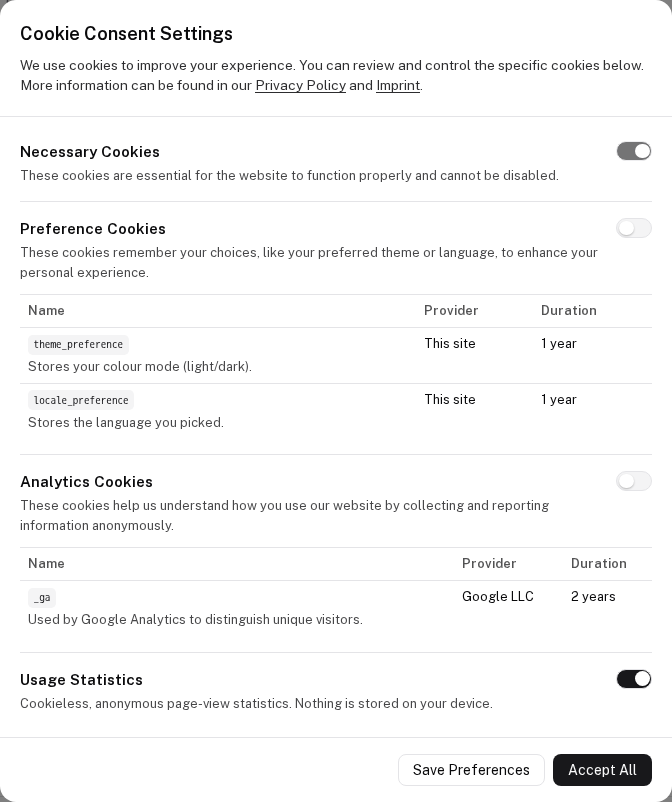
categories: {
  analytics: {
    kind: 'tracking',
    requiresBanner: false,     // opt-out: no banner, a toggle in the FAB / settings
    description: 'Cookieless usage analytics — no cookie, no device storage.',
  },
}
Default state (defaultEnabled)
What a visitor has before making a choice:
| Category | Starts |
|---|---|
necessary | always on |
kind: 'tracking' without a banner | on — that is what an opt-out means: it runs until the visitor switches it off |
| everything else (cookie categories, banner-gated tracking) | off until consent |
defaultEnabled overrides this per category. Use defaultEnabled: false for an opt-in without a banner —
e.g. session replays or heatmaps, which capture on-screen content and need an explicit yes, but shouldn't force a
banner on every visitor:
categories: {
  replays: {
    kind: 'tracking',
    requiresBanner: false,
    defaultEnabled: false,     // off until switched on from the FAB / settings
    description: 'Records clicks and scrolling to improve the pages. Off unless you switch it on.',
  },
}
Gate the matching script on the state: useNuxtApp().$consent.state.value.replays === true.
Full example
export default defineNuxtConfig({
  modules: ['@websideproject/nuxt-cookie-consent'],

  cookieConsent: {
    locale: 'en',
    fallbackLocale: 'en',

    linkMap: {
      privacy: '/privacy-policy',
      imprint: '/imprint',
    },

    categories: {
      necessary: { readonly: true },
      preferences: {
        cookies: [
          {
            id: 'theme_preference',
            descriptionKey: 'cookies.preferences.theme.description',
            provider: 'Our Website',
            duration: '1 year',
            requiresBanner: false,
          },
        ],
      },
      analytics: {
        cookies: [
          {
            id: '_ga',
            descriptionKey: 'cookies.analytics.ga.description',
            provider: 'Google LLC',
            duration: '2 years',
          },
        ],
      },
    },

    texts: {
      en: {
        cookies: {
          preferences: {
            theme: { description: 'Saves your selected theme (dark/light).' },
          },
          analytics: {
            ga: { description: 'Used by Google Analytics to distinguish users.' },
          },
        },
      },
    },
  },
})
See Internationalization for the full text structure, and Usage for wiring it all together.
Installation
Add the module to your Nuxt app.
Usage
Loading scripts on consent, switching language, and reacting to choices.